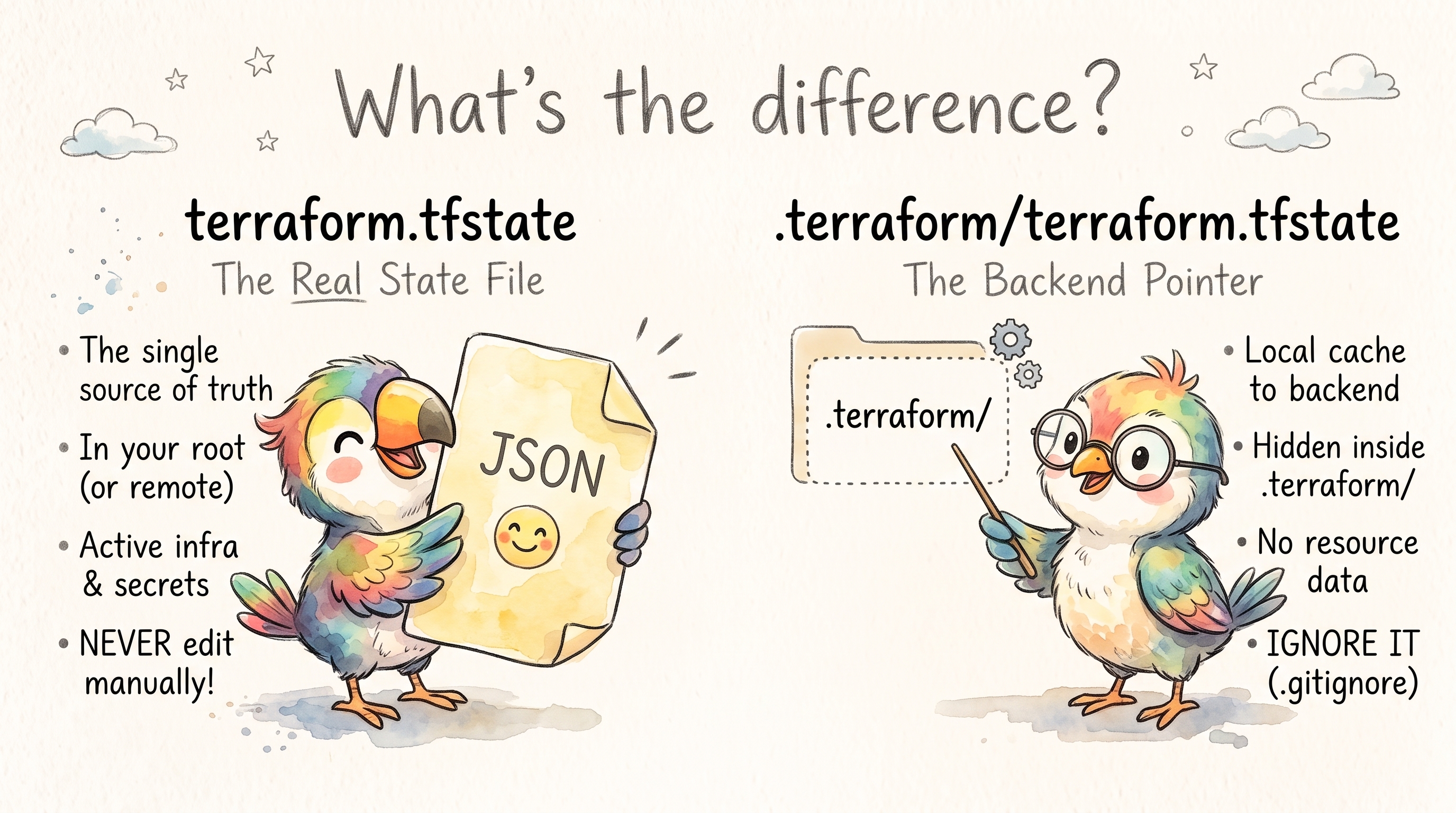
terraform.tfstate vs .terraform/terraform.tfstate
Overview
These two files serve completely different purposes in a Terraform workflow, and confusing them is a common source of frustration.
Everything below was tested with Terraform 1.16.5 on Debian, with an S3 backend running against a local S3-compatible server. The outputs shown are real.
terraform.tfstate (Root State File)
Location: ./terraform.tfstate (project root, or remote backend)
This is the actual state file — the source of truth for what Terraform has provisioned. It maps your declared resources to real-world infrastructure objects (IDs, attributes, dependencies).
- Created the first time Terraform writes state, normally the first
terraform apply.terraform initandterraform plandon’t create it - Tracks every resource Terraform manages
- Used by
planandapplyto calculate diffs - Can live locally (default) or in a remote backend (S3, GCS, Terraform Cloud, etc.)
- Contains sensitive data in plain text, including outputs marked
sensitive = true
A trimmed example after one apply:
{
  "version": 4,
  "terraform_version": "1.16.5",
  "serial": 1,
  "lineage": "c87f8132-763e-cf45-6b34-238cf4cfdec0",
  "outputs": {
    "db_password": {
      "value": "s3cr3t-password",
      "type": "string",
      "sensitive": true
    }
  },
  "resources": [
    {
      "mode": "managed",
      "type": "terraform_data",
      "name": "example",
      "provider": "provider[\"terraform.io/builtin/terraform\"]",
      "instances": [ ... ]
    }
  ]
}
sensitive = true only hides the value in CLI output. The state file stores it as-is, and terraform output -raw db_password prints it.
serialincreases on every writelineageis a random ID set when the state is first created. It protects against pushing the wrong state file into a backend:
$ terraform state push other-project.tfstate
Failed to write state: cannot import state with lineage "c93846ce-..." over unrelated state with lineage "028d6782-..."
When you configure a remote backend (e.g. S3), the state lives remotely and Terraform doesn’t keep a copy in the project root. Use terraform state pull to read it. But see Migrating from local to remote: migration leaves the old state behind on disk.
.terraform/terraform.tfstate (Backend State Cache)
Location: .terraform/terraform.tfstate
This is not your infrastructure state. It’s a small metadata file that records which backend Terraform is currently configured to use.
It only exists when the configuration has a backend block. With the default local backend there is no .terraform/terraform.tfstate. A project with no backend, no providers to download and no modules doesn’t even get a .terraform/ directory.
The real file for an S3 backend (most of the null entries trimmed):
{
  "version": 3,
  "terraform_version": "1.16.5",
  "backend": {
    "type": "s3",
    "config": {
      "access_key": null,
      "bucket": "my-tf-state",
      "dynamodb_table": null,
      "encrypt": null,
      "key": "prod/terraform.tfstate",
      "region": "eu-central-1",
      "secret_key": null,
      "use_lockfile": true,
      ...
    },
    "hash": 3094740840
  }
}
- Created/updated during
terraform init configlists every argument the backend supports,nullfor the ones you didn’t sethashis a checksum of thebackendblock in your.tffiles only.-backend-configvalues don’t change it: on the nextinit, Terraform detects those changes by comparing them with the values stored inconfig- Lives inside
.terraform/, a local working directory (likenode_modules), which should be in.gitignore
It Can Contain Your Credentials
Any value passed to terraform init with -backend-config is stored here, in plain text. That includes credentials:
terraform init \
  -backend-config=access_key=AKIA... \
  -backend-config=secret_key=...

jq '.backend.config | {access_key, secret_key}' .terraform/terraform.tfstate
# {
#   "access_key": "AKIA...",
#   "secret_key": "..."
# }
The same happens with a backend config file (-backend-config=prod.s3.tfbackend) containing keys. Credentials taken from environment variables (AWS_ACCESS_KEY_ID, AWS_SECRET_ACCESS_KEY) or an AWS profile are not written to the file: both fields stay null.
Pass credentials through the environment, and treat .terraform/ as sensitive on shared machines and in CI caches.
The Confusion
| Aspect | terraform.tfstate | .terraform/terraform.tfstate |
|---|---|---|
| Purpose | Infrastructure state | Backend configuration cache |
| Created by | First state write (terraform apply) | terraform init, only with a backend block |
| Contains | Resources, attributes, outputs | Backend type, every backend argument, a hash |
| Sensitive | Yes, always (secrets in plain text) | Yes, if credentials were passed with -backend-config |
| In version control | No | No (entire .terraform/ dir is gitignored) |
Why terraform init -reconfigure Is Required
The Problem
When you change your backend configuration (change the S3 bucket or key, or pass different -backend-config values), Terraform detects a mismatch between:
- What your
.tffiles and-backend-configflags declare as the backend - What
.terraform/terraform.tfstatehas cached from the lastinit
Running a plain terraform init in this situation produces:
Error: Backend configuration changed

A change in the backend configuration has been detected, which may require
migrating existing state.

If you wish to attempt automatic migration of the state, run "terraform init
-migrate-state".
If you wish to store the current configuration with no changes to the state,
run "terraform init -reconfigure".
Terraform won’t proceed because it doesn’t know if you want to migrate state from the old backend to the new one, or simply forget the old config and point to the new one.
Switching workspaces is not a backend change. terraform workspace select never needs -reconfigure.
What -reconfigure Does
terraform init -reconfigure
This tells Terraform:
“I know the backend changed. Don’t try to migrate state. Just update
.terraform/terraform.tfstateto reflect the new backend configuration and move on.”
It re-initializes the backend from scratch without attempting any state migration. It doesn’t touch providers or modules: they are reused, not downloaded again.
-reconfigure Can Point You at an Empty State
-reconfigure doesn’t check that state exists at the new location. Change the key to one that has no state yet (a typo is enough), and Terraform happily reconfigures:
terraform init -reconfigure      # key changed from prod/ to prod2/
terraform plan
# Plan: 1 to add, 0 to change, 0 to destroy.
The real infrastructure still exists. Terraform just can’t see it, and apply would try to create everything a second time. After any -reconfigure, run terraform plan and make sure it says “No changes” (or shows only the changes you expect) before you apply.
When You Need It
- Switching environments — You have separate state files per environment and change the backend key (e.g.
dev/terraform.tfstate→prod/terraform.tfstate) - CI/CD pipelines — The
.terraform/directory may be cached from a previous run with a different backend config - After cloning or moving a project — Stale
.terraform/metadata from another machine - Switching from local to remote backend (when you don’t need to migrate existing state)
- Backend config is parameterized via
-backend-configflags and the values changed between runs
Do Module or Provider Upgrades Need -reconfigure?
No. -reconfigure is only about the backend. Upgrades are handled by plain terraform init and -upgrade:
Modules can’t change the backend. Only the root module’s backend block counts. One in a child module is ignored:
Warning: Backend configuration ignored

  on child/main.tf line 2, in terraform:
   2:   backend "s3" {}

Any selected backend applies to the entire configuration, so Terraform
expects backend configurations only in the root module.
A new module version only needs terraform init. Change version = "0.25.0" to "0.24.1" and plain terraform init downloads the new version. If you forget, plan tells you:
Error: Module version requirements have changed

The version requirements have changed since this module was installed and the
installed version (0.25.0) is no longer acceptable. Run "terraform init" to
install all modules required by this configuration.
terraform init -upgrade is only needed to move to a newer version that the existing constraint already allows (e.g. ~> 0.24.0 from 0.24.0 to 0.24.1).
A new provider version needs -upgrade, because the lock file pins the old one:
Error: Failed to query available provider packages

Could not retrieve the list of available versions for provider
hashicorp/random: locked provider registry.terraform.io/hashicorp/random
3.6.3 does not match configured version constraint 3.7.2; must use terraform
init -upgrade to allow selection of new versions
Terragrunt and other wrappers are the exception. If they generate the backend block and an upgrade changes what they generate, that is a backend change like any other, with the same “Backend configuration changed” error.
-reconfigure vs -migrate-state
| Flag | Behavior |
|---|---|
-reconfigure | Drops old backend cache, re-initializes fresh. No state migration. |
-migrate-state | Copies state from old backend to new backend, then updates cache. |
-migrate-state -force-copy | Same, but answers “yes” to the copy prompts. Needed in CI. |
Use -migrate-state when you’re moving an existing project’s state to a new location and need to preserve it. Use -reconfigure when you’re pointing to an already-existing state or starting fresh.
Migrating from Local to Remote
Adding a backend "s3" block to a project with local state doesn’t produce the “Backend configuration changed” error. Terraform asks interactively whether to copy the existing state into the new backend. In CI, where there’s no one to answer, it fails instead:
Error: Error asking for state migration action: input is disabled
Run the migration explicitly:
terraform init -migrate-state -force-copy
This copies every workspace. The dev workspace from terraform.tfstate.d/dev/ ended up at env:/dev/<key> in the bucket.
Clean up afterwards. Terraform empties the local terraform.tfstate (0 bytes), but terraform.tfstate.backup and the files in terraform.tfstate.d/ still hold the complete old state, secrets included. Once you’ve confirmed the remote state with terraform state pull, delete them.
Practical Example (CI/CD)
# Backend key is dynamic per environment
terraform init \
  -reconfigure \
  -backend-config="bucket=my-tf-state" \
  -backend-config="key=${ENV}/terraform.tfstate" \
  -backend-config="region=eu-central-1"
Without -reconfigure, this fails with “Backend configuration changed” when a cached .terraform/ was initialized for a different ENV. Running it twice with the same values works without the flag.
In pipelines that start from a clean checkout every time, there’s no cached .terraform/ and -reconfigure changes nothing. It only matters when .terraform/ is cached or reused between jobs.
Workspaces and Where Their State Goes
Each workspace has its own state, and the location depends on the backend:
| Backend | default workspace | Workspace dev |
|---|---|---|
| local | terraform.tfstate | terraform.tfstate.d/dev/terraform.tfstate |
| s3 | <key> | env:/dev/<key> (prefix set by workspace_key_prefix) |
The selected workspace is stored in .terraform/environment. That file only appears once you select a workspace other than default. After switching back it stays, containing default.
What’s Inside the .terraform/ Directory
The .terraform/ directory is Terraform’s local working cache, regenerated by terraform init. For a project with an S3 backend, one provider and one registry module:
.terraform/
├── terraform.tfstate          # Backend metadata (only with a backend block)
├── environment                # Selected workspace (only after selecting a non-default one)
├── providers/                 # Downloaded provider binaries
│   └── registry.terraform.io/
│       └── hashicorp/
│           └── random/
│               └── 3.6.3/
│                   └── linux_arm64/
│                       └── terraform-provider-random_v3.6.3_x5
└── modules/                   # Downloaded module source code
    ├── modules.json           # Module manifest (maps module calls to paths)
    └── label/                 # Full copy of the module, including its .git/ for git sources
modules.json records which version is installed where:
{
  "Modules": [
    { "Key": "", "Source": "", "Dir": "." },
    {
      "Key": "label",
      "Source": "registry.terraform.io/cloudposse/label/null",
      "Version": "0.25.0",
      "Dir": ".terraform/modules/label"
    }
  ]
}
Key points:
- providers/ — Cached provider plugin binaries. Sizes vary a lot:
randomis about 13 MB, while the AWS provider download alone is about 180 MB compressed - modules/ — Source code for external modules fetched from registries or git
- environment — A single-line file with the selected workspace name
- Everything here is reproducible via
terraform init— it’s safe to delete the whole directory and re-init
.terraform.lock.hcl (The Dependency Lock File)
Not to be confused with .terraform/terraform.tfstate, this file lives in the project root (not inside .terraform/).
.terraform.lock.hcl    ← commit this to version control
.terraform/            ← do NOT commit this
- Created on first
terraform init, records exact provider versions and cryptographic checksums - Ensures every team member and CI runner uses identical provider versions
- Similar in purpose to
package-lock.jsonorPipfile.lock - Covers providers only. Module versions are not locked: pin them with exact
versionconstraints, or a gitref - Should be committed to version control — unlike the
.terraform/directory - Updated by
terraform init -upgradewhen you want to pull newer provider versions within your constraints
State Locking (Preventing Concurrent Corruption)
When using a remote backend, Terraform supports state locking to prevent two processes from writing to the same state simultaneously.
Without locking, concurrent terraform apply runs can corrupt state — both read the current state, compute a diff, and race to write back, with one overwriting the other.
Common Locking Mechanisms
| Backend | Locking Method |
|---|---|
| S3 | Lock file in the bucket (use_lockfile, Terraform 1.10+). DynamoDB locking (dynamodb_table) is deprecated |
| GCS | Built-in object locking |
| Azure Blob | Blob leases |
| Terraform Cloud / HCP | Managed automatically |
| Consul | Session-based locks |
| local | A .terraform.tfstate.lock.info file next to the state |
Example: S3 Backend with Native Locking
terraform {
  backend "s3" {
    bucket       = "my-tf-state"
    key          = "prod/terraform.tfstate"
    region       = "eu-central-1"
    use_lockfile = true
    encrypt      = true
  }
}
During a run, Terraform creates prod/terraform.tfstate.tflock next to the state object and deletes it when done. The bucket needs no extra setup and no DynamoDB table.
The older dynamodb_table argument still works, but now produces:
Warning: Deprecated Parameter

  on main.tf line 5, in terraform:
   5:     dynamodb_table = "terraform-locks"

The parameter "dynamodb_table" is deprecated. Use parameter "use_lockfile"
instead.
To migrate, set use_lockfile = true alongside dynamodb_table for a while (Terraform then takes both locks), and remove dynamodb_table once everyone runs Terraform 1.10 or later.
When the Lock Is Held
A second apply while the first one is running:
Error: Error acquiring the state lock

Error message: operation error S3: PutObject, https response error
StatusCode: 412, ... api error PreconditionFailed: At least one of the
pre-conditions you specified did not hold
Lock Info:
  ID:        83b32a69-5381-a711-cbd2-a8efb0ae6aeb
  Path:      my-tf-state/locktest/terraform.tfstate
  Operation: OperationTypeApply
  Who:       root@e5bcf957d76c
  Version:   1.16.5
  Created:   2026-10-07 11:41:37.150161576 +0000 UTC
Who and Created tell you whether the lock belongs to a run that’s still going. To wait for it instead of failing straight away:
terraform apply -lock-timeout=5m
If the process that held the lock crashed, remove the lock with the ID from the error. Make sure nothing is still running first:
terraform force-unlock LOCK_ID
terraform force-unlock -force LOCK_ID   # no confirmation prompt
State Recovery and Disaster Scenarios
Recovery Approaches
- S3 versioning — If your state bucket has versioning enabled, restore a previous version
- terraform.tfstate.backup — The local backend keeps the previous state in this file each time it writes a new one
- terraform import — Re-import resources one by one into a fresh state (last resort)
terraform apply -refresh-only— Sync state with actual infra without making changes. It replacesterraform refresh, which still works but is deprecated
Prevention
- Always enable versioning on your state bucket
- Always enable state locking
- Use separate state files per environment/component (state isolation)
- Run
terraform planin CI beforeapplyto catch drift early - Take a copy before risky operations (backend changes,
state mv,state rm):terraform state pull > backup.tfstate
Recommended .gitignore for Terraform Projects
# Local .terraform directory (providers, modules, backend cache)
**/.terraform/*

# State files (should be in remote backend, not in repo)
*.tfstate
*.tfstate.*

# Crash log files
crash.log
crash.*.log

# Sensitive variable files (may contain passwords/secrets)
*.tfvars
*.tfvars.json

# Backend config files, if they contain credentials
*.tfbackend

# Override files (local developer overrides)
override.tf
override.tf.json
*_override.tf
*_override.tf.json

# CLI configuration file
.terraformrc
terraform.rc
*.tfstate.* also covers terraform.tfstate.backup and the local lock file .terraform.tfstate.lock.info.
Do commit:
.terraform.lock.hcl(dependency lock file)*.tffiles (your actual configuration)terraform.tfvars.example(template without real values)*.tfbackendfiles without credentials, if you use one per environment (remove the ignore rule above)
Key Takeaways
terraform.tfstate= your actual infrastructure state (the important one). Secrets inside are plain text.terraform/terraform.tfstate= a cache of which backend to use (plumbing). It holds plain-text credentials if you pass them with-backend-config.terraform.lock.hcl= provider version lock file (commit this!). It doesn’t lock modules.terraform/directory = local cache of providers + modules (gitignore this!)terraform init -reconfigure= “reset the backend cache without migrating state” — required when backend config changes and you don’t need to carry old state forward. Runplanafterwards to check you’re looking at the right state- Module and provider upgrades never need
-reconfigure: useterraform init/terraform init -upgrade - Always use remote backends with state locking for team environments. On S3, that’s
use_lockfile = true - Enable S3 bucket versioning for disaster recovery
Comments