Terraform S3 Backend: dynamodb_table Is Deprecated, Use use_lockfile
Since Terraform 1.15.0, init, plan and apply against an S3 backend that locks with DynamoDB print a warning about a deprecated parameter. Nothing fails, but the DynamoDB lock is on its way out and the replacement is a lock file stored in the S3 bucket itself. This guide shows the exact message, what it means, how the new lock works (with the real objects it creates), a safe migration in one change, and how to remove a stuck lock.
1. The Message
Warning: Deprecated Parameter

  on main.tf line 16, in terraform:
  16:     dynamodb_table = "tf-locks"

The parameter "dynamodb_table" is deprecated. Use parameter "use_lockfile"
instead.
The same warning exists for the DynamoDB endpoint argument:
The parameter "dynamodb_endpoint" is deprecated. Use parameter
"endpoints.dynamodb" instead.
Where it appears: terraform init, terraform plan and terraform apply each printed it once. terraform validate did not. Plan and apply still succeeded, so it is a warning, not an error.
The warning is new in Terraform 1.15.0. The arguments were deprecated in 1.11.0, but the versions before 1.15 say nothing. With the same dynamodb_table backend, terraform init printed:
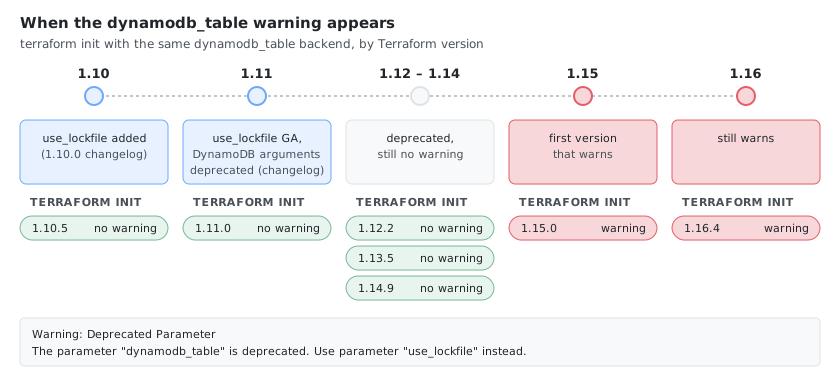
So a team that upgrades from 1.14 to 1.15 sees it for the first time, even though nothing in their configuration changed.
2. What It Means
HashiCorp’s S3 backend documentation says that DynamoDB-based locking is deprecated and will be removed in a future minor version. Native S3 locking (use_lockfile) arrived in Terraform 1.10 and became generally available in 1.11.0, whose changelog also deprecated the DynamoDB arguments. The warning itself only arrived in 1.15.0 (section 1).
| Argument | Status |
|---|---|
use_lockfile | The replacement. Locks with an object in the same bucket |
dynamodb_table | Deprecated |
dynamodb_endpoint | Deprecated, use endpoints = { dynamodb = "..." } |
Not the other lock file
Terraform has two unrelated “lock files”:
| File | What it locks | Where |
|---|---|---|
.terraform.lock.hcl | The provider versions and checksums your configuration was initialized with | Your working directory, commit it to Git. See Terraform Lock File Checksums: zh and h1 Hashes |
terraform.tfstate.tflock | The state, so two runs cannot write it at once | A temporary object in the S3 bucket, created by use_lockfile |
The deprecation message is about the second one.
3. Before and After
terraform {
  backend "s3" {
    bucket         = "my-state-bucket"
    key            = "prod/terraform.tfstate"
    region         = "eu-west-1"
    encrypt        = true
    dynamodb_table = "terraform-locks"   # deprecated
  }
}
terraform {
  backend "s3" {
    bucket       = "my-state-bucket"
    key          = "prod/terraform.tfstate"
    region       = "eu-west-1"
    encrypt      = true
    use_lockfile = true                  # lock object next to the state
  }
}
4. How the Native Lock Works
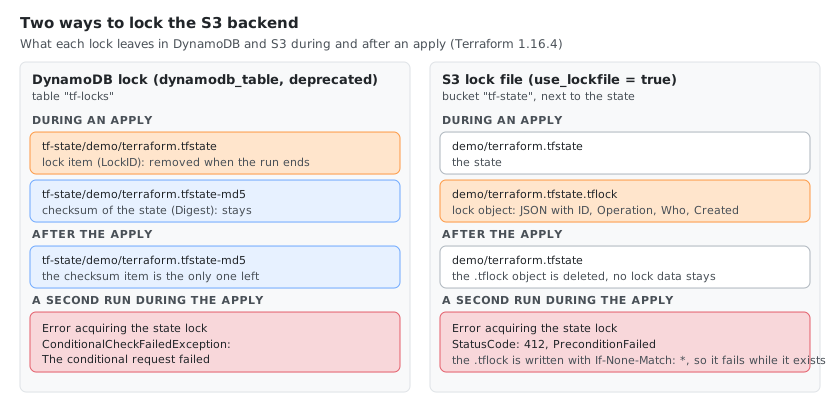
While an apply was running with use_lockfile = true, the bucket held two objects:
demo/terraform.tfstate
demo/terraform.tfstate.tflock
The .tflock object is JSON that describes the lock:
{"ID":"9cc00290-8f36-5046-ab0c-d45494e1180d","Operation":"OperationTypeApply","Info":"","Who":"user@host","Version":"1.16.4","Created":"2026-10-25T13:39:23.654217Z","Path":"tf-state/demo/terraform.tfstate"}
When the apply finished, the .tflock object was gone. It is created with a conditional write (If-None-Match: *), so a second Terraform run cannot create it while it exists. That requires an S3 store that supports conditional writes: the emulator used here did (a second upload with If-None-Match failed with PreconditionFailed), and AWS S3 does too.
The DynamoDB lock, for comparison, was an item whose LockID is the bucket and key (tf-state/demo/terraform.tfstate), plus a second item tf-state/demo/terraform.tfstate-md5 that stores the state checksum and stays after the run.
5. What a Blocked Run Looks Like
With use_lockfile (the second plan while an apply held the lock):
Error: Error acquiring the state lock

Error message: operation error S3: PutObject, https response error
StatusCode: 412, ...
api error PreconditionFailed: At least one of the pre-conditions you
specified did not hold
Lock Info:
  ID:        9cc00290-8f36-5046-ab0c-d45494e1180d
  Path:      tf-state/demo/terraform.tfstate
  Operation: OperationTypeApply
  Who:       user@host
  Version:   1.16.4
  Created:   2026-10-25 13:39:23.654217 +0000 UTC
With DynamoDB the error message ends in ConditionalCheckFailedException: The conditional request failed, with the same Lock Info block.
Useful options with use_lockfile:
terraform plan -lock-timeout=6s    # waits ("Acquiring state lock. This may take a few moments..."), gave up after exactly 6 s
terraform plan -lock=false         # reads without taking the lock (plan worked while the apply held it); never use it for apply
By default a second run does not wait. Without -lock-timeout it failed immediately (0.04 s against moto). Some guides say the second command “should wait”; that only happens with -lock-timeout, so set it in CI (for example TF_CLI_ARGS_plan="-lock-timeout=5m", or pass the flag) if you want queued runs to wait for the lock. With TF_CLI_ARGS_plan="-lock-timeout=30s", a plan started during an apply waited 7 s and then ran.
6. Migrate in One Change
Switch from dynamodb_table to use_lockfile in a single change, for every user and pipeline of the state at once.
1. Check the Terraform version everywhere. use_lockfile needs 1.10 or newer (generally available in 1.11). Check laptops and CI images with terraform version.
2. Find every place that configures the backend. .tf files, .tfbackend files and -backend-config arguments in pipelines (the grep commands in section 8).
3. Check the S3 permissions of every identity that runs Terraform (your user, the CI role), with that identity’s credentials:
aws sts get-caller-identity                     # which identity the checks run as

# read the state: the backend needs this already
aws s3api head-object --bucket my-state-bucket --key prod/terraform.tfstate

# create the lock object the way Terraform does (conditional write), then remove it
touch empty
aws s3api put-object --bucket my-state-bucket --key prod/terraform.tfstate.tflock \
  --body empty --if-none-match '*'
aws s3api delete-object --bucket my-state-bucket --key prod/terraform.tfstate.tflock
The put-object returns an ETag when the identity may write the lock key and the store supports conditional writes. A second put-object with --if-none-match '*' while the object exists fails with PreconditionFailed, which is the behaviour Terraform relies on. AccessDenied on put-object or delete-object means a missing permission (see the IAM policy in section 8). Run this only while nothing runs against the state, and make sure the delete-object succeeds: a leftover .tflock blocks every run like a stale lock (section 7).
4. Stop runs against the state. Pause the pipelines and make sure nothing holds the DynamoDB lock. With nothing running, the table holds only the checksum item:
aws dynamodb scan --table-name terraform-locks --query 'Items[].LockID.S' --output text
# my-state-bucket/prod/terraform.tfstate-md5
A second item without -md5 (my-state-bucket/prod/terraform.tfstate) is a run in progress.
5. Replace dynamodb_table with use_lockfile and reinitialize.
use_lockfile = true # replaces dynamodb_table = "terraform-locks"
terraform init -reconfigure
A plain terraform init fails after this change:
Error: Backend configuration changed

A change in the backend configuration has been detected, which may require
migrating existing state.

If you wish to attempt automatic migration of the state, run "terraform init
-migrate-state".

If you wish to store the current configuration with no changes to the state,
run "terraform init -reconfigure".
The state does not move, only the lock setting changed, so -reconfigure is the right choice. plan no longer prints the deprecation warning, and during an apply the bucket holds terraform.tfstate.tflock. Update the pipelines and .tfbackend files in the same change, then resume the pipelines.
6. Delete the DynamoDB table later. This removes the lock history and the checksum item for good and cannot be undone. Keep the table for a week or two as a way back, and delete it only after the change is merged everywhere and a few applies have run with the lock file. One forgotten repository that still points at the table will fail when someone uses it.
The way back needs one extra step. Lock-file-only runs don’t update the checksum item (<bucket>/<key>-md5) that DynamoDB keeps, so after a few applies it no longer matches the state. Adding dynamodb_table back then fails on init:
Error: Error refreshing state: state data in S3 does not have the expected content.

The checksum calculated for the state stored in S3 does not match the checksum
stored in DynamoDB.
If the state in S3 is the right one, delete the stale checksum item. init then works, and the next apply writes a new checksum:
aws dynamodb delete-item --table-name terraform-locks \
  --key '{"LockID":{"S":"my-state-bucket/prod/terraform.tfstate-md5"}}'
IAM permissions
According to the backend documentation, with use_lockfile Terraform needs s3:GetObject, s3:PutObject and s3:DeleteObject on the lock object (the state key plus .tflock), in addition to the permissions on the state object. The DynamoDB permissions (dynamodb:DescribeTable, GetItem, PutItem, DeleteItem) are no longer needed once the table is removed.
7. Removing a Stuck Lock
If a run is killed (a CI job cancelled, a laptop closed), the lock can stay. After kill -9 on a running apply, the .tflock object remained, and the next run printed the lock error with the lock ID.
terraform force-unlock <LOCK_ID>          # asks for "yes"; answering no printed "force-unlock cancelled."
terraform force-unlock -force <LOCK_ID>   # no prompt
Terraform state has been successfully unlocked!
The .tflock object was removed and the next plan worked. Two safety points:
- The ID must match. A wrong ID is refused:
Failed to unlock state: lock ID '1234' does not match the existing lock ID '479ea5c2-...', followed by the lock info. Copy the ID from theLock Infoblock (the line that starts withID:), not from theStatusCode: 412, RequestID: ...line above it. - Only force-unlock a lock that is really dead. Check
WhoandCreatedin the lock info first, and confirm that the run is not still going. Removing a live lock lets two runs write the state at the same time, which can corrupt it.
8. CI, Versioning and Finding Every Usage
CI: pass the setting on the command line
A pipeline can switch on the lock file without editing the backend block, with a partial configuration:
terraform init -reconfigure -backend-config="use_lockfile=true"
With use_lockfile absent from main.tf, this created terraform.tfstate.tflock during an apply. A .tfbackend file (terraform init -backend-config=prod.s3.tfbackend) works the same way, so check those files too when you search for dynamodb_table.
Removing dynamodb_table without adding use_lockfile means no lock
This is the easiest mistake in the migration. With neither setting, Terraform takes no lock at all: no .tflock object appeared during an apply, a second plan ran without any error, and init -reconfigure printed no warning. Every run that does not set use_lockfile after you drop the table is unprotected. Make use_lockfile = true part of the same change that removes dynamodb_table, and check for it in CI (next section).
Find every backend that still needs migrating
# Still using the deprecated arguments (tf files, .tfbackend files, tfvars, HCL)
grep -rn -E 'dynamodb_table|dynamodb_endpoint' --include='*.tf' --include='*.tfbackend' --include='*.hcl' --include='*.tfvars' .

# S3 backends with no lock setting at all
for f in $(grep -rl 'backend "s3"' --include='*.tf' .); do
  grep -q -E 'use_lockfile|dynamodb_table' "$f" || echo "$f"
done
On a small tree with one file per case, the first command listed the main.tf with dynamodb_table and the .tfbackend file, the second the backend with no lock setting. They only see what is in files: a use_lockfile passed in a pipeline (previous section) is invisible to the second check, so keep one convention.
S3 versioning keeps every lock object
Versioning on the state bucket is a good idea, because you can fetch an older state if a run goes wrong:
aws s3api list-object-versions --bucket my-state-bucket --prefix prod/terraform.tfstate
aws s3api get-object --bucket my-state-bucket --key prod/terraform.tfstate --version-id <version-id> old.tfstate
jq .serial old.tfstate        # compare with the current state's serial
Here the previous version had serial 2 and the current one 3. Restoring is a separate, careful step: copy it back, then run terraform plan before anything else.
But versioning has a side effect with use_lockfile: every apply creates and deletes a .tflock object, and on a versioned bucket each delete leaves a noncurrent version and a delete marker. After 3 applies the bucket held 3 .tflock versions and 3 delete markers (plus 3 versions of the state), while aws s3 ls showed only terraform.tfstate. The objects are tiny, but they pile up in version listings and make them noisy. A lifecycle rule can expire old noncurrent versions (a rule on the whole prefix also expires old state versions, so keep the retention long enough for rollbacks):
resource "aws_s3_bucket_lifecycle_configuration" "state" {
  bucket = aws_s3_bucket.state.id

  rule {
    id     = "expire-old-versions"
    status = "Enabled"
    filter {}

    noncurrent_version_expiration {
      noncurrent_days = 90
    }
    expiration {
      expired_object_delete_marker = true
    }
  }
}
Example IAM policy
Based on the permission list in the backend documentation. Lock object permissions are on the .tflock key, state permissions on the state key:
{
  "Version": "2012-10-17",
  "Statement": [
    {
      "Effect": "Allow",
      "Action": "s3:ListBucket",
      "Resource": "arn:aws:s3:::my-state-bucket"
    },
    {
      "Effect": "Allow",
      "Action": ["s3:GetObject", "s3:PutObject"],
      "Resource": "arn:aws:s3:::my-state-bucket/prod/terraform.tfstate"
    },
    {
      "Effect": "Allow",
      "Action": ["s3:GetObject", "s3:PutObject", "s3:DeleteObject"],
      "Resource": "arn:aws:s3:::my-state-bucket/prod/terraform.tfstate.tflock"
    }
  ]
}
Gotchas
- No lock setting means no lock (section 8). Dropping
dynamodb_tablewithout addinguse_lockfilesilently turns locking off. - Old Terraform versions ignore
use_lockfile. Mixed versions on one state defeat the lock. Pin the Terraform version in CI. - Going back to DynamoDB needs a fresh checksum. After lock-file-only applies, delete the stale
-md5item before re-addingdynamodb_table(section 6). - The
.tflockobject lives only during a run. If you see it in the bucket with no run in progress, it is a stale lock (section 7). -lock=falseis for reading. Do not use it withapplyto get around a lock error.- A third-party S3-compatible store must support conditional writes (
If-None-Match) foruse_lockfileto be safe. Check this before moving off DynamoDB.
Comments