Linux Swap Usage: When Processes Aren’t the Culprit
You check free -m and see swap is being used. You run a per-process swap check and the numbers don’t add up. The total swap consumed by processes is a fraction of what the system reports. Where is the rest?
The answer is often System V shared memory (SHM) segments: memory that doesn’t belong to any single process and can be swapped on its own. But it is not the only place swap can hide; tmpfs (including /dev/shm) and the swap cache do the same.
All output below comes from an Ubuntu 24.04 VM (kernel 6.8, 956 MiB of RAM, a 1 GiB swap file) set up to show each case:
| What | Size |
|---|---|
A System V segment, held by a running process (key 0x5ca1ab1e) | 300 MiB |
A System V segment whose creator detached and exited (key 0x0bad5eed) | 150 MiB |
A file in /dev/shm | 150 MiB |
| A process with private (anonymous) memory | 150 MiB |
Everything was written to, then a 900 MiB allocation pushed most of it out to swap.
Checking Per-Process Swap Usage
The standard approach to find swap consumers is iterating over /proc/*/status:
for file in /proc/*/status ; do
    awk '/VmSwap|Name/{printf $2 " " $3}END{ print ""}' $file
done | sort -k 2 -n -r | grep -v "^$" | awk 'NF==3' | head -20
The awk 'NF==3' filter removes kernel threads that don’t have a VmSwap entry (they only print the name without a value). On the VM:
python3 156796 kB
dockerd 11132 kB
lima-guestagent 5356 kB
python3 3200 kB
containerd 2196 kB
(sd-pam) 1276 kB
sudo 888 kB
systemd-udevd 768 kB
The first python3 is the process with 150 MiB of private memory: almost all of it is in swap. The second python3, with 3200 kB, is the process holding the 300 MiB shared segment. Remember that number.
To get the total swap used by all processes:
for file in /proc/*/status ; do
    awk '/VmSwap|Name/{printf $2 " " $3}END{ print ""}' $file
done | sort -k 2 -n -r | awk '{ SUM += $2 } END { print SUM/1024/1024 " GB"}'
0.175735 GB
VmSwap is in kB, so this is GiB. A shorter version that gives MiB:
awk '/^VmSwap:/ { s += $2 } END { printf "%.1f MiB\n", s/1024 }' /proc/[0-9]*/status
179.9 MiB
Now compare it with the system:
free -m
swapon --show
               total        used        free      shared  buff/cache   available
Mem:             956         187         775          12          64         768
Swap:           1023         768         255

NAME      TYPE  SIZE   USED PRIO
/swapfile file 1024M 768.7M   -2
768.7 MiB of swap is used, and processes account for 179.9 MiB of it. (swapon -s still works but is deprecated; swapon --show replaces it.)
System V Shared Memory and Swap
System V shared memory (shmget/shmat) creates memory segments that exist independently of any single process. Multiple processes can attach to the same segment, and the kernel can swap these segments to disk just like any other page.
The key difference: VmSwap in /proc/<pid>/status only counts the process’s own anonymous pages that are in swap. When a page of a shared segment goes to swap, the segment keeps track of it, not the processes that have it attached. That is why the process holding a 300 MiB segment, almost all of it swapped out, shows only 3200 kB of VmSwap.
Inspecting SHM Segments
The kernel exposes all SHM segment details in /proc/sysvipc/shm:
cat /proc/sysvipc/shm
       key      shmid perms                  size  cpid  lpid nattch   uid   gid  cuid  cgid      atime      dtime      ctime                   rss                  swap
1554098974          0   600             314572800  1799  1799      1     0     0     0     0 1792497818          0 1792497818              13017088             301555712
 195911405          1   600             157286400  1800  1800      0     0     0     0     0 1792497818 1792497819 1792497818                     0             157286400
The important columns:
| Column | Field | Meaning |
|---|---|---|
key | $1 | Identifier used to create or find the segment, in decimal (ipcs shows it in hex) |
shmid | $2 | Kernel-assigned segment ID, used by ipcrm -m |
size | $4 | Allocated size in bytes |
nattch | $7 | Number of processes currently attached. 0 means nobody uses it |
uid | $8 | Owner’s user ID |
gid | $9 | Owner’s group ID |
rss | second to last | Part of the segment in RAM (bytes) |
swap | last | Part of the segment in swap (bytes) |
The segment held by a process (shmid 0) has 12 MiB in RAM and 288 MiB in swap. The other one (shmid 1, nattch 0) is entirely in swap: 150 MiB that no running process accounts for.
ipcs shows the same segments in an easier format, with the key in hex and the owner by name:
ipcs -m     # list the segments
ipcs -mu    # summary: pages resident vs swapped
------ Shared Memory Segments --------
key        shmid      owner      perms      bytes      nattch     status
0x5ca1ab1e 0          root       600        314572800  1
0x0bad5eed 1          root       600        157286400  0

------ Shared Memory Status --------
segments allocated 2
pages allocated 115200
pages resident  3178
pages swapped   112022
Swap performance: 0 attempts	 0 successes
112022 pages of 4 KiB are 437.6 MiB in swap, for the two segments together.
Calculating Total SHM Swap Usage
To sum up all swap used by SHM segments:
awk 'NR>1 { sum += $NF } END { printf "%.2f GiB\n", sum/1024/1024/1024 }' /proc/sysvipc/shm
0.43 GiB
Or per segment, in MiB, with the owner and the number of attached processes:
awk 'NR>1 && $NF > 0 { printf "shmid=%s uid=%s nattch=%s size=%.0fMiB rss=%.0fMiB swap=%.0fMiB\n", $2, $8, $7, $4/1048576, $(NF-1)/1048576, $NF/1048576 }' /proc/sysvipc/shm
shmid=0 uid=0 nattch=1 size=300MiB rss=12MiB swap=288MiB
shmid=1 uid=0 nattch=0 size=150MiB rss=0MiB swap=150MiB
The uid is field $8. Field $9 is the gid, which looks the same when everything belongs to root but not on a real server: in the database example further down, uid 1101 and gid 1021.
Where the Rest of the Swap Is
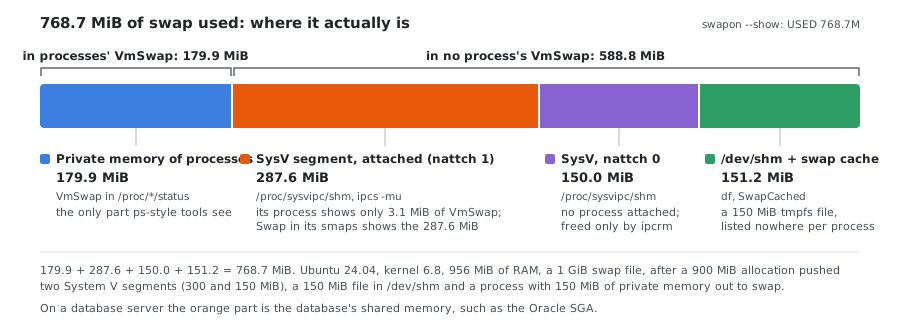
| Where | How to see it | On the VM |
|---|---|---|
| Private memory of processes | VmSwap in /proc/<pid>/status | 179.9 MiB |
| System V shared memory | swap column of /proc/sysvipc/shm, ipcs -mu | 437.6 MiB |
tmpfs files: /dev/shm, /run, POSIX shared memory | not shown per file; the rest after the two lines above | ≈ 150 MiB |
| Swap cache | SwapCached in /proc/meminfo | ≈ 1 MiB here |
| Total | swapon --show, free -m | 768.7 MiB |
179.9 + 437.6 + 150 = 767.5 MiB; the last 1.2 MiB is swap cache and rounding.
tmpfs and /dev/shm
Files in tmpfs live in the same kind of memory as shared segments (Shmem in /proc/meminfo) and are swapped the same way. That covers /dev/shm (where POSIX shm_open() creates its objects), /run, /tmp on systems that mount it as tmpfs, and memfd memory. None of them appear in /proc/sysvipc/shm, and none are charged to a process’s VmSwap.
df -h /dev/shm
Filesystem      Size  Used Avail Use% Mounted on
tmpfs           479M  150M  329M  32% /dev/shm
df shows how much the files use, but not how much of that is in swap. With Shmem at 12.7 MB after the pressure, almost all of the 150 MiB file was in swap. A large, forgotten file in /dev/shm holds memory or swap until someone deletes it, even after the program that wrote it has exited.
Swap cache
When a page is read back from swap, the kernel can keep its copy in swap as well, so that if the page is swapped out again unchanged, it doesn’t need to be written. Those pages are counted both in RAM and in swap “used”. A process with 300 MiB in swap, before and after it read its memory back:
VmRSS | VmSwap | SwapCached | Swap used | |
|---|---|---|---|---|
| Swapped out | 3448 kB | 309692 kB | 5408 kB | 353.4 MiB |
| After reading it back | 311308 kB | 2260 kB | 313312 kB | 353.4 MiB |
The process’s VmSwap dropped to 2 MB, but swap “used” didn’t change: 306 MiB of it was swap cache. What happens to that copy next decides whether swap “used” ever goes down:
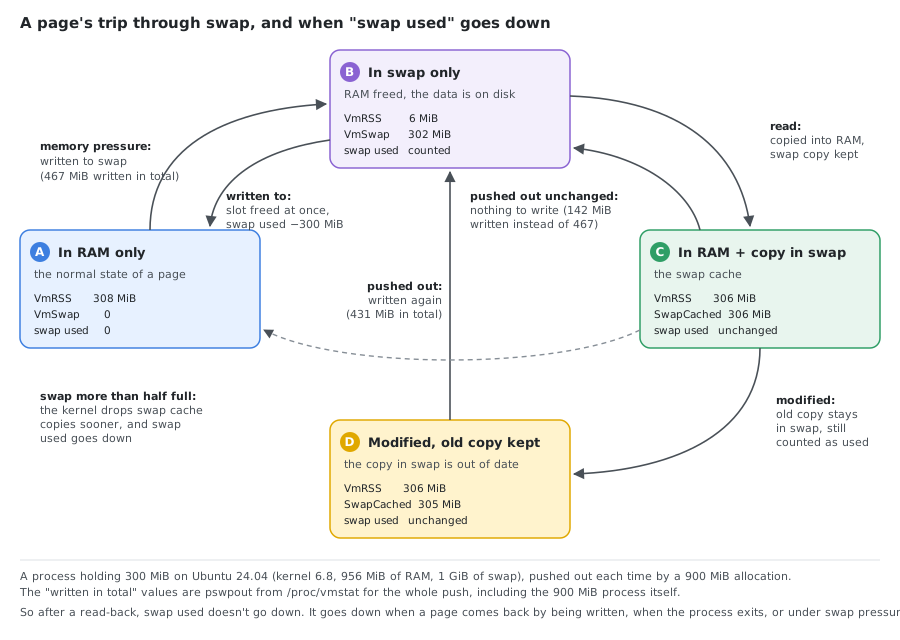
The same 300 MiB, followed through each step on the VM:
- Pushed out again unchanged: the copy in swap is still valid, so nothing has to be written. The same 900 MiB push wrote 142 MiB in total (
pswpoutin/proc/vmstat) instead of the 467 MiB of the first time. - Modified while in RAM: the copy in swap is now out of date, but it is not freed.
SwapCachedstayed at 305 MiB and swap used didn’t change; the slot is only written again when the page is pushed out. - Swapped in by a write instead of a read: the kernel frees the slot right away, and swap used dropped by 300 MiB.
Once swap is more than half full, the kernel releases swap cache more aggressively (vm_swap_full() in the kernel source), so on a system that is short of swap this part stays small. Here swap was only a third full, so the copies were kept. Check SwapCached before chasing a “missing” process:
grep -E '^(SwapTotal|SwapFree|SwapCached|Shmem):' /proc/meminfo
Seeing a segment’s swap from the process side
VmSwap misses swapped shared memory, but /proc/<pid>/smaps does show it, per mapping. For the process holding the 300 MiB segment:
# the mapping of the System V segment (marked SYSV in smaps)
awk '/SYSV/{f=1} f&&/^(Size|Rss|Swap|SwapPss):/{print} f&&/^VmFlags/{f=0}' /proc/<pid>/smaps
grep -E '^(Rss|Swap|SwapPss):' /proc/<pid>/smaps_rollup
Size:             307200 kB
Rss:                   0 kB
Swap:             294488 kB
SwapPss:               0 kB

Rss:                1824 kB
Swap:             297688 kB
SwapPss:            3200 kB
Swap for the mapping, 294488 kB, is exactly the segment’s swap column (301555712 bytes). SwapPss leaves shared memory out, so it equals VmSwap (3200 kB). If several processes attach the same segment, each one’s Swap shows the whole swapped part, so summing Swap over processes counts a segment several times.
Orphaned Segments
A System V segment is not freed when the processes using it exit. It stays until it is removed with ipcrm (or shmctl(IPC_RMID)), or until reboot. A segment with nattch 0 is used by no one right now. It may be harmless, a database that is down and will attach again, or left over from a crash, holding RAM or swap for nothing.
# segments with no process attached
ipcs -m | awk '$1 ~ /^0x/ && $6 == 0'
Removing them, by ID or by key:
ipcrm -m 1              # by shmid
ipcrm -M 0x5ca1ab1e     # by key
On the VM, after removing the orphan segment and the /dev/shm file, swap used dropped from 768.7 MiB to 467.2 MiB. When the process holding the other segment exited, the segment stayed in ipcs -m with nattch 0 and kept its swap. After ipcrm -M (and stopping the process with private memory), swap used was down to 23.4 MiB.
Check with the owner before removing a segment. A database whose segment was removed underneath it can’t attach again and has to be restarted, and data that was only in that segment is lost.
Example: A Database Server
On a production server running an Oracle database, /proc/sysvipc/shm looked like this:
       key      shmid perms                  size  cpid  lpid nattch   uid   gid  cuid  cgid      atime      dtime      ctime                   rss                  swap
-100203331          0   666              59828264  2353  2353      1     0     0     0     0 1696890521          0 1696890521                     0              59830272
-100203327          1   666              59828264  2353  2353      1     0     0     0     0 1696890521          0 1696890521                     0              59830272
         0      65538   600            8573157376 23253 19028     83  1101  1021  1101  1021 1698760860 1698760860 1698294790            3056758784            4030705664
 631185196          3   600                 73728 32237 18380     26  1101  1023  1101  1023 1698760801 1698760801 1697081967                  4096                     0
         0      65540   600               7827456 23253 19028     83  1101  1021  1101  1021 1698760860 1698760860 1698294790               7712768                114688
         0      32812   600            8573157376 32092 18929     80  1101  1021  1101  1021 1698760839 1698760869 1698204659            2413105152            4673310720
Two segments stand out:
| shmid | size | rss | swap | nattch | uid |
|---|---|---|---|---|---|
| 65538 | 7.98 GiB | 2.85 GiB | 3.75 GiB | 83 | 1101 |
| 32812 | 7.98 GiB | 2.25 GiB | 4.35 GiB | 80 | 1101 |
Each segment is about 8 GiB; the kernel keeps part of each in RAM and swaps the rest. Together these two hold 8.1 GiB of swap (8704016384 bytes), far more than the about 2.1 GB that VmSwap attributed to all processes on that server. They are attached by 80 or more processes each, and UID 1101 is the Oracle user: these are the SGA (System Global Area), which Oracle keeps in large shared segments.
Why This Happens
The kernel treats SHM segment pages like any other swappable page. When there’s memory pressure:
- The kernel identifies pages that haven’t been accessed recently
- SHM pages that are not actively being read/written are candidates for swap-out
- The segment continues to exist — processes can still attach and access it — but accessing a swapped page triggers a page fault and swap-in
For Oracle databases, the SGA can be tens of gigabytes. If the system doesn’t have enough RAM to keep it all resident, portions will be swapped. This can cause significant performance degradation because database operations that hit swapped SGA pages will stall on disk I/O.
What Can Be Done
1. Put the segment in huge pages
Huge pages (hugetlbfs, the HugePages_* lines in /proc/meminfo) are reserved RAM that is never swapped. A program asks for them with shmget(..., SHM_HUGETLB); Oracle does it with USE_LARGE_PAGES.
# Check if huge pages are configured
grep -i huge /proc/meminfo
AnonHugePages:         0 kB
ShmemHugePages:        0 kB
FileHugePages:         0 kB
HugePages_Total:       0
HugePages_Free:        0
HugePages_Rsvd:        0
HugePages_Surp:        0
Hugepagesize:       2048 kB
Hugetlb:               0 kB
HugePages_Total: 0 means none are reserved. Reserving 100 pages of 2 MiB and creating a 100 MiB segment in them, then applying the same 700 MiB memory pressure:
sysctl vm.nr_hugepages=100 # persistent: vm.nr_hugepages = 100 in /etc/sysctl.d/
HugePages_Total:     100
HugePages_Free:       50
Hugetlb:          204800 kB
The segment used 50 huge pages (100 MiB) and its swap column stayed at 0. Two things to know:
- Reserved huge pages are taken from RAM whether they are used or not: here
Hugetlbholds 200 MiB that nothing else can use, while the segment only needs 100 MiB. Sizevm.nr_hugepagesto the segments that will use them. - Use
HugePages_Freeto see how much is used. On kernel 6.8 thersscolumn of/proc/sysvipc/shmshowed 51200 MiB for this 100 MiB segment, 512 times too much (the number of 4 KiB pages in a 2 MiB page).
HugePages are not Transparent Huge Pages (THP). THP (/sys/kernel/mm/transparent_hugepage/enabled, AnonHugePages in /proc/meminfo) lets the kernel use large pages for ordinary memory automatically, and that memory can still be swapped. Oracle recommends disabling THP and configuring HugePages for the SGA.
2. Lock the segment in RAM
shmctl(shmid, SHM_LOCK, NULL) keeps a segment’s pages out of swap without huge pages. Oracle’s LOCK_SGA parameter does this. Two 200 MiB segments, one locked, under the same pressure:
------ Shared Memory Segments --------
key        shmid      owner      perms      bytes      nattch     status
0x0010c4ed 2          root       600        209715200  1                 locked
0x0000f1ee 3          root       600        209715200  1
shmid=2 key=1098989 size=200MiB rss=200MiB swap=0MiB
shmid=3 key=61934 size=200MiB rss=0MiB swap=200MiB
The locked one stayed in RAM, shown as locked in ipcs -m and counted in Unevictable in /proc/meminfo (204800 kB); the other went entirely to swap. A non-root process can only lock as much as its memlock limit allows (ulimit -l, in KiB, memlock in /etc/security/limits.conf). With the default limit of 122380 KiB, locking 200 MiB failed with ENOMEM (errno 12). Locked memory can’t be reclaimed at all, so lock only what the machine can afford.
3. Increase Physical RAM
If the workload legitimately needs the memory, adding RAM eliminates the pressure that causes swapping.
4. Adjust vm.swappiness
Lowering swappiness makes the kernel prefer dropping page cache over swapping out anonymous and shared memory:
# Check current value (the kernel default is 60)
cat /proc/sys/vm/swappiness

# Change it until the next reboot (0-200)
sysctl vm.swappiness=10
The range is 0 to 200 since kernel 5.8: on 6.8, sysctl vm.swappiness=150 is accepted and 201 fails with Invalid argument. Values like 10 or 30 usually come from tuned profiles on RHEL-like systems, not from the kernel. To keep the setting after a reboot, put it in a file under /etc/sysctl.d/:
printf 'vm.swappiness = 10\n' | sudo tee /etc/sysctl.d/99-swappiness.conf
sudo sysctl --system
* Applying /etc/sysctl.d/99-swappiness.conf ...
This doesn’t prevent swapping, it only shifts the kernel’s preference toward reclaiming file-backed pages first.
5. Ask the DBA team or Oracle Support
For Oracle-specific SHM tuning, the DBA team or Oracle Support can advise on:
- Proper SGA sizing relative to available RAM
- Configuring
USE_LARGE_PAGESin the Oracle parameter file - AMM (Automatic Memory Management) vs ASMM (Automatic Shared Memory Management) settings; AMM can’t use HugePages
- Locking SGA in memory via the
LOCK_SGAparameter
Summary
| Question | Where to look |
|---|---|
| How much swap are processes using? | VmSwap in /proc/*/status |
| How much swap are SHM segments using? | swap column of /proc/sysvipc/shm, ipcs -mu |
| Who owns the SHM segments? | uid ($8) in /proc/sysvipc/shm, owner in ipcs -m |
| Is anyone still using a segment? | nattch; 0 means no process is attached |
How much is in /dev/shm and other tmpfs? | df -h /dev/shm /run, Shmem in /proc/meminfo |
| How much of “used” swap is swap cache? | SwapCached in /proc/meminfo |
| Which processes map swapped shared memory? | Swap in /proc/<pid>/smaps |
| Total system swap usage? | free -m or swapon --show |
When per-process swap doesn’t add up to total swap, check /proc/sysvipc/shm first, then /dev/shm and SwapCached. On database servers the gap is usually the database’s shared memory, like the Oracle SGA; elsewhere, look for forgotten tmpfs files and orphaned segments.
Where the Numbers Come From
Everything except the database example was run as root on a throwaway Colima VM: Ubuntu 24.04.4, kernel 6.8, aarch64, 2 CPUs, 956 MiB of RAM, a 1 GiB swap file, util-linux 2.39.3 (ipcs). The VM was deleted afterwards.
- The segments were created with a small Python 3.12 script calling
shmget/shmat/shmctlthroughctypes, and filled withmemset. Memory pressure was a process writing 700 or 900 MiB of anonymous memory. - The
/dev/shmfile was 150 MiB written withddfrom/dev/urandom. - Not shown: a real Oracle database (the example above is from a production server), POSIX
shm_open()itself (it creates files in/dev/shm, which is shown), andx86_64.
See Also
- The /proc filesystem —
status,smaps(includingSwapandSwapPssfor shared memory) andmeminfo - ipcs(1) and shmctl(2) — segments,
IPC_RMID,SHM_LOCK - HugeTLB pages and Transparent Hugepage support
- /proc/sys/vm —
swappiness,nr_hugepages - Linux Memory: RSS, VSZ, and Why RSS Alone Is Misleading — RSS, PSS, USS and what the OOM killer counts
Comments