
Understanding /proc/meminfo
/proc/meminfo is the kernel’s detailed memory report. free, top, vmstat and most monitoring agents read their numbers from it. This guide explains the fields on RHEL 7, 8, 9 and 10 and Ubuntu 20.04, 22.04, 24.04 and 26.04, and how the kernel reclaims memory when it runs low.
cat /proc/meminfo
| Release | Kernel | /proc/meminfo and related defaults |
|---|---|---|
| RHEL 7 | 3.10 | MemAvailable is backported (upstream it arrived in 3.14). Upstream 3.10 has no KReclaimable, Percpu, Hugetlb and no PSI (not checked on RHEL 7 itself) |
| RHEL 8 | 4.18 | Adds ShmemHugePages, Hugetlb, and backports KReclaimable, Percpu, FileHugePages. PSI built in but off (psi=1) |
| RHEL 9 | 5.14 | Backports Zswap, Zswapped, SecPageTables, Unaccepted. MGLRU on, PSI off by default |
| RHEL 10 | 6.12 | Adds Balloon. MGLRU on, PSI off by default |
| Ubuntu 20.04 | 5.4 | Has KReclaimable, Percpu, FileHugePages, Hugetlb. PSI on. free from procps-ng 3.3.16 |
| Ubuntu 22.04 | 5.15 | Same fields as 20.04. PSI on. procps-ng 3.3.17 |
| Ubuntu 24.04 | 6.8 | Adds Zswap, Zswapped, SecPageTables. MGLRU on, PSI on. procps-ng 4.0.4 |
| Ubuntu 26.04 | 7.0 | Adds Balloon. MGLRU on, PSI on. procps-ng 4.0.4 |
Red Hat backports a lot into its kernels, so a RHEL kernel number says little: RHEL 8’s 4.18 already has fields that upstream added in 4.20 and 5.4, and RHEL 9’s 5.14 has the zswap fields from 5.19. Some fields also depend on the architecture or build options: ShadowCallStack only appears on arm64, Unaccepted on confidential-computing VMs (memory the guest hasn’t accepted yet), CmaTotal only with CMA, HighTotal/LowTotal only on 32-bit. So don’t script against a field without checking it exists:
grep -q '^KReclaimable:' /proc/meminfo && echo present
Sample from a 2 GB Ubuntu 24.04 VM (kernel 6.8), after reading a 400 MiB file, trimmed:
MemTotal:        2006616 kB
MemFree:          645008 kB
MemAvailable:    1764532 kB
Buffers:           19620 kB
Cached:          1143152 kB
SwapCached:            0 kB
Active:           398800 kB
Inactive:         834916 kB
Active(anon):      71632 kB
Inactive(anon):        0 kB
Active(file):     327168 kB
Inactive(file):   834916 kB
Dirty:            165556 kB
AnonPages:         70960 kB
Mapped:           121072 kB
Shmem:               724 kB
KReclaimable:      39040 kB
Slab:              79916 kB
SReclaimable:      39040 kB
SUnreclaim:        40876 kB
CommitLimit:     3100456 kB
Committed_AS:     439880 kB
All values are in kibibytes, despite the kB label (except the HugePages_* counts).
High-Level Statistics
| Field | Meaning |
|---|---|
MemTotal | Total usable RAM: physical RAM minus a few reserved bits and the kernel binary code |
MemFree | RAM not used for anything. Low is normal: Linux uses spare RAM as cache |
MemAvailable | Estimate of how much memory can be given to new applications without swapping: free memory plus cache and slab that can be reclaimed. This is the number to watch. |
Buffers | Raw disk block cache (filesystem metadata, block devices). Usually small |
Cached | Page cache: file contents kept in RAM, minus SwapCached. Includes Shmem (tmpfs, shared memory), which can’t simply be dropped |
SwapCached | Memory that was swapped out and read back in, but is still also in the swap file. If it has to be evicted again, it doesn’t need to be written to swap again, which saves I/O |
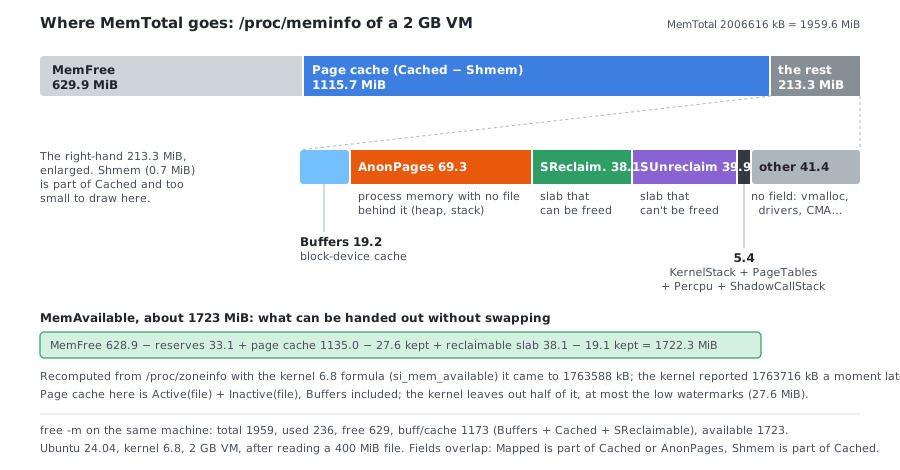
free shows available = MemAvailable, and buff/cache = Buffers + Cached + SReclaimable. On the sample: 19620 + 1143152 + 39040 kB = 1173 MiB, exactly what free -m printed:
               total        used        free      shared  buff/cache   available
Mem:            1959         236         629           0        1173        1723
Swap:           2047           0        2047
used depends on the procps-ng version. With 4.0.4 (Ubuntu 24.04 and 26.04) it is total − available (1959 − 1723 = 236); 3.3.x (Ubuntu 20.04 and 22.04) computes total − free − buff/cache instead, so the same machine shows a different used.
How MemAvailable Is Calculated
MemAvailable is an estimate, computed in si_mem_available() (mm/show_mem.c in kernel 6.8):
available = MemFree − totalreserve
          + page cache   − min(page cache / 2,   sum of low watermarks)
          + reclaimable  − min(reclaimable / 2,  sum of low watermarks)
totalreserveis memory the kernel keeps back in each zone (thehighwatermark plus the largestprotectionvalue in/proc/zoneinfo).- Page cache here is
Active(file)+Inactive(file). The kernel assumes it can’t drop all of it without thrashing, so it leaves out half of it, at most the low watermarks. - Reclaimable is
KReclaimable(reclaimable slab plus other reclaimable kernel memory), treated the same way.
Recomputed from /proc/zoneinfo and /proc/meminfo on the VM:
low watermarks 7072 pages, totalreserve 8480 pages
MemFree 644024 kB - reserve 33920 kB + page cache 1162244 kB - kept 28288 kB + reclaimable 39056 kB - kept 19528 kB
computed MemAvailable 1763588 kB, kernel says 1763716 kB
The two readings were a moment apart, hence the 128 kB difference. What MemAvailable doesn’t know: dirty pages must be written first, Shmem in the cache can’t be dropped, and file pages in active use will be read back right away. So it is a good guide, not a promise.
Detailed Statistics
VM Statistics: Active and Inactive Lists
The kernel keeps pages on LRU (least recently used) lists. Pages used recently are active; pages not touched for a while move to inactive. When memory is needed, the kernel takes it from the inactive lists first, since those pages are expected not to be needed soon. It continuously checks what’s used and moves pages between the lists. A long sequential read (backup, cat of a big file) puts pages straight on the inactive list, so it doesn’t push out the active working set.
| Field | Meaning |
|---|---|
Active / Inactive | Totals of the lists below |
Active(anon) / Inactive(anon) | Process memory not backed by a file (heap, stack). Reclaiming it means writing it to swap; inactive anon is swapped first |
Active(file) / Inactive(file) | Page cache. Clean pages can be dropped instantly; inactive file pages are the first to go |
Unevictable / Mlocked | Pages that can’t be reclaimed: locked with mlock() (databases, some security software), System V shared memory locked with SHM_LOCK, or on a ramfs |
A process that mlock()s 64 MiB shows up in both:
Unevictable:       65520 kB
Mlocked:           65520 kB
A System V segment locked with shmctl(SHM_LOCK) is counted in Unevictable but not in Mlocked; see Linux Swap Usage.
Older guides describe Inact_dirty, Inact_clean and Inact_target. Those were 2.4-kernel (RHEL 3 era) fields and don’t exist on any current release.
MGLRU (RHEL 9+, Ubuntu 24.04+)
Newer kernels can replace the two lists with the multi-generation LRU (MGLRU), which sorts pages into several generations by age. It is on by default in RHEL 9 and 10 and in Ubuntu 24.04 and 26.04 (CONFIG_LRU_GEN_ENABLED=y), not in Ubuntu 20.04 and 22.04 (kernels 5.4 and 5.15 don’t have it):
cat /sys/kernel/mm/lru_gen/enabled # 0x0000 = off; any other value = on (each bit is one feature)
/proc/meminfo still shows Active and Inactive, but they are now derived from the generations: the two youngest count as active. The split stops meaning “recently used vs about to be reclaimed” in the old sense, and some combinations look odd. On the Ubuntu 24.04 sample, 70 MiB of process memory is all Active(anon) and Inactive(anon) is 0. Use MemAvailable and the reclaim counters below rather than the active/inactive ratio.
Memory Statistics
| Field | Meaning |
|---|---|
SwapTotal | Total swap space |
SwapFree | Unused swap. Memory that was evicted from RAM sits in the used part, on disk |
Zswap / Zswapped (RHEL 9+, Ubuntu 24.04+) | RAM used by the zswap compressed cache / how much swapped data it holds (see below) |
Dirty | Modified file data waiting to be written back to disk. The kernel delays writes to batch them and reduce I/O, so some dirty memory is normal |
Writeback | Dirty data being written to disk right now. Constantly high = storage can’t keep up |
AnonPages | Memory not backed by a file, mapped into processes |
Mapped | Files mapped into processes, such as shared libraries and mmap()ed files |
Shmem | Shared memory (System V, POSIX) and tmpfs (/dev/shm, /run). Counted in Cached but only freed when the files or segments are deleted. See Linux Swap Usage: When Processes Aren’t the Culprit |
KReclaimable (RHEL 8+, Ubuntu 20.04+) | Kernel memory the kernel can free under pressure (includes SReclaimable) |
Slab | In-kernel data structure cache (SReclaimable + SUnreclaim) |
SReclaimable | Slab that can be freed, mainly dentry and inode caches. Large values are normal |
SUnreclaim | Slab that can’t be freed. Steady growth points at a kernel-side leak (often a driver or module) |
KernelStack | Memory used by kernel stacks, one per thread |
PageTables | Memory for page tables (virtual-to-physical address mappings). Grows with many processes or large shared memory without huge pages |
SecPageTables (RHEL 9+, Ubuntu 24.04+) | Secondary page tables: what KVM allocates for its guests’ memory and IOMMU allocations. Non-zero on hosts running VMs |
CommitLimit | The allocation limit when strict overcommit is on (see below) |
Committed_AS | Estimate of how much RAM + swap all processes would need in the worst case (see below) |
VmallocTotal | Size of the kernel’s vmalloc address space, not RAM. Enormous values on 64-bit are normal |
VmallocUsed | vmalloc memory actually in use |
Percpu (RHEL 8+, Ubuntu 20.04+) | Memory for per-CPU kernel allocations |
HardwareCorrupted | RAM the kernel stopped using because of memory errors. Anything above 0 means a failing DIMM |
AnonHugePages | Process memory backed by transparent huge pages (THP) |
HugePages_Total / _Free / _Rsvd / _Surp | Pre-allocated (static) huge pages: counts, not kB. Reserved even when unused |
Hugepagesize | Size of one huge page (2048 kB on x86_64, and on arm64 with 4 KiB pages) |
Hugetlb (RHEL 8+, Ubuntu 20.04+) | Total memory in huge pages of all sizes |
Balloon (RHEL 10, Ubuntu 26.04) | Memory this VM has returned to the host through a balloon driver; the guest can’t use it |
HighTotal, LowTotal, HighFree and LowFree only exist on 32-bit kernels, where the kernel couldn’t directly address memory above ~896 MB (“high memory”). RHEL 7–10 and these Ubuntu releases run 64-bit kernels, so you won’t see them, and MemFree is not “LowFree + HighFree”. MemShared and ReverseMaps are 2.4-era fields that are gone too.
Nothing in /proc/meminfo adds up to MemTotal exactly: fields overlap (Shmem is part of Cached, Mapped is part of Cached or AnonPages), and some kernel memory has no field at all. On the sample, 41.4 MiB is in no field (vmalloc, drivers, CMA and other kernel allocations), as the diagram above shows.
Committed_AS and Overcommit
Linux normally overcommits memory. A 1 GB malloc() costs nothing at first; real memory is handed out page by page only when the program starts using it. It’s like taking out a mortgage and hoping the bank doesn’t go bust. The same applies to private mmap() of a file: it’s shared between processes until one of them writes, and only then gets its own private copy (copy-on-write).
Committed_AS estimates how much RAM + swap you’d need if every process used everything it asked for: the amount needed for a 99.99% guarantee of never running out of memory for this workload. It can safely exceed MemTotal.
vm.overcommit_memory | Behavior |
|---|---|
0 (default) | Heuristic: refuse only obviously impossible allocations |
1 | Always allow (some databases and Redis recommend it) |
2 | Strict: allocations beyond CommitLimit fail with “Cannot allocate memory” |
CommitLimit is:
CommitLimit = (MemTotal − huge pages) × vm.overcommit_ratio / 100 + SwapTotal
or vm.overcommit_kbytes + SwapTotal when overcommit_kbytes is set instead of the ratio. On the VM: (2006616 × 50 / 100) + 2097148 = 3100456 kB, exactly the value shown. After reserving 100 huge pages (200 MiB), it dropped to 2998056 kB: (2006616 − 204800) × 50 / 100 + 2097148. Huge pages are never part of the commit pool.
sysctl vm.overcommit_memory vm.overcommit_ratio vm.overcommit_kbytes
grep -E '^(CommitLimit|Committed_AS):' /proc/meminfo
When the bet goes wrong, the kernel’s OOM killer picks a process to kill: see what the OOM killer looks at.
zswap and zram: Swap in RAM
Both trade CPU for memory by compressing pages instead of writing them to disk.
zswap is a compressed cache in front of a normal swap device. Pages on their way to swap are compressed and kept in RAM; only when the pool is full do they go to disk. It is built in on RHEL 9+, RHEL 10 and all four Ubuntu releases, but off by default on the Ubuntu ones:
cat /sys/module/zswap/parameters/enabled          # N = off
echo 1 | sudo tee /sys/module/zswap/parameters/enabled
On the 2 GB VM with zswap on (lzo, max_pool_percent 20), filling 2000 MiB with pages that are a quarter random data:
SwapTotal:       2097148 kB
SwapFree:        1456244 kB
Zswap:            202016 kB
Zswapped:         404632 kB
Zswap is the RAM the pool uses (197 MiB), Zswapped the data in it (395 MiB): 2:1 here. swapon --show still reported 625.9 MiB of the swap file as used, because zswap keeps a slot in the swap device for every page it holds.
zram is a compressed RAM disk used as the swap device, with no disk behind it (Fedora uses it by default). On Ubuntu the module is in the linux-modules-extra package:
sudo modprobe zram
sudo zramctl --find --size 1G --algorithm zstd     # prints /dev/zram0
sudo mkswap /dev/zram0 && sudo swapon -p 100 /dev/zram0
zramctl
NAME       ALGORITHM DISKSIZE   DATA COMPR TOTAL STREAMS MOUNTPOINT
/dev/zram0 zstd            1G 295.7M 74.2M   76M       2 [SWAP]
296 MiB of swapped pages stored in 76 MiB of RAM (4:1 with zstd). With zram, “swap used” in free and /proc/meminfo is not disk: the real cost in RAM is the TOTAL column of zramctl, and MemFree/MemAvailable already include it.
How the Kernel Reclaims Memory
At boot the kernel starts a kswapd thread per NUMA node (shown as kswapd0, kswapd1, … in ps). It sleeps most of the time. Each memory zone has three watermarks (min, low, high, visible in /proc/zoneinfo):
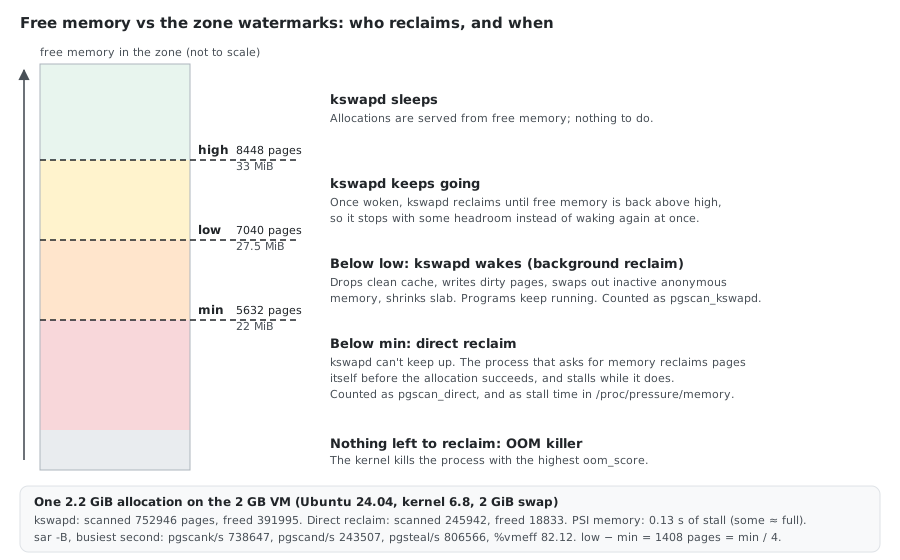
- Free memory drops below
low: kswapd wakes up and frees pages in the background (drops clean cache, writes dirty pages, swaps out inactive anonymous memory, shrinks slab caches) until free memory is back abovehigh. Applications aren’t slowed down. - Free memory drops below
min: kswapd can’t keep up. A process that asks for memory has to reclaim pages itself before its allocation succeeds. This is direct reclaim, and the process stalls while it happens. - Nothing can be reclaimed: the OOM killer is invoked.
# Watermarks per zone (in pages)
grep -E '^Node|^ +(min|low|high) ' /proc/zoneinfo

# The settings they come from
sysctl vm.min_free_kbytes vm.watermark_scale_factor
On the 2 GB VM (arm64 puts most of the RAM in the DMA zone):
Node 0, zone      DMA
        min      5632
        low      7040
        high     8448
...
vm.min_free_kbytes = 22528
vm.watermark_scale_factor = 10
min_free_kbytes (22528 kB = 5632 pages) is split across the zones as their min. The gap to low, and again to high, is the larger of min / 4 and watermark_scale_factor / 10000 of the zone’s memory: here 1408 pages, min / 4.
Raising vm.min_free_kbytes raises all three, so kswapd starts earlier, at the cost of keeping more RAM idle. On large machines vm.watermark_scale_factor is the better knob: it widens the gap between min, low and high (in units of 0.01 % of RAM) without raising the emergency reserve. All four Ubuntu VMs had the same values (22528 and 10 with 2 GB of RAM; min_free_kbytes scales with RAM).
Measuring Reclaim with sar
sar -B (package sysstat) shows both reclaim paths:
| Column | Meaning |
|---|---|
pgscank/s | Pages scanned by kswapd (background reclaim). Some activity is normal |
pgscand/s | Pages scanned by direct reclaim. Sustained non-zero = processes are stalling on memory |
pgsteal/s | Pages actually freed per second, by either path |
%vmeff | pgsteal / (pgscank + pgscand): how many scanned pages could be freed. Near 100% is healthy; low means the kernel scans a lot to find little |
pgsteal/s is not pgscank/s + pgscand/s: scanning is looking at pages, stealing is the subset that gets freed.
sar -B 1 10

# The same counters, cumulative since boot, without sysstat
grep -E '^(pgscan|pgsteal)_(kswapd|direct) ' /proc/vmstat
On the 2 GB VM, a process allocating 2.2 GiB (sysstat 12.6.1):
20:39:51     pgpgin/s pgpgout/s   fault/s  majflt/s  pgfree/s pgscank/s pgscand/s pgsteal/s    %vmeff
20:39:53         0.00      1.00     15.00      0.00     26.00      0.00      0.00      0.00      0.00
20:39:54      4625.74 484574.26 559381.19    110.89 414919.80 738647.52 243506.93 806566.34     82.12
20:39:55      5856.00     20.00    335.00     84.00      0.00      0.00      0.00      0.00      0.00
and the /proc/vmstat counters before and after:
pgscan_kswapd        752946
pgscan_direct        245942
pgsteal_kswapd       391995
pgsteal_direct        18833
Most of the work was kswapd’s, but a quarter of the scanning happened in direct reclaim, inside the allocating process. vmstat 1 showed it as so (swap-out) of 489104 KiB in that second.
Pressure Stall Information (PSI)
PSI reports the share of time tasks were stalled waiting for memory, a direct measure of the slowdown direct reclaim causes:
cat /proc/pressure/memory
Before and after the 2.2 GiB allocation:
some avg10=0.00 avg60=0.00 avg300=0.00 total=66
full avg10=0.00 avg60=0.00 avg300=0.00 total=18

some avg10=0.32 avg60=0.15 avg300=0.03 total=125921
full avg10=0.32 avg60=0.15 avg300=0.03 total=123978
some: % of time at least one task was waiting on memoryfull: % of time all non-idle tasks were waiting (the machine was effectively stalled)total: cumulative stall time in microseconds. Here it grew by 125855 µs: 0.13 s of stall for one big allocation.
PSI is on by default on all four Ubuntu releases. RHEL 9 and 10 build it in but disabled (CONFIG_PSI_DEFAULT_DISABLED=y in Red Hat’s kernel configuration), and RHEL 8 likewise: /proc/pressure doesn’t exist until you add psi=1 to the kernel command line:
sudo grubby --update-kernel=ALL --args="psi=1" # takes effect after reboot
Commands
# All fields sorted by size
sort -k2,2 -n /proc/meminfo

# Just the important ones, human-readable
awk '/^(MemTotal|MemFree|MemAvailable|Cached|SwapTotal|SwapFree|Dirty|Shmem|Slab|SUnreclaim):/ {printf "%-14s %8.1f MB\n", $1, $2/1024}' /proc/meminfo

# Used memory % (everything that isn't available)
awk '/^MemTotal:/{t=$2} /^MemAvailable:/{a=$2} END{printf "%.1f%%\n", (t-a)*100/t}' /proc/meminfo

# Free (available) memory %
awk '/^MemTotal:/{t=$2} /^MemAvailable:/{a=$2} END{printf "%.1f%%\n", a*100/t}' /proc/meminfo

# The same from free (column 7 = available)
free | awk '/^Mem:/ {printf "%.1f%%\n", ($2-$7)*100/$2}'

# Wide free output: buffers and cache in separate columns
free -mw

# Top 10 slab caches by size in MB (needs root; assumes 4 KB pages)
sudo awk 'NR>2 {printf "%8.1f MB  %s\n", $6*$15*4/1024, $1}' /proc/slabinfo | sort -rn | head

# Slab caches sorted by size, printed once
sudo slabtop -s c -o | head -n 20

# Watch memory change every 2 seconds
watch -n 2 'grep -E "^(MemFree|MemAvailable|Dirty|Writeback):" /proc/meminfo'
The old RHEL 6 one-liners that parse the -/+ buffers/cache line of free print nothing on RHEL 7+ and current Ubuntu, because that line no longer exists; use MemAvailable instead.
Dropping Caches (Testing Only)
sync; echo 3 | sudo tee /proc/sys/vm/drop_caches # 1 = page cache, 2 = dentries/inodes, 3 = both
Before and after, with a 400 MiB file in the cache:
MemFree:         1383564 kB      →   1815504 kB
MemAvailable:    1785552 kB      →   1804240 kB
Cached:           456068 kB      →     31876 kB
SReclaimable:      14068 kB      →     12752 kB
MemFree went up by 422 MiB, but MemAvailable barely moved (+18 MiB): the cache was already counted as available. Dropping it throws away useful data and makes the system slower until it’s rebuilt. It’s for benchmarks and troubleshooting (“is this memory really reclaimable?”), never a routine fix for “low free memory”.
Inside Containers
/proc/meminfo is not aware of containers: inside a container it shows the host’s memory. A container’s own numbers are in its cgroup’s memory.stat, with fields that mirror /proc/meminfo: anon (≈ AnonPages), file (≈ Cached), shmem, slab_reclaimable, slab_unreclaimable, active_file, inactive_file. See Memory Inside Containers and Kubernetes.
What to Look At First
| Symptom | Check | Meaning |
|---|---|---|
| “Free memory is almost zero” | MemAvailable | If MemAvailable is healthy, the RAM is just cache: normal |
| System slow, disk busy | pgscand/s, /proc/pressure/memory, si/so in vmstat | Direct reclaim or swapping: real memory shortage |
Cached large but MemAvailable small | Shmem | tmpfs or shared memory counts as cache but can’t be dropped |
| Memory used but no process owns it | Slab / SUnreclaim, HugePages_Total, Unevictable | Kernel memory, pre-allocated huge pages, or locked memory |
| Swap “used” but no disk activity | Zswap, zramctl | zswap or zram: the swapped pages are compressed in RAM |
| Processes killed | dmesg -T | grep -i oom, Committed_AS vs CommitLimit | OOM killer |
HardwareCorrupted > 0 | dmesg -T | grep -i mce | Failing RAM |
Where the Numbers Come From
- Ubuntu: each release booted in a throwaway VM (Ubuntu 20.04.6 with kernel 5.4, 22.04.5 with 5.15, 24.04.4 with 6.8, 26.04 with 7.0; all
aarch64, 2 GB of RAM), reading/proc/meminfo,/proc/pressure,/sys/kernel/mm/lru_gen/enabled,/sys/module/zswap/parameters/enabledand the kernel config. The VMs were deleted afterwards. - RHEL: from Red Hat’s kernel source for RHEL 8, 9 and 10 (the CentOS Stream kernel trees on GitLab, from which RHEL kernels are built): the fields printed by
fs/proc/meminfo.cand theCONFIG_PSI_DEFAULT_DISABLEDandCONFIG_LRU_GEN_ENABLEDsettings. Not read from a running RHEL system, so a given minor release can differ slightly. RHEL 7 is from the upstream 3.10 kernel plus theMemAvailablebackport. - First upstream kernel of each field:
fs/proc/meminfo.candmm/hugetlb.con kernel.org:MemAvailable3.14,ShmemHugePages4.8,Hugetlb4.16,KReclaimableandPercpu4.20,FileHugePages5.4,Zswap5.19,SecPageTables6.1. - Sample,
MemAvailableformula,CommitLimit,mlock, zswap, zram, watermarks,sar, PSI anddrop_caches: one Ubuntu 24.04 VM (kernel 6.8, 2 GB of RAM, a 2 GiB swap file), deleted afterwards. The zswap and zram runs used pages that were a quarter random data and three quarters zeros; real data compresses differently.
See Also
- The /proc filesystem: meminfo — the kernel’s own description of each field
- Overcommit accounting and /proc/sys/vm —
overcommit_*,min_free_kbytes,watermark_scale_factor - PSI - Pressure Stall Information
- Multi-Gen LRU , zswap and zram
- Linux Memory: RSS, VSZ, and Why RSS Alone Is Misleading
- Linux Swap Usage: When Processes Aren’t the Culprit
Comments