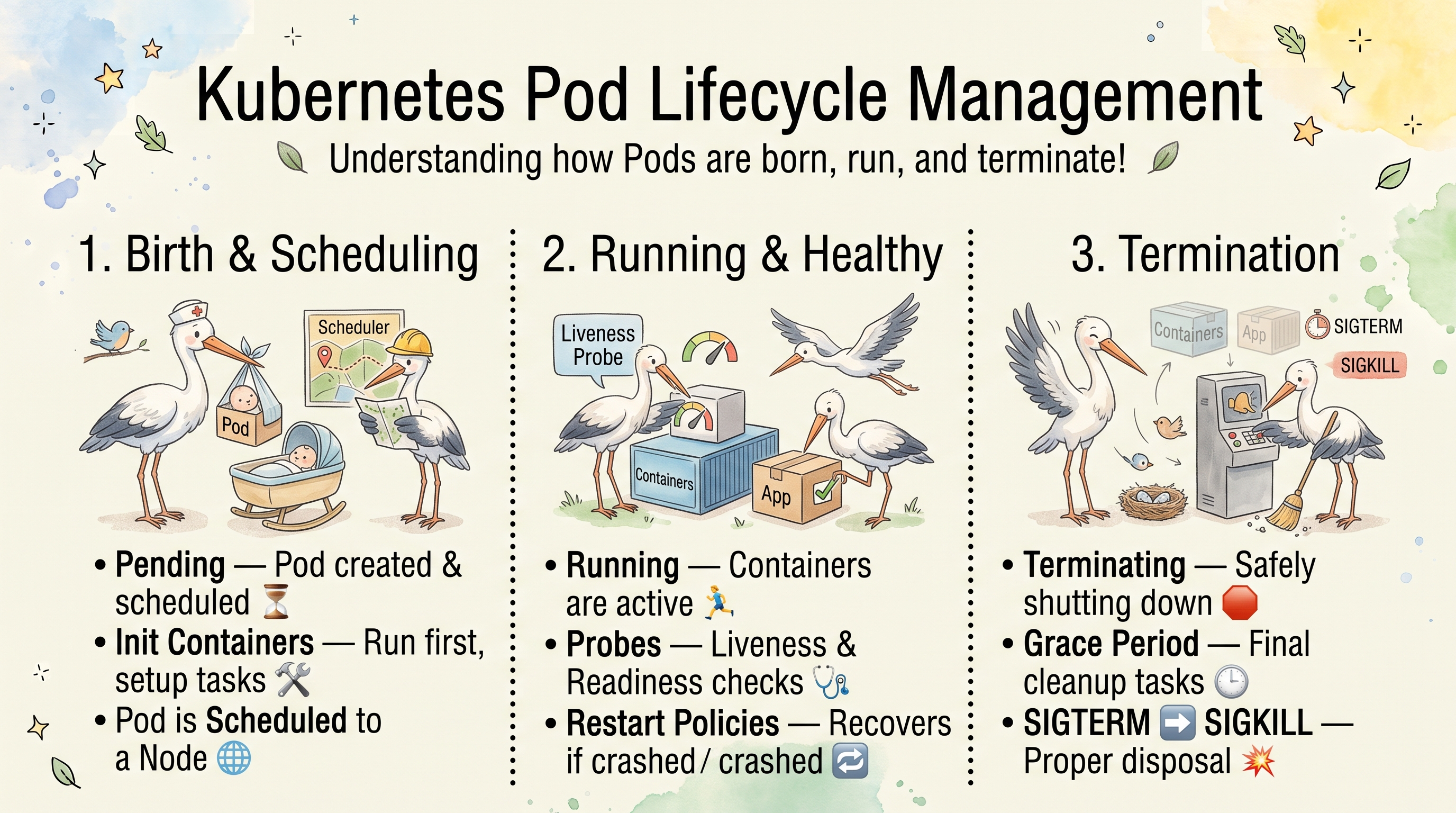
Kubernetes Pod Lifecycle Management
A pod goes through four stages: it is deployed (created and started), it runs (kept healthy), it is updated (replaced by a newer version), and finally it is deleted (shut down gracefully). This article follows a pod through each stage and shows what Kubernetes does, and what you control, at every step.
Key Takeaways
- A pod has only five phases:
Pending,Running,Succeeded,FailedandUnknown. Everything else you see inkubectl get pods(ContainerCreating,Init:0/1,CrashLoopBackOff,Terminating) is a container state or a kubectl status. - Probes tell Kubernetes whether the app is really healthy: liveness restarts it, readiness takes it out of the Service, startup protects slow starters.
- On deletion the app gets SIGTERM, then a grace period (30 s by default), then SIGKILL. Handle SIGTERM, and use a
preStophook when the load balancer needs time to stop sending traffic. - Deployments replace pods step by step; with readiness probes and
maxUnavailable: 0, an update doesn’t drop capacity. - Pick the restart policy per workload:
Alwaysfor services,OnFailureorNeverfor Jobs.
The Lifecycle on One Page
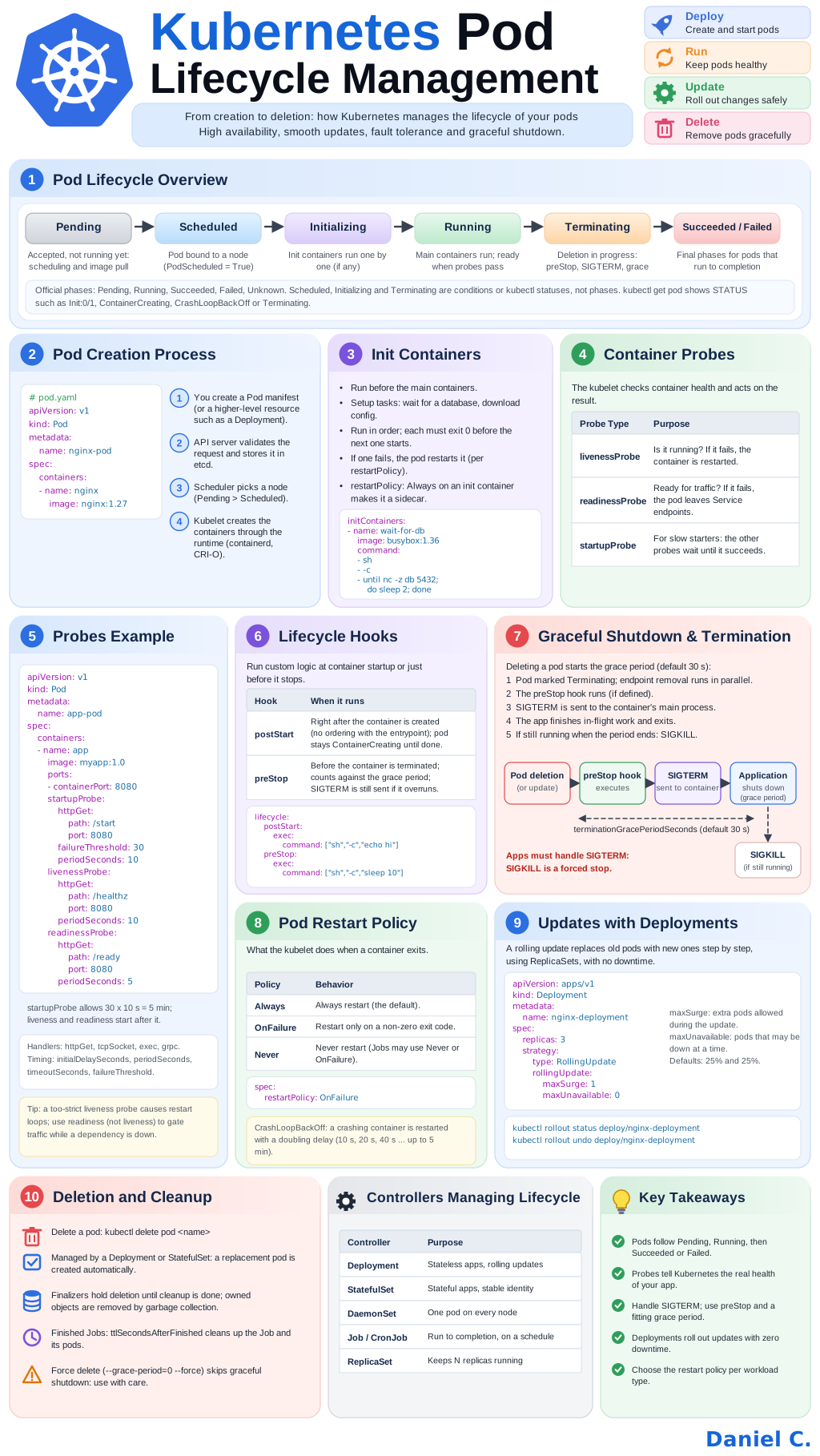
The whole lifecycle in one picture. Its numbered panels match the sections below, which explain each step in detail with the YAML and the kubectl commands to watch it happen. Click it to open it full size.
1. Pod Lifecycle Overview
| Stage | What happens |
|---|---|
| Pending | Accepted by the API server, not running yet: waiting for scheduling or pulling images |
| Scheduled | Bound to a node (condition PodScheduled=True) |
| Initializing | Init containers run one by one, if there are any |
| Running | The main containers run; the pod is ready when its readiness probes pass |
| Terminating | Deletion in progress: preStop, SIGTERM, grace period |
| Succeeded / Failed | Final phase for pods that run to completion (Jobs) |
Only Pending, Running, Succeeded, Failed and Unknown (the node stopped reporting) are official phases (status.phase). Scheduled, Initializing and Terminating are conditions or kubectl statuses. The STATUS column of kubectl get pods mixes all of them, which is why it can show Init:0/1, ContainerCreating, CrashLoopBackOff or Terminating.
The pod conditions record the steps in more detail:
| Condition | True when |
|---|---|
PodScheduled | The pod is bound to a node |
PodReadyToStartContainers | The sandbox and network are ready |
Initialized | All init containers finished |
ContainersReady | All containers pass their readiness probes |
Ready | The pod can receive traffic from Services |
kubectl get pod nginx-pod -o jsonpath='{.status.phase}{"\n"}'
kubectl get pod nginx-pod -o jsonpath='{range .status.conditions[*]}{.type}={.status}{"\n"}{end}'
kubectl get pods -w                      # watch the status change live
kubectl describe pod nginx-pod           # conditions, container states and events
2. Pod Creation Process
# pod.yaml
apiVersion: v1
kind: Pod
metadata:
  name: nginx-pod
spec:
  containers:
    - name: nginx
      image: nginx:1.27
- You create a Pod manifest, or more often a higher-level resource such as a Deployment that creates pods for you.
- The API server validates the request (schema, admission controllers) and stores the object in etcd. The pod is now
Pending. - The scheduler picks a node based on resources, affinity, taints and tolerations, and binds the pod to it (
PodScheduled=True). - The kubelet on that node creates the containers through the container runtime (containerd or CRI-O): it pulls the images, sets up the network and volumes, and starts the containers.
kubectl apply -f pod.yaml
kubectl get pod nginx-pod -o wide        # NODE column: where it was scheduled
kubectl get events --field-selector involvedObject.name=nginx-pod --sort-by=.lastTimestamp
The events show each step: Scheduled, Pulling, Pulled, Created, Started. A pod stuck in Pending usually has a FailedScheduling event that says why (not enough CPU or memory, no node matches, an unbound PersistentVolumeClaim).
From kubectl apply to Running
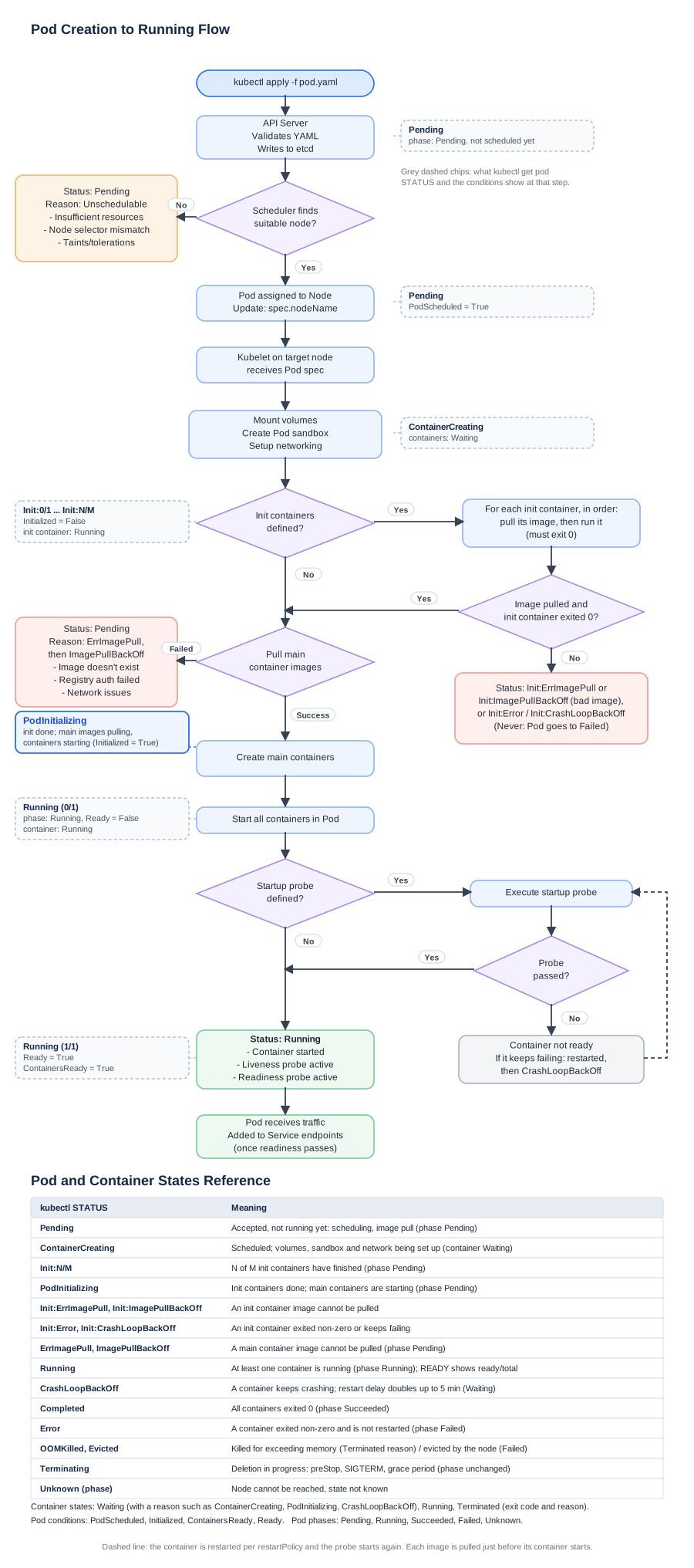
The flow below follows those steps in detail, with the decisions along the way: scheduling, init containers, image pulls and the startup probe. The grey chips show what kubectl get pod reports at each step, the red boxes the statuses you see when a step fails, and the table at the bottom explains every STATUS value. Click it to open it full size.
3. Init Containers
Init containers run before the main containers:
- They handle setup tasks: wait for a database, download configuration, run migrations, fix permissions.
- They run in order, and each one must exit with code 0 before the next one starts.
- If one fails, the kubelet retries it according to the pod’s
restartPolicy; withNever, the pod fails. restartPolicy: Alwayson an init container turns it into a sidecar: it starts before the main containers and keeps running next to them.
spec:
  initContainers:
    - name: wait-for-db
      image: busybox:1.36
      command:
        - sh
        - -c
        - until nc -z db 5432; do sleep 2; done
  containers:
    - name: app
      image: myapp:1.0
While init containers run, kubectl get pods shows Init:0/1; a failing one shows Init:Error or Init:CrashLoopBackOff.
kubectl logs app-pod -c wait-for-db # logs of one init container
4. Container Probes
The kubelet checks container health and acts on the result:
| Probe | Question | On failure |
|---|---|---|
livenessProbe | Is it still working? | The container is restarted |
readinessProbe | Can it take traffic now? | The pod is removed from the Service endpoints, not restarted |
startupProbe | Has it finished starting? | The other probes wait until it succeeds; if it never does, the container is restarted |
Each probe uses one handler: httpGet, tcpSocket, exec (a command that must exit 0) or grpc. Timing is set with initialDelaySeconds, periodSeconds, timeoutSeconds, successThreshold and failureThreshold.
5. Probes Example
apiVersion: v1
kind: Pod
metadata:
  name: app-pod
spec:
  containers:
    - name: app
      image: myapp:1.0
      ports:
        - containerPort: 8080
      startupProbe:
        httpGet:
          path: /start
          port: 8080
        failureThreshold: 30
        periodSeconds: 10
      livenessProbe:
        httpGet:
          path: /healthz
          port: 8080
        periodSeconds: 10
      readinessProbe:
        httpGet:
          path: /ready
          port: 8080
        periodSeconds: 5
The startup probe allows 30 × 10 s = 5 minutes for the app to start; liveness and readiness only begin after it succeeds.
A liveness probe that is too strict causes restart loops: if
/healthzchecks the database and the database is down, every replica restarts and none of them gets better. Let liveness check only the process itself, and use readiness to stop traffic while a dependency is down.
kubectl describe pod app-pod | grep -A3 -E 'Liveness|Readiness|Startup'
kubectl get events --field-selector reason=Unhealthy     # failed probes
6. Lifecycle Hooks
Hooks run custom logic when a container starts or just before it stops:
| Hook | When it runs |
|---|---|
postStart | Right after the container is created. There is no ordering with the entrypoint: they run at the same time. The container isn’t reported as running until the hook finishes, and if the hook fails the container is killed. |
preStop | Before the container is terminated. It counts against the grace period, and SIGTERM is sent only after it finishes. |
spec:
  containers:
    - name: app
      image: myapp:1.0
      lifecycle:
        postStart:
          exec:
            command: ["sh", "-c", "echo hi"]
        preStop:
          exec:
            command: ["sh", "-c", "sleep 10"]
Hooks use exec, httpGet or sleep (preStop: sleep: seconds: 10, without needing a shell in the image). Hook output isn’t in kubectl logs; a failed hook shows up as a FailedPostStartHook or FailedPreStopHook event.
7. Graceful Shutdown and Termination
Deleting a pod starts the grace period (terminationGracePeriodSeconds, default 30 s):
- The pod is marked Terminating. In parallel, it is removed from the Service endpoints, so new traffic stops reaching it, but not instantly.
- The
preStophook runs, if there is one. - SIGTERM is sent to the main process (PID 1) of each container.
- The app finishes in-flight requests, closes connections and exits.
- If it is still running when the grace period ends, the kubelet sends SIGKILL.
If the preStop hook is still running when the grace period expires, the kubelet allows a one-time extra 2 seconds, then kills the container.
spec:
  terminationGracePeriodSeconds: 60     # preStop + shutdown must fit in here
  containers:
    - name: app
      image: myapp:1.0
      lifecycle:
        preStop:
          sleep:
            seconds: 10                 # let endpoint removal reach the load balancers
Apps must handle SIGTERM: SIGKILL is a forced stop. Common reasons an app ignores SIGTERM and gets killed after 30 s:
- The process is started through a shell (
command: sh -c "node app.js"), so the shell is PID 1 and doesn’t forward the signal. Use the exec form (["node", "app.js"]) orexecin the script. - The app has no SIGTERM handler, and as PID 1 the default “terminate” action doesn’t apply to it.
The preStop: sleep covers the gap in step 1: endpoint removal and shutdown happen in parallel, so without the sleep the app can stop before the load balancer stops sending it requests.
kubectl delete pod app-pod                         # graceful, default grace period
kubectl delete pod app-pod --grace-period=60       # longer grace period for this delete
kubectl get pod app-pod -o jsonpath='{.status.containerStatuses[0].lastState.terminated.exitCode}{"\n"}'
An exit code of 143 means the process ended on SIGTERM (128 + 15), 137 means SIGKILL (128 + 9): the app didn’t stop in time, or it was killed for running out of memory (OOMKilled).
8. Pod Restart Policy
What the kubelet does when a container exits:
| Policy | Behavior |
|---|---|
Always | Always restart (the default; required for Deployments) |
OnFailure | Restart only on a non-zero exit code |
Never | Never restart (Jobs may use Never or OnFailure) |
spec:
  restartPolicy: OnFailure
The policy applies to all containers of the pod, and restarts happen on the same node: the pod isn’t rescheduled.
A container that keeps crashing goes into CrashLoopBackOff: the kubelet restarts it with a doubling delay (10 s, 20 s, 40 s, … up to 5 minutes). The delay resets after the container runs for 10 minutes without problems.
kubectl get pod app-pod                      # RESTARTS column
kubectl logs app-pod --previous              # logs of the crashed container
kubectl describe pod app-pod                 # Last State: Terminated, Reason, Exit Code
9. Updates with Deployments
A rolling update replaces old pods with new ones step by step, through ReplicaSets, without downtime:
apiVersion: apps/v1
kind: Deployment
metadata:
  name: nginx-deployment
spec:
  replicas: 3
  selector:
    matchLabels:
      app: nginx
  strategy:
    type: RollingUpdate
    rollingUpdate:
      maxSurge: 1
      maxUnavailable: 0
  template:
    metadata:
      labels:
        app: nginx
    spec:
      containers:
        - name: nginx
          image: nginx:1.27
| Setting | Meaning | Default |
|---|---|---|
maxSurge | Extra pods allowed above replicas during the update | 25% |
maxUnavailable | Pods that may be unavailable during the update | 25% |
With maxSurge: 1 and maxUnavailable: 0, Kubernetes starts one new pod, waits until it is ready, then removes one old pod, and repeats. That only works as intended with a readiness probe: without one, a pod counts as ready as soon as its containers start.
The other strategy, Recreate, stops all old pods before starting new ones: there is downtime, but two versions never run at the same time.
kubectl set image deploy/nginx-deployment nginx=nginx:1.28   # start an update
kubectl rollout status deploy/nginx-deployment               # wait for it
kubectl rollout history deploy/nginx-deployment              # revisions
kubectl rollout undo deploy/nginx-deployment                 # back to the previous revision
kubectl rollout restart deploy/nginx-deployment              # replace all pods, same spec
10. Deletion and Cleanup
| Situation | What happens |
|---|---|
kubectl delete pod <name> | Graceful deletion, as in section 7 |
| Pod managed by a Deployment or StatefulSet | The controller creates a replacement pod at once; delete or scale the controller instead |
| Finalizers | Deletion waits until the controllers that own the finalizers finish their cleanup |
| Owned objects | Removed by garbage collection when their owner is deleted (ownerReferences) |
| Finished Jobs | ttlSecondsAfterFinished deletes the Job and its pods after the given time |
--grace-period=0 --force | Removes the pod from the API at once, without waiting for the kubelet: use with care |
kubectl delete pod app-pod
kubectl scale deploy/nginx-deployment --replicas=0          # stop all pods of a Deployment
kubectl delete deploy/nginx-deployment                      # delete it with its ReplicaSets and pods
kubectl get pod app-pod -o jsonpath='{.metadata.finalizers}{"\n"}'   # why is it stuck in Terminating?
kubectl delete pod app-pod --grace-period=0 --force         # last resort
A force delete only removes the pod from the API server. If the node is unreachable, the containers may still be running there. For a StatefulSet this can mean two pods with the same identity writing to the same storage.
Controllers Managing the Lifecycle
You rarely create bare pods: a controller creates them, replaces them when they fail and updates them.
| Controller | Purpose |
|---|---|
| Deployment | Stateless apps, rolling updates and rollbacks |
| StatefulSet | Stateful apps: stable names (db-0, db-1), stable storage, ordered start and stop |
| DaemonSet | One pod on every node (log collectors, monitoring agents, CNI) |
| Job / CronJob | Run to completion, once or on a schedule |
| ReplicaSet | Keeps N replicas running; normally managed by a Deployment, not used directly |
kubectl get deploy,sts,ds,job,cronjob,rs
kubectl get pod app-pod -o jsonpath='{.metadata.ownerReferences[0].kind}/{.metadata.ownerReferences[0].name}{"\n"}'
Quick Reference
| Command | Description |
|---|---|
kubectl get pods -w | Watch pods change status |
kubectl describe pod <pod> | Conditions, container states, events |
kubectl get events --sort-by=.lastTimestamp | Recent events |
kubectl logs <pod> -c <container> | Logs of one container (init containers too) |
kubectl logs <pod> --previous | Logs before the last restart |
kubectl rollout status deploy/<name> | Follow a rolling update |
kubectl rollout undo deploy/<name> | Roll back |
kubectl delete pod <pod> --grace-period=60 | Delete with a longer grace period |
kubectl explain pod.spec.containers.lifecycle | Field documentation from the cluster |
Comments