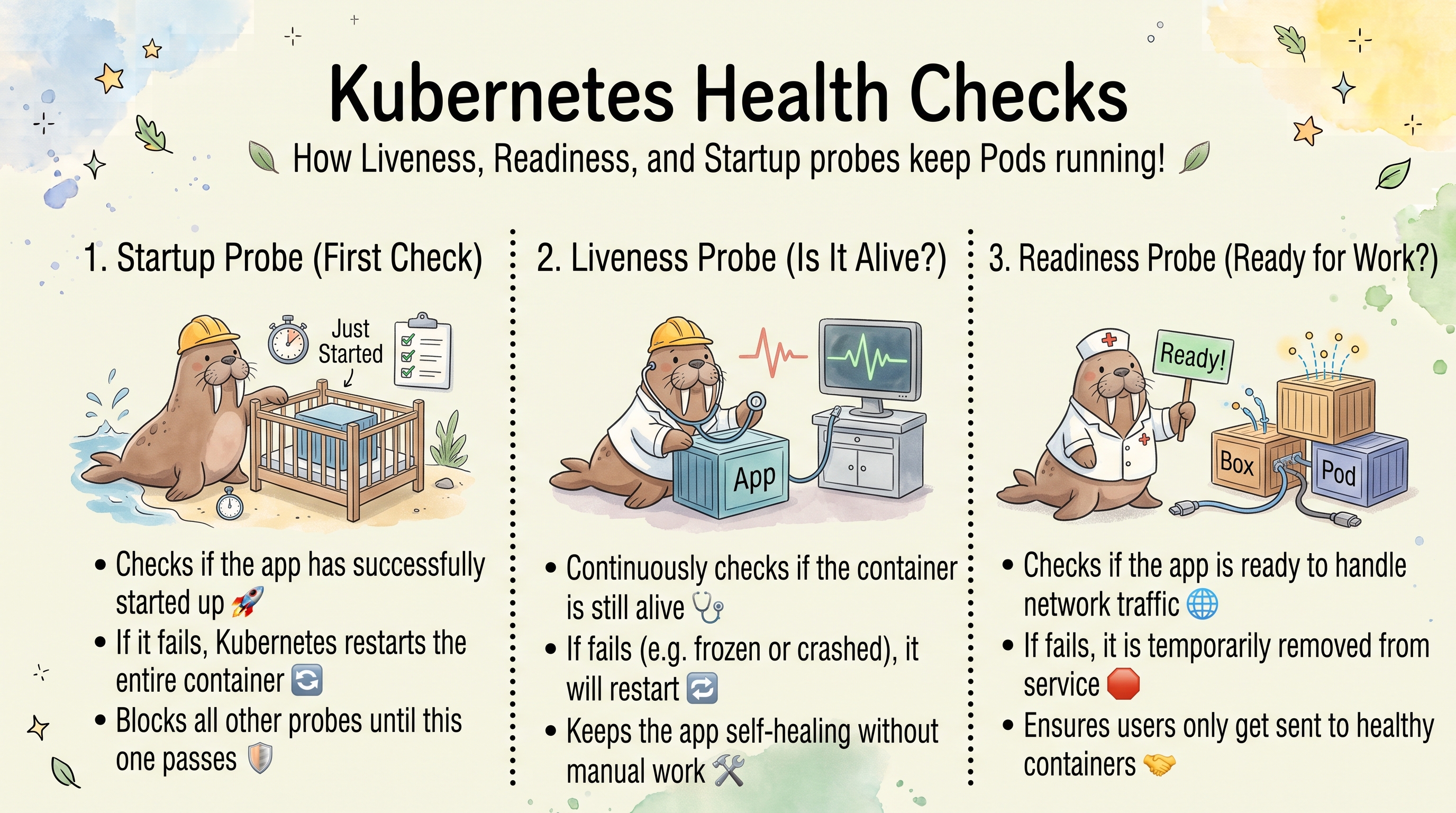
Kubernetes Health Checks: Liveness, Readiness, and Startup Probes
Kubernetes only knows three container states on its own: waiting, running, and terminated. “Running” just means the process (PID 1) exists — not that the application inside is actually serving requests. Probes close that gap. Without them, a pod is marked Ready the instant its container starts and stays Ready even if the app inside has hung. This article explains what happens without health checks, how each probe works, and how to configure them.
What Happens Without Probes
When a container starts with no probes configured:
- The kubelet pulls the image; the runtime creates and starts the container.
- Immediately the pod phase becomes
Runningand the container state becomesRunning. - Immediately the pod’s
Readycondition becomesTrue(a container with no readiness probe is ready as soon as it is running). - The EndpointSlice controller adds the pod IP to the Service’s endpoints.
- kube-proxy programs iptables/IPVS rules and traffic starts flowing.
The problem: nobody verified the application is actually responding.
Container runtime checks: is the process alive (PID exists)?
Kubernetes checks:        is the container state "Running"?
Nobody checks:            is the app answering requests?
The Startup Race
If the app needs a few seconds to initialize (parse config, load TLS certs, bind its port), there’s a window where the pod is Ready but requests fail:
T+0.0s  Container starts, PID 1 spawned
T+0.1s  Pod marked Ready=True
T+0.2s  Pod IP added to Service endpoints
T+0.3s  kube-proxy updates iptables
T+0.5s  First request arrives -> app still loading -> 502/503 or connection refused
T+2.0s  App finally ready
A readiness probe eliminates this window by withholding Ready until the app answers.
Pods Without Probes
On a single-node K3s v1.35.9 cluster, an app that sleeps 20 seconds and then starts httpd on port 8080 stands in for a slow-starting application, and a client pod requests the Service once per second.
| Scenario | Without probes | With readinessProbe (tcpSocket: 8080, periodSeconds: 2) |
|---|---|---|
Both pods Ready after creation | 3 s, with both endpoints ready=true | Only when the app listens (about 20 s) |
| Requests during the first 20 s | 19 failures (wget: download timed out), first OK at +23 s | — |
Rolling update (kubectl set env to force new pods) | rollout status returned after 2 s. In the next 32 requests, 19 failed (Connection refused) and 13 succeeded | rollout status took 44 s. 0 failures, 52 successes |
A rollout without a readiness probe is “successful” while every new pod is still starting, because Kubernetes counts a running container as available. The old pods are removed first, and the Service has no working backend for the length of the startup.
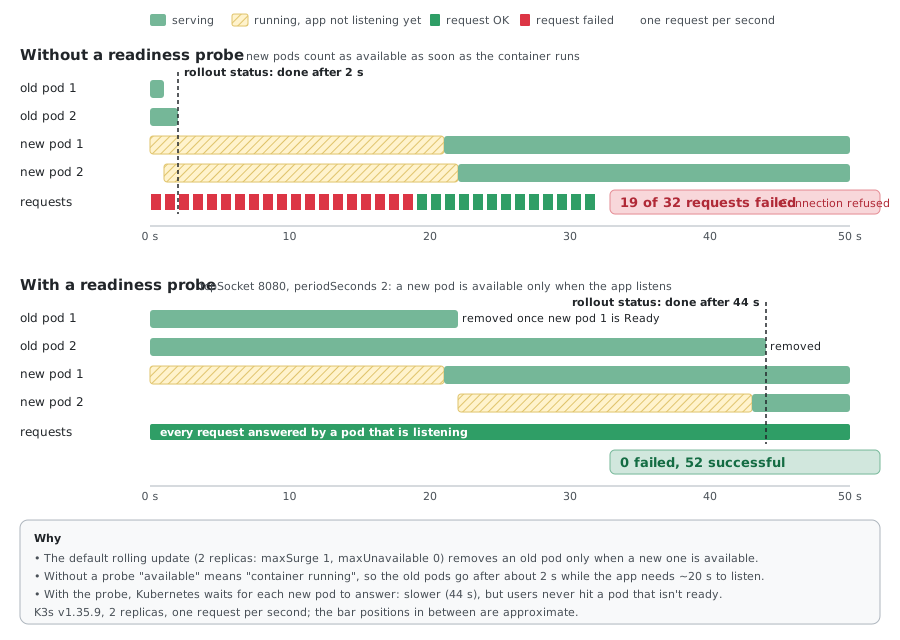
To see this on your own cluster, run a client loop (while true; do wget -q -T1 -O- http://<svc>/ ...; sleep 1; done) in the same namespace and compare kubectl rollout status timings with and without the probe.
What Kubernetes Cannot Detect Without a Liveness Probe
A process can be alive but useless. Without liveness checks, none of these trigger a restart:
- Worker threads deadlocked or thread pool exhausted
- Port bound but not accepting connections
- App returning 500s for every request
- Memory or file descriptors exhausted while PID 1 lingers
- Upstream dependency down and the app wedged waiting on it
# Process exists...
$ ps aux | grep nginx
root  1234  nginx: master process

# ...but it's not serving
$ curl http://localhost
curl: (7) Connection refused

# Kubernetes still thinks all is well — and keeps sending traffic
$ kubectl get pod web
NAME   READY   STATUS    RESTARTS   AGE
web    1/1     Running   0          30m
A crashed process (PID 1 exits) is restarted by the pod’s
restartPolicyon its own — you don’t need a liveness probe for that. Liveness probes earn their keep only for the alive-but-hung case, where the process never exits.
Does Kubernetes Monitor PID 1?
Yes — the kubelet watches the container’s main process (PID 1). If PID 1 exits, the container terminates and is restarted per the pod’s restartPolicy, with or without any probe. That’s why a hard crash is handled for free.
What PID 1 monitoring can’t see is a process that stays alive while the app inside is broken — a deadlock, a full thread pool, a port that’s bound but not accepting. PID 1 is running, so Kubernetes considers the container healthy and keeps routing traffic. A liveness probe is the only thing that catches this.
| App state | With no probe | What a liveness probe adds |
|---|---|---|
| PID 1 exits (crash) | Container restarts automatically | Nothing extra — already handled |
| PID 1 alive but hung/unresponsive | Stays “Running”, keeps traffic | Detects it and restarts the container |
Two consequences:
- A restart isn’t always a crash. With the default
restartPolicy: Always, a container whose process exits with code0is restarted too. A pod whose command printeddoneand exited cleanly piled up restarts, its STATUS alternated betweenCompletedandCrashLoopBackOff, and the event still readBack-off restarting failed container job-like in pod .... For work that is supposed to finish, use a Job (orrestartPolicy: OnFailure/Never), not a Deployment. - Not every app needs a liveness probe. If the app reliably exits on its own when it gets into a bad state (it fails fast on fatal errors),
restartPolicyalready restarts it, and a liveness probe only adds a way to kill a healthy container by mistake. Add one when the app can hang without exiting.
Readiness gets no PID-1 signal at all. There is no automatic readiness equivalent: without a readiness probe a pod is considered ready the moment PID 1 is running, so it joins Service endpoints immediately — even mid-initialization. For production workloads a readiness probe is effectively mandatory.
The Three Probes
| Probe | When it runs | Action on failure |
|---|---|---|
startupProbe | During startup only, until it first succeeds | Kill and restart the container |
livenessProbe | Continuously, after startup completes | Kill and restart the container |
readinessProbe | Continuously, after startup completes | Remove pod from Service endpoints (no restart) |
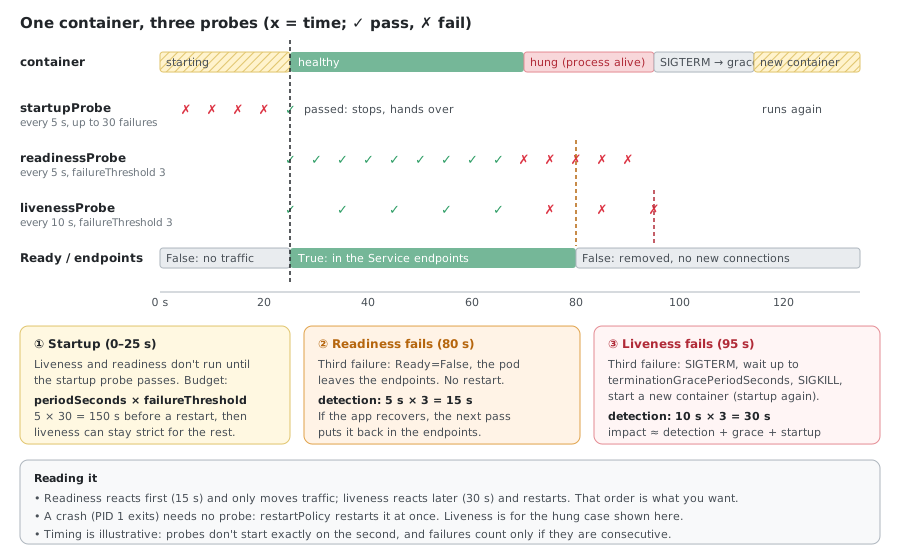
The startup probe gates the other two: liveness and readiness don’t begin until the startup probe passes. This lets you give a slow-starting app a long startup budget without making liveness lenient forever.
Readiness Probes
Readiness controls traffic, not restarts. A failing readiness probe pulls the pod out of Service endpoints; the container keeps running and can rejoin once it recovers.
readinessProbe:
  httpGet:
    path: /healthz
    port: 80
  initialDelaySeconds: 5
  periodSeconds: 5
  timeoutSeconds: 3
  successThreshold: 1
  failureThreshold: 3
What Happens on Readiness Failure
The removal propagates through several components in order:
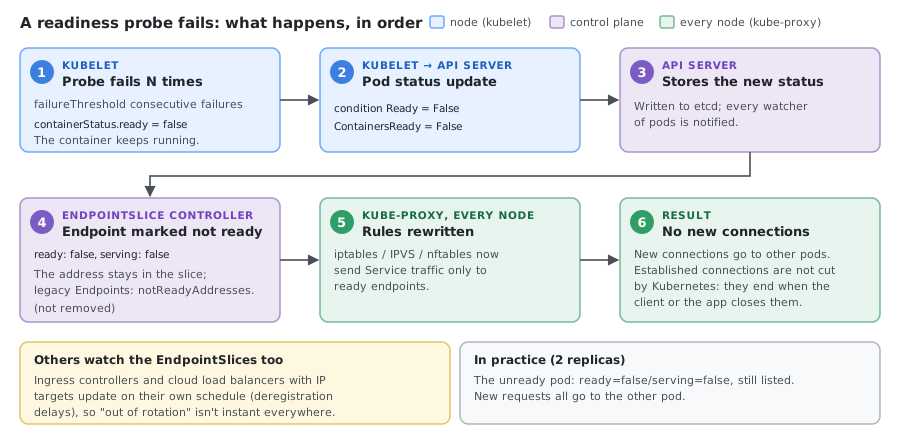
- kubelet sets
containerStatus.ready = false. - kubelet updates the pod’s
Readycondition toFalse. - The API server persists the new status.
- The EndpointSlice controller sees
Ready=Falseand marks the pod’s endpointready: false(andserving: false). The address stays in the EndpointSlice; the legacy Endpoints object lists it undernotReadyAddresses. - kube-proxy observes the change and updates iptables/IPVS rules to send traffic only to ready endpoints.
- New connections stop routing to the pod.
With two replicas, after the readiness probe of one pod fails, its endpoint shows ready=false/serving=false next to the other pod’s true/true, and new requests to the Service all go to the remaining pod.
Because iptables/IPVS act on new connections, existing established connections may continue until they close. Removal from endpoints stops new traffic; it doesn’t forcibly cut live connections. Budget for that when reasoning about drain timing.
Liveness Probes
Liveness controls restarts. After failureThreshold consecutive failures, the kubelet kills the container and lets restartPolicy recreate it.
livenessProbe:
  httpGet:
    path: /healthz
    port: 80
  initialDelaySeconds: 30
  periodSeconds: 10
  timeoutSeconds: 5
  failureThreshold: 3
Restart sequence when a hung app trips the liveness probe:
T+30s  Liveness probe fails (timeout, or a status outside 200-399)
T+40s  Fails again
T+50s  Third failure hits failureThreshold
T+50s  kubelet sends SIGTERM; pod marked Ready=False, out of the endpoints
T+50s+ After terminationGracePeriodSeconds, SIGKILL if still alive
       New container starts -> runs readiness probe -> rejoins endpoints when ready
If Liveness Fails, Does Readiness Fail Too?
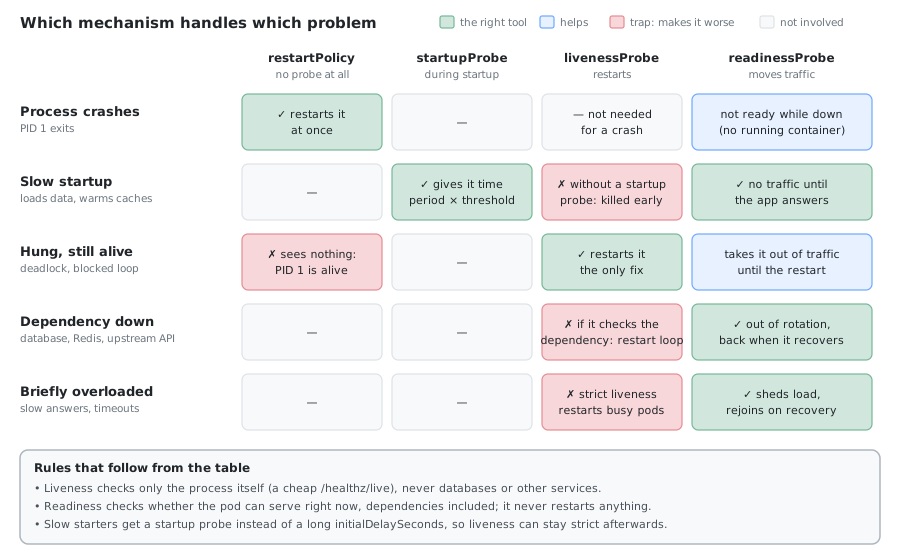
The probes are independent — the kubelet evaluates each on its own schedule and takes its own action. Whether a liveness failure coincides with a readiness failure depends entirely on what each probe checks:
| App state | Liveness | Readiness | Action | Example |
|---|---|---|---|---|
| Healthy | Pass | Pass | Serve traffic | Normal operation |
| Starting up | Pass | Fail | Alive, no traffic yet | Loading caches, warming up |
| Dependency down | Pass | Fail | Stay alive, out of rotation | Redis/DB unreachable |
| Deadlocked / hung | Fail | Fail | Kill and restart | Thread deadlock, event loop blocked |
| Crashed | Fail | Fail | Kill and restart | Process died (PID 1 exits) |
Two takeaways:
- When the app is genuinely dead or hung, both usually fail together — and a restart is the right response.
- When only a dependency is down, you want readiness to fail while liveness keeps passing, so the pod leaves rotation but is not restarted and can recover on its own. That only works if liveness doesn’t check the dependency (see the Common Mistakes section).
If both probes fail together specifically when an external dependency is down, that’s a signal the probes are misconfigured — liveness is checking something it shouldn’t.
Startup Probes
For apps with long or variable startup, a startup probe is better than a large initialDelaySeconds on liveness. It disables liveness/readiness checks until the app has started, then hands off.
startupProbe:
  httpGet:
    path: /healthz
    port: 80
  periodSeconds: 5
  failureThreshold: 30    # up to 30 x 5s = 150s to start before giving up
Probe Types
All three probes support the same handlers.
HTTP (httpGet)
httpGet:
  path: /healthz
  port: 80
  scheme: HTTP
  httpHeaders:
    - name: X-Probe
      value: kube
- The kubelet makes the request from the node, directly to the pod IP — it bypasses Services.
- Success is any status
200 <= code < 400; anything else (or a timeout) is a failure. - Requests carry a
User-Agent: kube-probe/<version>header, handy for filtering probe traffic in access logs. portcan be a name instead of a number: withports: [{name: http, containerPort: 8080}]in the container,httpGet: {path: /ok, port: http}probes port 8080. If the port number changes later, only theportslist needs updating. The same works fortcpSocket.
TCP (tcpSocket)
tcpSocket:
  port: 80
Succeeds if the kubelet can open a TCP connection. It sends no data, so it proves the port is accepting connections but not that the app is healthy behind it. Useful when there’s no HTTP endpoint.
Exec (exec)
exec:
  command: ["cat", "/tmp/healthy"]
Runs a command inside the container; exit code 0 is success. Most flexible (custom scripts, file checks, local queries) but also the most expensive since it forks a process each period.
gRPC (grpc)
grpc:
  port: 9090
Uses the standard gRPC health checking protocol (beta in Kubernetes 1.24, stable since 1.27). The service must implement the gRPC health service.
When Your App Has No Health Endpoint
Plenty of images (legacy apps, third-party binaries, an app baked into an AMI) expose no /health route. You still have options — roughly in order of least effort to most reliable:
TCP probe — if the app already listens on a port,
tcpSocketis the quickest win. It confirms the port accepts connections, which is a decent readiness signal for many servers.readinessProbe: tcpSocket: port: 8080 initialDelaySeconds: 5 periodSeconds: 10Exec probe — check a process, file, or run a small script inside the container when there’s no network endpoint to hit.
livenessProbe:
  exec:
    command: ["/bin/sh", "-c", "pgrep -x app_process >/dev/null"]
  periodSeconds: 10
Startup probe — wrap a slow or unpredictable boot so liveness doesn’t fire prematurely, even with just a TCP check.
startupProbe:
  tcpSocket:
    port: 8080
  failureThreshold: 30
  periodSeconds: 10
Add a real HTTP endpoint — the best long-term fix. A dedicated
/health/readyand/health/livein the app can check what actually matters (DB connection, cache warmed, dependencies reachable) rather than just “port is open.”
A TCP or exec probe is a reasonable stopgap, but be honest about what it proves: “the port is open” or “the process exists” is not the same as “the app can serve requests.” Move to an HTTP/gRPC endpoint for anything production-critical.
Configuration: Getting the Timing Right
Startup budget — set initialDelaySeconds (or a startup probe) to cover typical startup plus a buffer:
initialDelaySeconds ≈ average startup time + margin
# app starts in ~5s -> initialDelaySeconds: 10
Failure detection time — how long a fault takes to register:
detection time = periodSeconds × failureThreshold
# 10s × 3 = 30s before a liveness restart triggers
Total recovery time for a liveness restart:
total ≈ detection time + terminationGracePeriodSeconds + startup time
# 30s + 30s + 10s ≈ 70s of impact
Common Mistakes
initialDelaySeconds too low — probe fails before the app finishes starting, causing a restart loop. Use a startup probe for slow starts.
failureThreshold: 1 on liveness — a single transient blip restarts the container. Keep liveness lenient.
Same probe for liveness and readiness — the biggest anti-pattern. A brief hiccup that should only remove the pod from rotation instead restarts it.
# Anti-pattern: identical probes
livenessProbe: &probe
  httpGet: { path: /, port: 80 }
readinessProbe: *probe
Split them — lenient liveness (is it alive at all?), stricter readiness (is it fit to serve?):
livenessProbe:
  httpGet: { path: /healthz, port: 80 }
  failureThreshold: 5      # tolerant — only restart on real hangs
  periodSeconds: 10
readinessProbe:
  httpGet: { path: /ready, port: 80 }
  failureThreshold: 2      # strict — pull from traffic quickly
  periodSeconds: 5
Liveness probe checks an external dependency — a close relative of the above and a frequent cause of restart storms. A liveness endpoint that verifies Redis, a database, or an upstream API will fail when that dependency is down and restart the container — even though the app itself is healthy. Restarting doesn’t fix a down dependency, so every pod cycles until the dependency returns.
Keep dependency checks in readiness (removes the pod from traffic, no restart) and keep liveness a cheap, self-contained check of the process itself:
livenessProbe:
  httpGet: { path: /healthz/live, port: 80 }    # process alive — no Redis/DB
readinessProbe:
  httpGet: { path: /healthz/ready, port: 80 }   # dependencies checked here
Some frameworks already expose this split — for example Spring Boot Actuator’s
/actuator/health/liveness and /actuator/health/readiness when probe support is
enabled. The symptom to watch for: “pods keep restarting, and deleting them (or
the restart itself) temporarily fixes it” — the fresh process re-establishes the
dependency connection, which is the tell-tale sign liveness is checking something
it shouldn’t.
Writing Probe Endpoints
The probe settings are only half of it; the handler on the other end matters as much:
- No authentication on the health endpoint. The kubelet sends no credentials, so a
/healthzbehind basic auth or a login answers401to every probe:Readiness probe failed: HTTP probe failed with statuscode: 401, and the pod never becomes Ready (as a liveness endpoint it would restart the container forever). Exempt the health paths from authentication, or serve them on a separate port. - No retry loops inside the handler. If a check is flaky, let it fail and raise
failureThresholdinstead: Kubernetes already retries everyperiodSeconds. A handler that retries internally runs longer thantimeoutSecondsand turns one slow check into a failed probe. - Keep it cheap. Probes run every few seconds for the life of the pod, and the CPU and memory of an
execprobe count against the container’s own limits. Anexecprobe that starts a new process each time (a JVM is the extreme case: a whole Java runtime every period) costs far more than anhttpGetto the app that is already running. - Check only the app itself in liveness (see Common Mistakes): a liveness endpoint that fails when a database or another service is down restarts every pod and fixes nothing.
Complete Example
apiVersion: apps/v1
kind: Deployment
metadata:
  name: web
spec:
  replicas: 3
  selector:
    matchLabels: { app: web }
  template:
    metadata:
      labels: { app: web }
    spec:
      containers:
        - name: web
          image: nginx:1.25
          ports:
            - containerPort: 80
          # Gate liveness/readiness until the app has started
          startupProbe:
            httpGet: { path: /, port: 80 }
            periodSeconds: 5
            failureThreshold: 30      # up to 150s to start
          # Restart only on genuine hangs
          livenessProbe:
            httpGet: { path: /, port: 80 }
            periodSeconds: 10
            timeoutSeconds: 5
            failureThreshold: 5
          # Protect users: no traffic until ready, pulled fast on failure
          readinessProbe:
            httpGet: { path: /, port: 80 }
            periodSeconds: 5
            timeoutSeconds: 3
            failureThreshold: 2
          resources:
            requests: { cpu: 100m, memory: 128Mi }
            limits:   { cpu: 500m, memory: 512Mi }
Monitoring and Debugging
# Probe config and recent events
kubectl describe pod <pod>
kubectl get events --field-selector involvedObject.name=<pod>

# Restart count (liveness failures) and readiness
kubectl get pod <pod> -o jsonpath='{.status.containerStatuses[0].restartCount}'
kubectl get pod <pod> -o jsonpath='{.status.containerStatuses[0].ready}'

# Inspect just the probe blocks
kubectl get pod <pod> -o json | jq '.spec.containers[].readinessProbe'
Successful probes leave no trace: there is no event for a probe that passes and nothing in the pod’s status beyond ready: true, so a pod with healthy probes shows only the Scheduled, Pulling, Pulled, Created and Started events. To see probes running, look for kube-probe/ requests in the app’s access log, or at the prober_probe_total counters below.
Typical failure events:
Warning  Unhealthy  kubelet  Liveness probe failed: HTTP probe failed with statuscode: 503
Normal   Killing    kubelet  Container web failed liveness probe, will be restarted
Warning  Unhealthy  kubelet  Readiness probe failed: HTTP probe failed with statuscode: 500
Warning  Unhealthy  kubelet  Readiness probe failed: Get "http://10.42.0.32:80/": context deadline exceeded (Client.Timeout exceeded while awaiting headers)
Warning  BackOff    kubelet  Back-off restarting failed container busybox in pod crash-76fdf575cf-h5hqr_noprobe(d8736e38-...)
After a Liveness Restart
The Killing event says why the container was restarted. Whether it shut down cleanly or was killed shows in the previous container’s state:
kubectl describe pod <pod> | sed -n '/Last State/,/Finished/p'
kubectl get pod <pod> -o jsonpath='{.status.containerStatuses[0].lastState.terminated.reason} exit={.status.containerStatuses[0].lastState.terminated.exitCode}{"\n"}'
kubectl logs <pod> -c <container> --previous      # the last lines of the container that was restarted
| Last State | Exit code | Meaning |
|---|---|---|
Completed | 0 | The app handled SIGTERM and exited on its own (nginx logged exiting as its last line) |
Error | 143 | Ended by SIGTERM (128 + 15) without handling it |
Error | 137 | Killed with SIGKILL (128 + 9): it was still running when terminationGracePeriodSeconds ran out. A container that ignored SIGTERM, with a 5 s grace period, ended this way |
A 137 after liveness restarts means every restart waits for the full grace period: make the app exit on SIGTERM, or lower the probe’s own terminationGracePeriodSeconds.
Restart Back-Off (CrashLoopBackOff)
A container that keeps failing isn’t restarted at once every time. The kubelet waits before each restart, and the wait doubles: 10 s, 20 s, 40 s, 80 s, 160 s, then 300 s (5 minutes) for every restart after that. While it waits, the pod’s STATUS shows CrashLoopBackOff. The delay goes back to the start once the container has run for 10 minutes without failing.
The default delays, from the exit of one container to the start of the next (in practice a few seconds more each time):
| Before restart | 2 | 3 | 4 | 5 | 6 | 7 and later |
|---|---|---|---|---|---|---|
| Default delay | 10 s | 20 s | 40 s | 80 s | 160 s | 300 s (cap) |
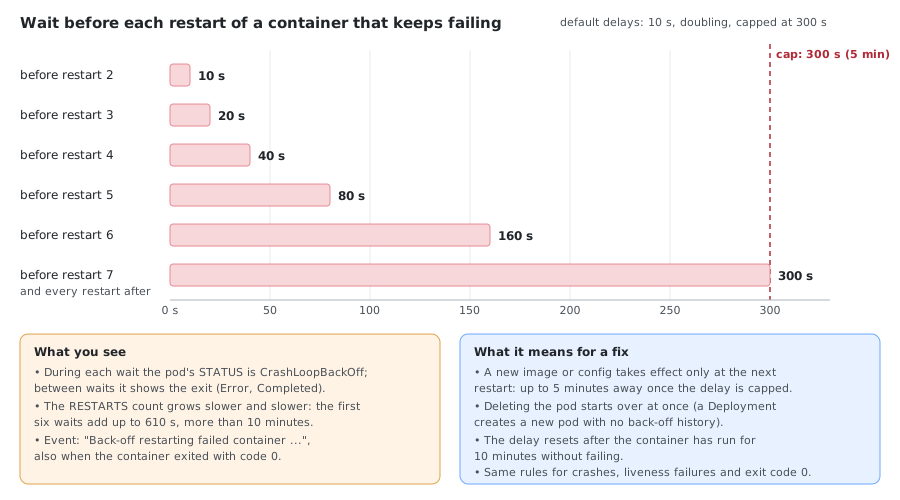
The same back-off applies whatever caused the restart: a crash, a failed liveness probe, or a clean exit with code 0. Read the waits from the container state:
kubectl get pod <pod> -o jsonpath='{.status.containerStatuses[0].restartCount} exited={.status.containerStatuses[0].lastState.terminated.finishedAt} started={.status.containerStatuses[0].state.running.startedAt}{"\n"}'
kubectl get events --field-selector involvedObject.name=<pod>,reason=BackOff
Two practical consequences:
- A fix waits for the next restart. Once the delay is at 5 minutes, a corrected ConfigMap or a dependency that came back is noticed only when the container starts again, up to 5 minutes later.
- Deleting the pod skips the wait. A Deployment replaces it with a new pod that has no back-off history, so
kubectl delete pod <pod>(orkubectl rollout restart deployment/<name>) starts it straight away.
Metrics worth alerting on (via kube-state-metrics):
kube_pod_container_status_restarts_total— climbing indicates liveness restartskube_pod_status_ready/kube_pod_container_status_ready— readiness at pod/container level
Kubelet Probe Metrics
The kubelet counts every probe it runs. prober_probe_total (a BETA counter, labelled by namespace, pod, pod_uid, container, probe_type and result) and prober_probe_duration_seconds (a histogram) are served on the kubelet’s /metrics/probes endpoint. Read them through the API server (this needs permission on nodes/proxy):
kubectl get --raw /api/v1/nodes/<node-name>/proxy/metrics/probes | grep '^prober_probe_total'
With two pods, one whose exec readiness command always times out and a healthy nginx pod with an HTTP readiness probe, the counters read:
prober_probe_total{container="c",namespace="probe-extra",pod="exec-timeout",pod_uid="32bebdce-...",probe_type="Readiness",result="failed"} 39
prober_probe_total{container="web",namespace="probe-extra",pod="ok-pod",pod_uid="2ac2ea51-...",probe_type="Readiness",result="successful"} 38
Unlike kube_pod_container_status_restarts_total, these counters also show probes that fail without ever restarting anything, such as readiness failures, so a pod that is repeatedly pulled out of the Service shows up here. Errored probes are not counted: an exec probe whose command doesn’t exist in the image never appears, because only successful and failed results are recorded.
Summary
- Without a readiness probe, pods receive traffic before they’re ready and keep receiving it when they break.
- Without a liveness probe, hung-but-alive containers are never restarted (crashed ones still are, via
restartPolicy). - A startup probe gives slow starters room without weakening liveness.
- Keep liveness lenient and readiness strict, and never reuse one probe for both.
- Detection time is
periodSeconds × failureThreshold; total recovery adds the grace period and startup time.
Comments