Kubernetes emptyDir Volumes
An emptyDir is the simplest Kubernetes volume: an empty directory that the kubelet creates when a Pod starts on a node and removes when the Pod goes away. Everything below was run on a k3s v1.35.9 node with 1960 MiB of RAM.
The Basics
volumes:
- name: log-volume
  emptyDir: {}
An emptyDir volume is a temporary, empty directory created when a Pod is scheduled to a node. It exists for the lifetime of the Pod and is deleted when the Pod is removed.
Why emptyDir?
It’s the lightest-weight volume type. Ideal for transient data that only needs to exist while the Pod is running — like logs being shipped by a sidecar, scratch space for processing, or shared config between containers.
| Volume Type | Why Not (for transient data) |
|---|---|
hostPath | Ties to a specific node, security concerns |
PersistentVolumeClaim | Overkill for throwaway data, costs storage |
configMap / secret | Read-only (touch in a mounted ConfigMap: Read-only file system), not for runtime data |
Properties
- Automatically created when the Pod is scheduled.
- Shared across all containers in the Pod that mount it.
- Survives container restarts, but not Pod deletion.
- Removed when the Pod is deleted: the Pod’s directory on the node was gone within 5 seconds of
kubectl delete pod. - Lives on the node’s disk by default (here an
ext4filesystem, as/proc/mountsin the container shows), or in RAM withmedium: Memory.
Sharing Files Between Containers
Containers in a Pod have isolated filesystems by default. They share the network (same localhost, same IP) but not the disk. There’s no implicit shared directory — you need a volume.
The volume name is what links containers, not the mount path. Each container can mount the same volume at a different path:
apiVersion: v1
kind: Pod
metadata:
  name: share
spec:
  containers:
  - name: app
    image: alpine
    command: ["sh", "-c", "i=0; while true; do echo \"line $i\" >> /app/logs/output.log; i=$((i+1)); sleep 2; done"]
    volumeMounts:
    - name: log-volume
      mountPath: /app/logs        # app writes here
  - name: log-agent
    image: alpine
    command: ["sleep", "100000"]
    volumeMounts:
    - name: log-volume
      mountPath: /fluentd/input   # the agent reads from here
  volumes:
  - name: log-volume
    emptyDir: {}
$ kubectl exec share -c log-agent -- ls -l /fluentd/input
total 4
-rw-r--r--    1 root     root            21 Oct 26 09:41 output.log

$ kubectl exec share -c log-agent -- tail -n 2 /fluentd/input/output.log
line 1
line 2
How Different Paths Share the Same Data
The emptyDir volume is a folder on the node, outside of both containers. Each container mounts that same folder to a different location inside its own filesystem:
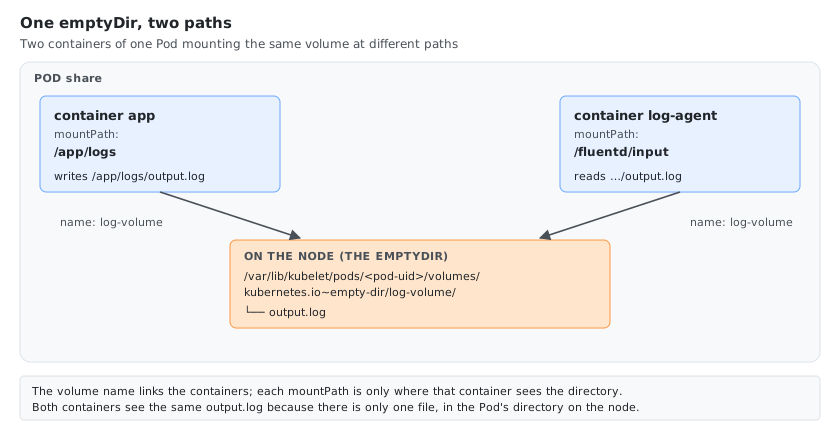
When the app writes /app/logs/output.log, it’s actually writing to the node-level log-volume/output.log. The log-agent sees that same file as /fluentd/input/output.log.
The mountPath is just an alias — where the volume appears inside that container’s filesystem. The underlying data is the same.
Actual Path on the Node
The emptyDir lives on the node at:
/var/lib/kubelet/pods/<pod-uid>/volumes/kubernetes.io~empty-dir/<volume-name>/
For the Pod above:
$ ls -l /var/lib/kubelet/pods/dcf45ff6-0987-44b0-8859-12622d910cd7/volumes/kubernetes.io~empty-dir/log-volume/
total 4
-rw-r--r-- 1 root root 21 Oct 26 09:41 output.log
You don’t control this path — kubelet manages it automatically. It creates it when the Pod starts and deletes it when the Pod is removed. /var/lib/kubelet is the kubelet’s default root directory; a node configured with a different --root-dir uses that instead.
Finding the Pod UID
# most direct way
kubectl get pod <pod-name> -o jsonpath='{.metadata.uid}'

# or from the yaml output, under metadata.uid
kubectl get pod <pod-name> -o yaml
$ kubectl get pod share -o jsonpath='{.metadata.uid}'
dcf45ff6-0987-44b0-8859-12622d910cd7
Container Restarts and Pod Deletion
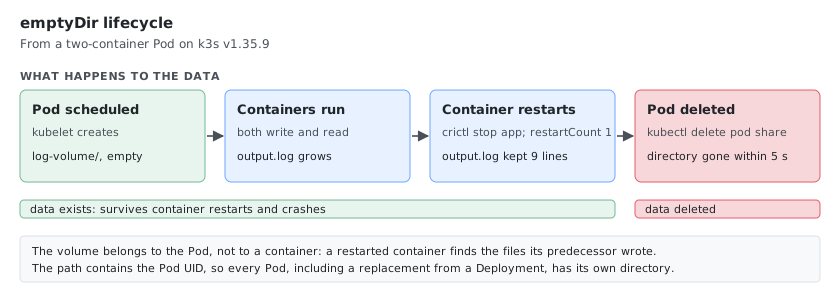
The volume belongs to the Pod, not to a container. After the app container was stopped (crictl stop on the node) and restarted by the kubelet (restartCount 1), output.log still had its 9 earlier lines, and the new container kept appending to it.
Deleting the Pod removes the volume: within 5 seconds of kubectl delete pod share, /var/lib/kubelet/pods/<pod-uid> no longer existed on the node.
Filling an emptyDir with an Init Container
A common use: an init container prepares files (downloads, renders a config) before the app starts, and the app mounts the same volume, here read-only:
apiVersion: v1
kind: Pod
metadata:
  name: init-demo
spec:
  initContainers:
  - name: fetch-config
    image: alpine
    command: ["sh", "-c", "sleep 5; echo \"generated at $(date -u +%H:%M:%S) by $HOSTNAME\" > /work/app.conf"]
    volumeMounts:
    - name: workdir
      mountPath: /work
  containers:
  - name: app
    image: alpine
    command: ["sh", "-c", "cat /config/app.conf; sleep 100000"]
    volumeMounts:
    - name: workdir
      mountPath: /config
      readOnly: true
  volumes:
  - name: workdir
    emptyDir: {}
The Pod shows Init:0/1 while the init container runs, then PodInitializing, then Running. The app finds the file:
$ kubectl logs init-demo -c app
generated at 09:52:28 by init-demo

$ kubectl exec init-demo -c app -- touch /config/x
touch: /config/x: Read-only file system
readOnly: true on the mount keeps the app from changing what the init container prepared; the init container itself mounts it read-write.
Memory-Backed emptyDir
By default, emptyDir uses the node’s disk. You can switch to RAM by setting medium: "Memory":
volumes:
- name: log-volume
  emptyDir:
    medium: "Memory"
This creates a tmpfs mount: faster, but the files are memory, and they count against the container’s memory limit.
How Big Is the tmpfs?
df -h inside the containers on the 1960 MiB node:
| Pod | Mount | Size |
|---|---|---|
| No volume, the container’s default | /dev/shm | 64.0M |
medium: Memory, no sizeLimit, no memory limit | /data | 1.9G (the node’s RAM) |
medium: Memory, sizeLimit: 50Mi | /data | 50.0M |
medium: Memory, no sizeLimit, container limits.memory: 64Mi | /data | 64.0M |
Without sizeLimit and without a memory limit, a memory-backed emptyDir can grow to all the node’s RAM. With a limit, the tmpfs is sized to it; sizeLimit sets it directly (size=51200k in /proc/mounts).
What sizeLimit Does
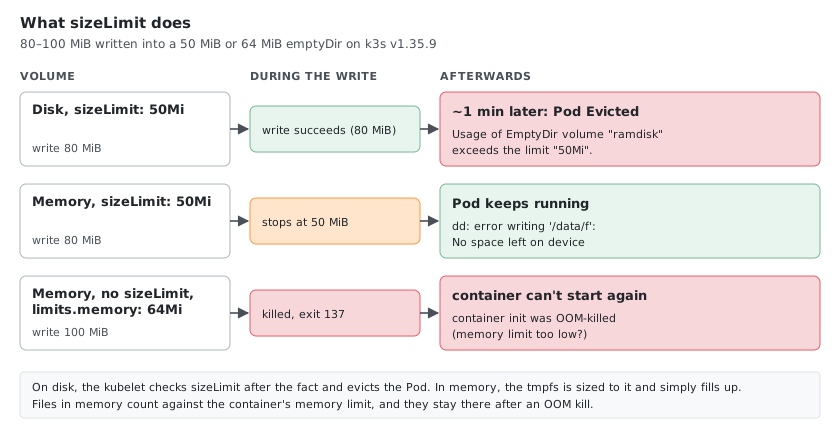
sizeLimit behaves differently on disk and in memory. Writing 80 MiB into a volume with sizeLimit: 50Mi:
| Volume | What happened |
|---|---|
medium: Memory, sizeLimit: 50Mi | The write stopped at 50 MiB: dd: error writing '/data/f': No space left on device. The Pod kept running. |
Disk (default), sizeLimit: 50Mi | The write succeeded. About a minute later the kubelet evicted the Pod: Usage of EmptyDir volume "ramdisk" exceeds the limit "50Mi". |
On disk, sizeLimit is checked by the kubelet’s eviction manager after the fact. In memory, the tmpfs is simply full.
volumes:
- name: ramdisk
  emptyDir:
    medium: Memory
    sizeLimit: 50Mi
Memory Limits and OOM Kills
Files in a memory-backed emptyDir count against the container’s memory limit. With limits.memory: 64Mi and no sizeLimit, writing 100 MiB into the volume got the process killed with exit code 137.
Worse, the data stays in the volume across the restart, still counting against the limit, so the container can’t start again:
failed to create containerd task: failed to create shim task: OCI runtime create failed:
runc create failed: unable to start container process: container init was OOM-killed (memory limit too low?)
The Pod stayed in RunContainerError with growing back-off until it was deleted. Give a memory-backed emptyDir a sizeLimit well below the container’s memory limit, so a full volume means No space left on device instead of an OOM kill loop.
Enlarging /dev/shm
Containers get a 64 MiB /dev/shm by default (64.0M in df -h). Some databases, browsers (Chromium) and ML/data libraries need more, so mounting a memory-backed emptyDir at /dev/shm is a frequent pattern. The tmpfs size is the sizeLimit, so pick one above 64Mi; with sizeLimit: 50Mi, /dev/shm became 50.0M, smaller than without the volume.
containers:
- name: app
  image: myapp
  volumeMounts:
  - name: dshm
    mountPath: /dev/shm        # POSIX shared memory
  resources:
    requests:
      memory: 512Mi
    limits:
      memory: 1Gi              # sizeLimit must fit in here, next to the app's own memory
volumes:
- name: dshm
  emptyDir:
    medium: Memory
    sizeLimit: 256Mi
What Happens Without a Matching Volume?
If a volumeMounts entry references a volume name that doesn’t exist in the volumes: list, the API server rejects the Pod. It is never created:
$ kubectl apply -f novolume.yaml
The Pod "novolume" is invalid: spec.containers[0].volumeMounts[0].name: Not found: "log-volume"
The volume name in volumeMounts.name must match a volumes.name entry in the same Pod spec. No match, no Pod.
The Two Steps
- Define the volume at the Pod level under
volumes:— give it a name and a type. - Mount it in each container under
volumeMounts:— reference the same volume name and pick whatevermountPathyou want.
That’s it. The volume name is the glue.
Comments