Comparing Helm Chart Versions Before an Upgrade
How to see exactly what changes between two versions of a chart, using metrics-server (chart 3.12.2 to 3.13.0) as the worked example. The outputs below come from Helm 4.3.0 and helm-diff 3.15 against a k3s v1.35.9 cluster.
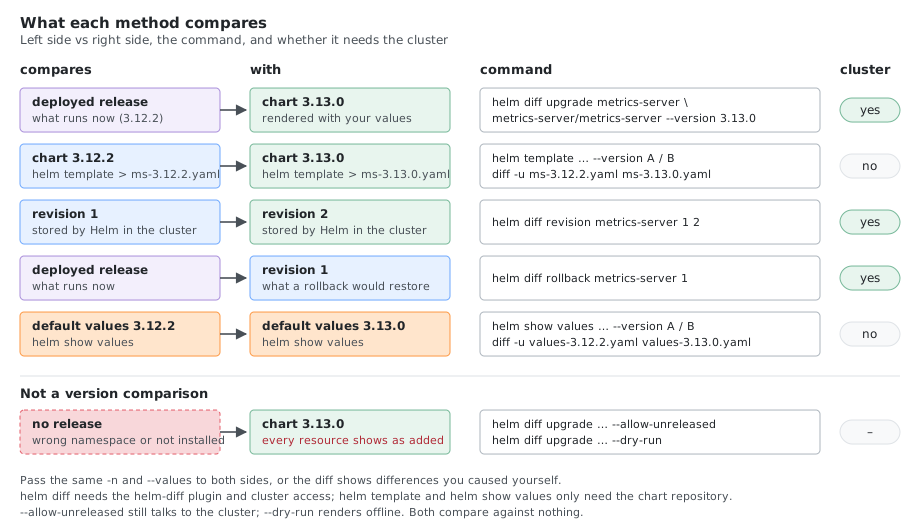
1. Which Method to Use
| Question | Method |
|---|---|
| What will change in my running release if I upgrade? | helm diff upgrade (plugin) |
| What changed between chart version A and B, regardless of what is deployed? | helm template for both, then diff |
| What changed between two revisions of a release? | helm diff revision (plugin) |
| Did the default values change between versions? | helm show values for both, then diff |
| What changed in the chart’s templates, including paths my values don’t use? | helm pull --untar for both, then diff -r |
| Which app version ships in which chart version? | helm search repo --versions |
helm diff upgrade ... --allow-unreleased on a chart that isn’t installed does not compare two versions. It shows the whole chart as added. For version-to-version comparison without a release, use helm template.
2. Install the Plugin and Add the Repository
helm plugin install https://github.com/databus23/helm-diff --verify=false
helm plugin list
Helm 4 verifies plugin signatures by default, and helm-diff has none. Without --verify=false the install stops with:
Error: plugin source does not support verification. Use --verify=false to skip verification
With it, Helm prints WARNING: Skipping plugin signature verification and installs the plugin.
The chart repository:
helm repo add metrics-server https://kubernetes-sigs.github.io/metrics-server/
helm repo update
3. Method 1: helm diff upgrade (Deployed Release)
Compares the live release with a new chart version:
helm list -A                                   # find the release namespace first
helm diff upgrade metrics-server metrics-server/metrics-server \
  --version 3.13.0 -n kube-system
The output lists each resource that changes (kube-system, metrics-server, Deployment (apps) has changed:), followed by the manifest with - and + lines.
Useful flags:
| Flag | Description |
|---|---|
-n <namespace> | Namespace of the release (required if not default) |
--values values.yaml / --set key=value | Compare with your overrides applied |
-C <n> | Lines of context around each change |
--suppress-output-line-regex '<regex>' | Hide noise such as version labels |
--detailed-exitcode | Exit code 2 when there are changes, 0 when there are none (CI gates) |
--three-way-merge | Also consider changes made outside Helm |
--suppress-secrets | Redact Secret values |
--allow-unreleased / --install | Allow diffing a release that doesn’t exist (same effect) |
--dry-run | No cluster access: renders the chart and shows every resource as added, not a diff against the release |
# Hide the label churn that every upgrade produces
helm diff upgrade metrics-server metrics-server/metrics-server --version 3.13.0 -n kube-system \
  --suppress-output-line-regex 'helm.sh/chart|app.kubernetes.io/version'
For metrics-server this cuts the output from 272 to 104 lines; what remains is the image change and its context.
The flags --compare-to and --compare-to-version do not exist in helm-diff (Error: unknown flag: --compare-to). To compare two revisions of a release, or to preview a rollback, use the subcommands:
helm diff revision metrics-server 1 2 -n kube-system     # revision 1 vs revision 2
helm diff rollback metrics-server 1 -n kube-system       # what rolling back to revision 1 changes
4. Method 2: helm template and diff (Any Two Versions)
Works without a cluster and without a release:
helm repo update
helm template metrics-server metrics-server/metrics-server --version 3.12.2 -n kube-system > ms-3.12.2.yaml
helm template metrics-server metrics-server/metrics-server --version 3.13.0 -n kube-system > ms-3.13.0.yaml

diff -u ms-3.12.2.yaml ms-3.13.0.yaml
Pass the same -n and --values to both renders, or the output differs for the wrong reasons. Without -n, helm template renders into default (visible as namespace: default in the output).
Render Like the Cluster Would
helm template doesn’t ask the cluster which Kubernetes version and APIs it has. It uses Helm’s built-in defaults, so templates that branch on .Capabilities (semverCompare on the Kubernetes version, .Capabilities.APIVersions.Has "monitoring.coreos.com/v1" and so on) can render differently from a real install. Tell it what the cluster has:
kubectl version                                  # server version, e.g. v1.35.9+k3s1
kubectl api-versions | grep monitoring           # optional APIs the chart may check for

helm template metrics-server metrics-server/metrics-server --version 3.13.0 -n kube-system \
  --kube-version 1.35.9 \
  --api-versions monitoring.coreos.com/v1 \
  --is-upgrade > ms-3.13.0.yaml
| Flag | Effect |
|---|---|
--kube-version <version> | Sets .Capabilities.KubeVersion |
--api-versions <group/version> | Adds to .Capabilities.APIVersions (repeat the flag for each API) |
--is-upgrade | Sets .Release.IsUpgrade to true, for templates that behave differently on upgrade |
--validate | Validates the manifests against the cluster instead (needs cluster access) |
Use the same flags for both versions.
Other viewers for the same two files:
sdiff -w 200 -s ms-3.12.2.yaml ms-3.13.0.yaml          # side by side, only differences
colordiff -u ms-3.12.2.yaml ms-3.13.0.yaml             # needs colordiff (brew/dnf/apt)
diff --color=always -u ms-3.12.2.yaml ms-3.13.0.yaml | less -R
vimdiff ms-3.12.2.yaml ms-3.13.0.yaml
code --diff ms-3.12.2.yaml ms-3.13.0.yaml
Result for metrics-server 3.12.2 to 3.13.0
The whole diff is 20 changed lines: the two version labels on each of the 9 resources, plus two other lines:
-    helm.sh/chart: metrics-server-3.12.2
+    helm.sh/chart: metrics-server-3.13.0
-    app.kubernetes.io/version: "0.7.2"
+    app.kubernetes.io/version: "0.8.0"
...
-          image: registry.k8s.io/metrics-server/metrics-server:v0.7.2
+          image: registry.k8s.io/metrics-server/metrics-server:v0.8.0
...
   # APIService v1beta1.metrics.k8s.io
+  annotations:
| Change | Impact |
|---|---|
helm.sh/chart and app.kubernetes.io/version labels on all 9 resources | Cosmetic |
Empty annotations: key on the APIService | None |
Image v0.7.2 to v0.8.0 | The only functional change: read the app release notes (Go and client library bumps, server run options wired to flags) |
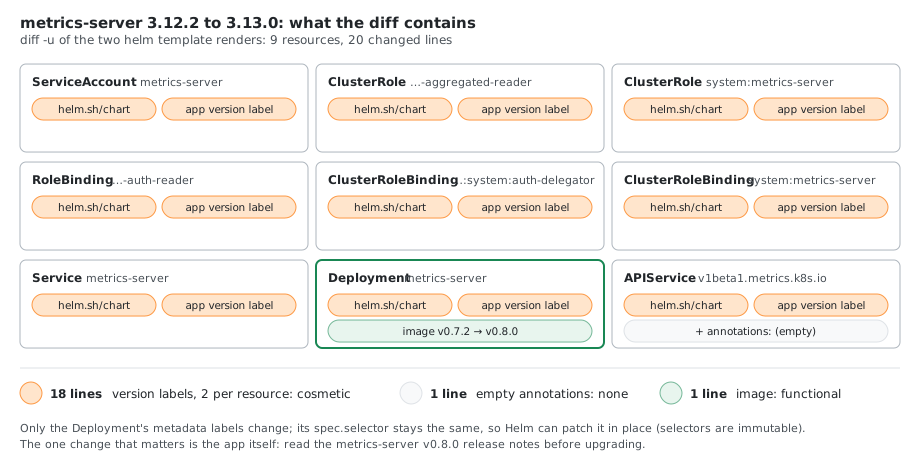
Note that label changes on the Deployment’s spec.selector would be a problem (selectors are immutable). Here only the Deployment’s metadata labels change, so the upgrade is safe.
Compare the Chart Sources
A render diff only shows what your values produce. A feature you haven’t turned on (an Ingress, a ServiceMonitor, a new tls: mode) can change in the templates without a single line of rendered output changing. To see everything, download both charts and diff the source:
helm pull metrics-server/metrics-server --version 3.12.2 --untar --untardir src-3.12.2
helm pull metrics-server/metrics-server --version 3.13.0 --untar --untardir src-3.13.0

diff -ru src-3.12.2/metrics-server src-3.13.0/metrics-server
diff -rq src-3.12.2/metrics-server src-3.13.0/metrics-server     # only the names of changed files
The chart lands in <untardir>/<chart name>/: Chart.yaml, values.yaml, templates/ and, if the chart has them, crds/, a README.md and a CHANGELOG.md.
Many charts also describe their changes in Chart.yaml, in the Artifact Hub annotation:
helm show chart metrics-server/metrics-server --version 3.13.0 | grep -A 20 'artifacthub.io/changes'
5. Method 3: Compare Values
Chart defaults can change between versions, and your overrides may no longer match.
helm show values metrics-server/metrics-server --version 3.12.2 > values-3.12.2.yaml
helm show values metrics-server/metrics-server --version 3.13.0 > values-3.13.0.yaml
diff -u values-3.12.2.yaml values-3.13.0.yaml

helm get values metrics-server -n kube-system -o yaml    # your overrides (user-supplied only)
helm get values metrics-server -n kube-system --all      # overrides merged with defaults
For 3.12.2 to 3.13.0 the defaults gained podDisruptionBudget.unhealthyPodEvictionPolicy and a new tls: section (certificate source: metrics-server, helm, cert-manager or existingSecret, default metrics-server), and the addon-resizer image moved from 1.8.21 to 1.8.23.
A release installed without overrides prints null for helm get values ... -o yaml.
Values on Upgrade: Don’t Use –reuse-values
Which values helm upgrade uses depends on the flags:
| Upgrade with | Chart defaults from | Your overrides from |
|---|---|---|
-f values.yaml / --set | New chart | The files and flags you pass |
No -f or --set at all | New chart | The previous release |
--reuse-values | Old chart | Previous release, plus any -f / --set |
--reset-then-reuse-values | New chart | Previous release, plus any -f / --set |
--reset-values | New chart | Only the -f / --set you pass |
--reuse-values brings the old chart’s defaults along, so keys the new version added (here tls: and podDisruptionBudget.unhealthyPodEvictionPolicy) don’t exist during the upgrade. A template that reads them gets empty values or fails with nil pointer evaluating interface {}. Use -f with your values file, or --reset-then-reuse-values (Helm 3.14 and later).
Preview with the same values flags you will upgrade with: helm diff upgrade accepts -f, --set, --reuse-values and --reset-values too.
6. Chart Version to App Version
helm search repo metrics-server/metrics-server --versions | head -n 8
helm show chart metrics-server/metrics-server --version 3.13.0 | grep -E '^(version|appVersion)'
| Chart version | App version |
|---|---|
| 3.14.0 | 0.9.0 |
| 3.13.1 | 0.8.1 |
| 3.13.0 | 0.8.0 |
| 3.12.2 | 0.7.2 |
| 3.12.1 | 0.7.1 |
| 3.12.0 | 0.7.0 |
The image tag adds a v: app version 0.8.0 runs metrics-server:v0.8.0. New versions keep appearing: run helm repo update first.
7. Upgrade Checklist
diff -rq src-3.12.2/metrics-server src-3.13.0/metrics-server   # new or changed crds/? apply them first

# same values flags on both commands; no --reuse-values
helm diff upgrade metrics-server metrics-server/metrics-server --version 3.13.0 -n kube-system
helm upgrade metrics-server metrics-server/metrics-server --version 3.13.0 -n kube-system

kubectl get pods -n kube-system -l app.kubernetes.io/name=metrics-server
kubectl get apiservice v1beta1.metrics.k8s.io
kubectl top nodes

# Roll back if needed
helm history metrics-server -n kube-system
helm diff rollback metrics-server <revision> -n kube-system
helm rollback metrics-server <revision> -n kube-system
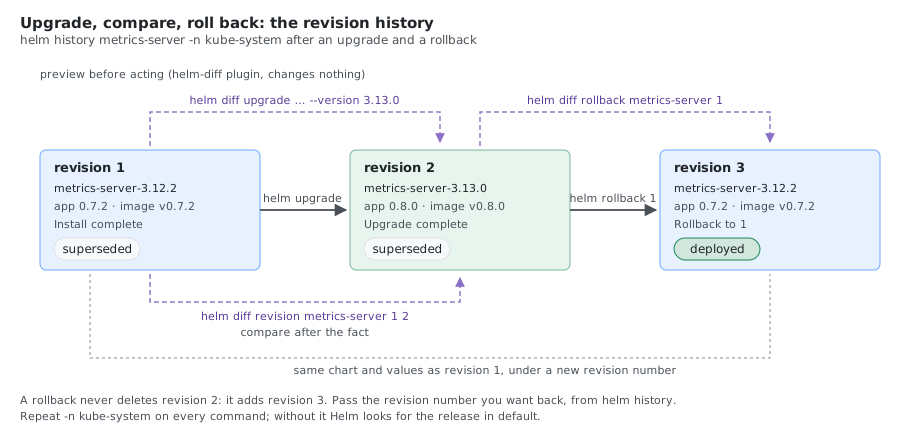
After the upgrade, kubectl get apiservice shows AVAILABLE True and kubectl top nodes returns CPU and memory again. A rollback is a new revision:
REVISION  STATUS      CHART                  APP VERSION  DESCRIPTION
1         superseded  metrics-server-3.12.2  0.7.2        Install complete
2         superseded  metrics-server-3.13.0  0.8.0        Upgrade complete
3         deployed    metrics-server-3.12.2  0.7.2        Rollback to 1
- Read the release notes of the app version: https://github.com/kubernetes-sigs/metrics-server/releases .
- Test in a non-production cluster first.
- Always repeat
-n <namespace>onhelm upgrade: without it Helm looks indefaultand fails withError: UPGRADE FAILED: "metrics-server" has no deployed releases. With--installit doesn’t fail: it installs a second release indefault.
Gotchas
- “Release was not present in Helm” means wrong namespace or no release. Check
helm list -A, or add--allow-unreleasedknowing it shows everything as added. --allow-unreleasedwith a new release name fails if another release already owns the chart’s cluster-scoped resources:unable to continue with install: ClusterRole "system:metrics-server-aggregated-reader" ... exists.helm difftalks to the cluster and fails without access (kubernetes cluster unreachable). Offline, usehelm template(or--dry-run, which shows everything as added).helm templatedoesn’t run hooks or validate against live API versions, andlookupfunctions return empty.- Secrets are shown in the diff by default unless you pass
--suppress-secrets. - CRDs in a chart’s
crds/directory are installed on the firsthelm installand then never upgraded or deleted by Helm. A new chart version can ship new CRDs thathelm upgradesilently skips.helm templateleaves them out unless you pass--include-crds, so compare them with the source diff (diff -ru src-A/<chart>/crds src-B/<chart>/crds) and apply them yourself withkubectl apply --server-side -f. CRDs that a chart puts intemplates/instead are upgraded like any other resource. metrics-server ships no CRDs.
Comments