How Docker Images Are Built: Layers, Cache and the Container on Top
A Docker image is a stack of read-only filesystem layers plus a small JSON config. Each Dockerfile instruction either adds a layer or only changes the config, and the order of the instructions decides both the image size and how fast rebuilds are. This article builds a few small images and looks at what comes out: docker history, the layer tarballs, the build cache and the overlay mounts of a running container.
Everything was built with Docker 29.9.2 (BuildKit) in throwaway Docker-in-Docker daemons, once on the containerd image store (the default for new installs) and once on the classic overlay2 store. Sizes are from the classic store unless a table says otherwise; section 9 explains why the two report different numbers.
1. The Demo Image
FROM alpine:3.20
LABEL org.opencontainers.image.title="layers-demo"
ENV APP_HOME=/app
WORKDIR /app
RUN head -c 20971520 /dev/urandom > /app/random.bin
COPY data.bin /app/data.bin
COPY app.sh /app/app.sh
RUN chmod +x /app/app.sh
EXPOSE 8080
USER nobody
CMD ["/app/app.sh"]
data.bin is 10 MB of random data, app.sh a two-line script. The build, with docker build --progress=plain -t demo:1 .:
#4 [internal] load build context
#4 transferring context: 10.49MB 0.0s done
#5 [1/6] FROM docker.io/library/alpine:3.20@sha256:d9e853e87e55526f6b2917df91a2115c36dd7c696a35be12163d44e6e2a4b6bc
#6 [2/6] WORKDIR /app
#7 [3/6] RUN head -c 20971520 /dev/urandom > /app/random.bin
#8 [4/6] COPY data.bin /app/data.bin
#9 [5/6] COPY app.sh /app/app.sh
#10 [6/6] RUN chmod +x /app/app.sh
#11 exporting layers
#11 naming to docker.io/library/demo:1 done
BuildKit counts 6 steps ([1/6] to [6/6]): FROM and the five instructions that touch the filesystem. LABEL, ENV, EXPOSE, USER and CMD don’t appear as steps at all.
2. Which Instructions Create Layers
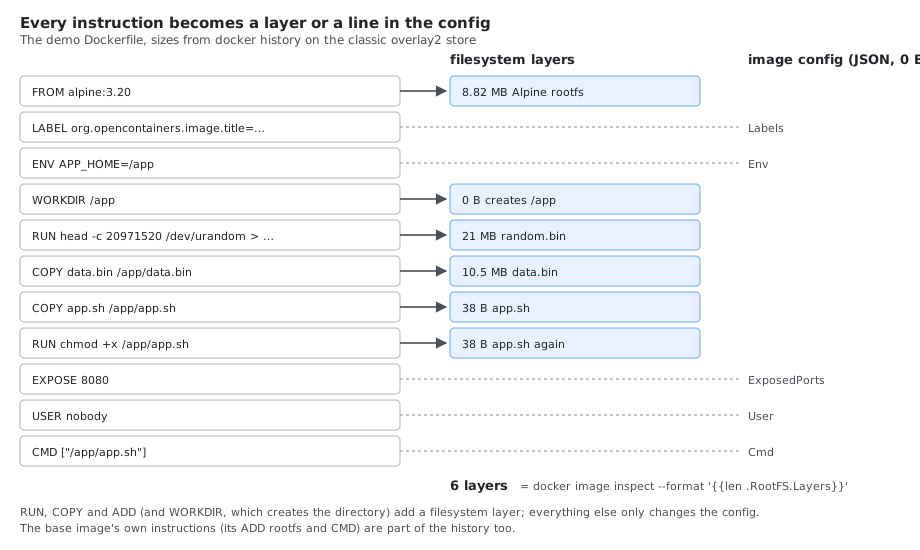
docker history lists every instruction, newest first, including those of the base image:
$ docker history demo:1
IMAGE          CREATED                  CREATED BY                                      SIZE      COMMENT
1dd84161dfcf   Less than a second ago   CMD ["/app/app.sh"]                             0B        buildkit.dockerfile.v0
<missing>      Less than a second ago   USER nobody                                     0B        buildkit.dockerfile.v0
<missing>      Less than a second ago   EXPOSE [8080/tcp]                               0B        buildkit.dockerfile.v0
<missing>      Less than a second ago   RUN /bin/sh -c chmod +x /app/app.sh # buildk…   38B       buildkit.dockerfile.v0
<missing>      Less than a second ago   COPY app.sh /app/app.sh # buildkit              38B       buildkit.dockerfile.v0
<missing>      Less than a second ago   COPY data.bin /app/data.bin # buildkit          10.5MB    buildkit.dockerfile.v0
<missing>      Less than a second ago   RUN /bin/sh -c head -c 20971520 /dev/urandom…   21MB      buildkit.dockerfile.v0
<missing>      Less than a second ago   WORKDIR /app                                    0B        buildkit.dockerfile.v0
<missing>      Less than a second ago   ENV APP_HOME=/app                               0B        buildkit.dockerfile.v0
<missing>      Less than a second ago   LABEL org.opencontainers.image.title=layers-…   0B        buildkit.dockerfile.v0
<missing>      6 months ago             CMD ["/bin/sh"]                                 0B        buildkit.dockerfile.v0
<missing>      6 months ago             ADD alpine-minirootfs-3.20.10-aarch64.tar.gz…   8.82MB    buildkit.dockerfile.v0
12 history entries, but only 6 layers:
docker image inspect --format '{{len .RootFS.Layers}} layers' demo:1 # 6 layers
| Instruction | Creates a layer | Ends up in |
|---|---|---|
FROM | The base image’s layers | Its layers and config are the starting point |
RUN | Yes: everything the command changed on disk | Layer |
COPY, ADD | Yes: the copied files | Layer |
WORKDIR | Yes, it creates the directory (0B here on the classic store, 8.19kB on the containerd store) | Layer + WorkingDir |
ENV, LABEL, EXPOSE, USER, CMD, ENTRYPOINT, ARG, VOLUME, HEALTHCHECK, STOPSIGNAL, SHELL | No | Config only |
<missing> in the IMAGE column is normal for BuildKit builds: intermediate steps are not stored as separate images. The metadata instructions all ended up in the config:
docker image inspect --format 'Env={{.Config.Env}} WorkingDir={{.Config.WorkingDir}} User={{.Config.User}} Cmd={{.Config.Cmd}} ExposedPorts={{.Config.ExposedPorts}} Labels={{.Config.Labels}}' demo:1
Env=[PATH=/usr/local/sbin:/usr/local/bin:/usr/sbin:/usr/bin:/sbin:/bin APP_HOME=/app] WorkingDir=/app User=nobody Cmd=[/app/app.sh] ExposedPorts=map[8080/tcp:{}] Labels=map[org.opencontainers.image.title:layers-demo]
docker history --no-trunc shows the full command of each step, useful to see how an image you didn’t build was made.
3. A Layer Is a Tarball of Changes
Each layer stores only what its instruction changed compared with the layers below: new and modified files, and deletions. A deletion can’t be stored as “nothing”, so it is a whiteout file. To see one, compare deleting a file in a later RUN with deleting it in the same RUN:
# Dockerfile.split
FROM alpine:3.20
RUN head -c 52428800 /dev/urandom > /big
RUN rm /big
# Dockerfile.joined
FROM alpine:3.20
RUN head -c 52428800 /dev/urandom > /big && rm /big
| Image | Size (classic store) | Size (containerd store) |
|---|---|---|
del:split | 61.3 MB | 118 MB |
del:joined | 8.82 MB (Alpine alone) | 13.6 MB |
In del:split the 50 MB file is still in the first RUN layer; the second layer only hides it. docker save writes the image as an OCI layout, and the two layers show exactly that:
docker save del:split -o del.tar && tar -xf del.tar
tar -tvf blobs/sha256/<layer>
== f97e4e97e3af…   (RUN head -c … > /big)
-rw-r--r-- 0/0  52428800 2026-10-25 09:16:05 big
drwxr-xr-x 0/0         0 2026-10-25 09:16:05 etc/
== 5964812779921534…   (RUN rm /big)
-rw------- 0/0         0 2026-10-25 09:16:05 .wh.big
drwxr-xr-x 0/0         0 2026-10-25 09:16:05 etc/
.wh.big is the whiteout: “big is deleted from here up”. That’s why cleanup has to happen in the same RUN that created the files, as in apt-get install … && rm -rf /var/lib/apt/lists/*, or in a different build stage (section 6).
4. Changing a File Copies It Again
Changing a file from a lower layer, even only its permissions, stores the whole file again in the new layer. Two ways to make data.bin (10.5 MB) executable:
FROM alpine:3.20
COPY data.bin /app/data.bin
RUN chmod 755 /app/data.bin
FROM alpine:3.20
COPY --chmod=755 data.bin /app/data.bin
| Variant | Size (classic store) | Layers above Alpine |
|---|---|---|
COPY + RUN chmod | 29.8 MB | COPY 10.5 MB, RUN chmod 10.5 MB |
COPY --chmod | 19.3 MB | COPY 10.5 MB |
The same applies to chown (use COPY --chown=user:group) and to any RUN that edits files a previous layer created. In the demo image, chmod +x app.sh cost only 38 bytes because the script is tiny.
5. The Build Cache and Instruction Order
BuildKit reuses a step from the cache when the step and everything before it are unchanged. For COPY and ADD, “unchanged” means the checksum of the copied files; for RUN, the command string. Once one step misses the cache, every step after it runs again.
Two Dockerfiles for the same small project, with a slow dependency step (sleep 3 stands in for pip install or npm ci):
# Dockerfile.bad
FROM alpine:3.20
WORKDIR /src
COPY . .
RUN sleep 3 && cp requirements.txt /installed-deps
# Dockerfile.good
FROM alpine:3.20
WORKDIR /src
COPY requirements.txt .
RUN sleep 3 && cp requirements.txt /installed-deps
COPY . .
Both built once, then one source file (src/main.txt) changed and both rebuilt with --progress=plain:
== Dockerfile.bad
#6 [2/4] WORKDIR /src
#6 CACHED
#7 [3/4] COPY . .
#8 [4/4] RUN sleep 3 && cp requirements.txt /installed-deps
took 3s

== Dockerfile.good
#6 [2/5] WORKDIR /src
#6 CACHED
#7 [3/5] COPY requirements.txt .
#7 CACHED
#8 [4/5] RUN sleep 3 && cp requirements.txt /installed-deps
#8 CACHED
#9 [5/5] COPY . .
took 0s
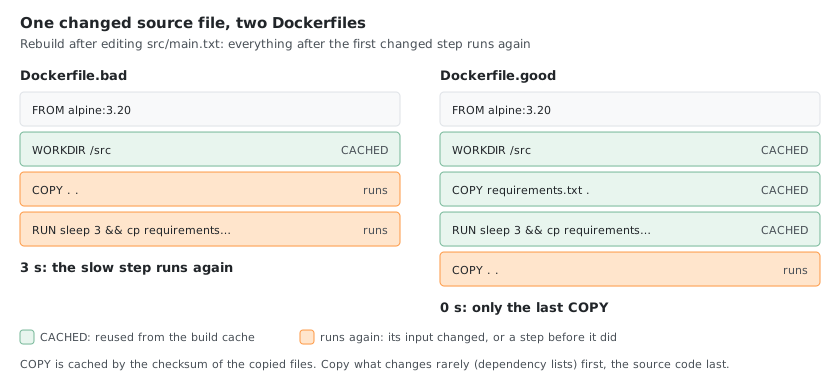
Order instructions from what changes least to what changes most: base image, system packages, dependency list and install, then the application code. A .dockerignore keeps files like .git, build output and local secrets out of COPY . ., so they neither invalidate the cache nor end up in a layer.
6. Multi-Stage Builds
Only the last stage becomes the image. Earlier stages can hold compilers, package caches and test data; the final stage copies just the result:
FROM alpine:3.20 AS build
RUN head -c 104857600 /dev/urandom > /toolchain.bin
RUN echo 'built artifact' > /artifact.txt

FROM alpine:3.20
COPY --from=build /artifact.txt /app/artifact.txt
CMD ["cat", "/app/artifact.txt"]
The same steps in one stage, for comparison:
| Image | Size (classic store) |
|---|---|
| One stage (toolchain stays) | 114 MB |
| Multi-stage | 8.82 MB |
$ docker history multi:stage
IMAGE          CREATED        CREATED BY                                      SIZE      COMMENT
5f0a943cf697   1 second ago   CMD ["cat" "/app/artifact.txt"]                 0B        buildkit.dockerfile.v0
<missing>      1 second ago   COPY /artifact.txt /app/artifact.txt # build…   12.3kB    buildkit.dockerfile.v0
<missing>      6 months ago   CMD ["/bin/sh"]                                 0B        buildkit.dockerfile.v0
<missing>      6 months ago   ADD alpine-minirootfs-3.20.10-aarch64.tar.gz…   8.82MB    buildkit.dockerfile.v0
The 100 MB toolchain layer of the build stage isn’t in the final image at all, and neither is any trace of it in the history.
7. Layers Are Shared Between Images
Layers are identified by their content hash (the DiffID), so two images built on the same base use the same base layer on disk. Two images, each FROM alpine:3.20 plus one small RUN:
one: ["sha256:88b4fba61c4c714a2fc173ddf7e9324a257304696830bf41ad28ecc58c11c95f","sha256:51555de313b6…"]
two: ["sha256:88b4fba61c4c714a2fc173ddf7e9324a257304696830bf41ad28ecc58c11c95f","sha256:61bdb5ecb881…"]
docker system df -v shows how much of each image is shared (containerd store):
REPOSITORY   TAG       IMAGE ID       CREATED                  SIZE      SHARED SIZE   UNIQUE SIZE   CONTAINERS
shared       two       a9472710a6f2   Less than a second ago   13.6MB    13.58MB       11.74kB       0
shared       one       7c2b1ded2baa   Less than a second ago   13.6MB    13.58MB       11.75kB       0
alpine       3.20      d9e853e87e55   6 months ago             13.7MB    13.58MB       81.56kB       0
Three images of 13.6 MB each take about 13.6 MB plus 100 kB on disk. Standardizing on a few base images across a team saves disk and pull time on every machine, because the base layers are downloaded once.
8. The Container on Top
A container doesn’t change the image. Docker stacks one more, writable layer on top of the read-only image layers, and the container sees the merged result through overlayfs. To see it, start a container from demo:1, add a file and delete one from an image layer:
docker run -d --name c1 --user root --entrypoint sleep demo:1 600
docker exec c1 sh -c 'echo changed > /app/new.txt; rm /app/random.bin'
docker diff c1
C /app
A /app/new.txt
D /app/random.bin
A added, C changed, D deleted. On the classic store, docker inspect shows the overlay directories:
docker inspect -f '{{range $k,$v := .GraphDriver.Data}}{{$k}} {{end}}' c1      # ID LowerDir MergedDir UpperDir WorkDir
ls -la $(docker inspect -f '{{.GraphDriver.Data.UpperDir}}' c1)/app
-rw-rw-rw-    1 root     root             8 Oct 25 09:16 new.txt
c---------    2 root     root        0,   0 Oct 25 09:16 random.bin
The new file is in the upper (writable) directory. The deleted random.bin is there too, as a character device 0,0: that’s how overlayfs stores a whiteout on disk. LowerDir lists 7 directories: the 6 image layers plus an -init layer where Docker writes /etc/hostname, /etc/hosts and /etc/resolv.conf for the container.
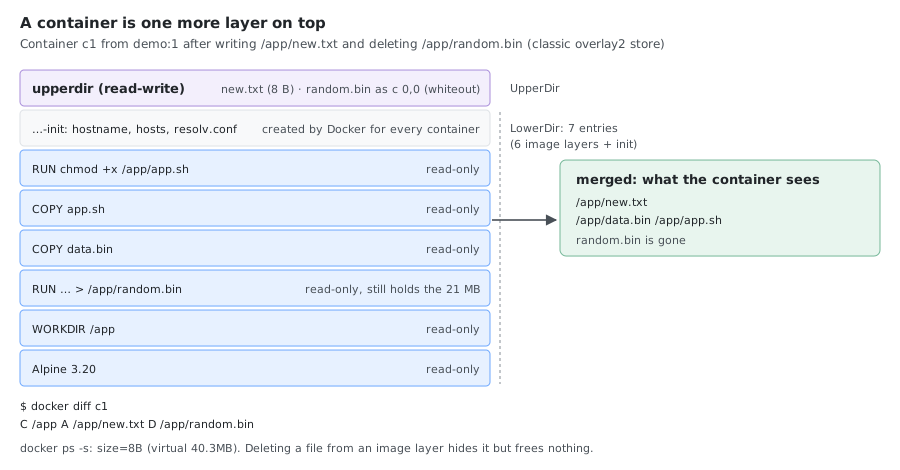
docker ps -s --format '{{.Names}} size={{.Size}}'
c1 size=8B (virtual 40.3MB)
size is the container’s own layer (the 8-byte new.txt), virtual adds the image. Deleting random.bin in the container freed nothing: the 21 MB are still in the image layer. On the containerd store docker diff gives the same result, but docker inspect has no GraphDriver section, since snapshots are managed by containerd.
9. Why the Two Image Stores Report Different Sizes
The same images, as docker images reports them:
| Image | Classic overlay2 store | containerd image store |
|---|---|---|
alpine:3.20 | 8.82 MB | 13.7 MB |
demo:1 | 40.3 MB | 76.6 MB |
del:split | 61.3 MB | 118 MB |
multi:single | 114 MB | 223 MB |
multi:stage | 8.82 MB | 13.6 MB |
The classic store keeps only the unpacked layers. The containerd store keeps the compressed layer blobs too (it needs them to push, and to serve other containerd clients), and its size counts both, so random data, which doesn’t compress, counts almost twice. The container in section 8 shows the unpacked size on both: virtual 40.3MB on the classic store, virtual 41MB on the containerd store. When comparing image sizes, compare on the same store.
Rules of Thumb
| Do | Why |
|---|---|
Clean up in the same RUN that created the files | A later rm only adds a whiteout (section 3) |
Use COPY --chmod / --chown instead of a later chmod / chown | Changing a file stores it again (section 4) |
| Copy dependency lists before the source code | A code change then doesn’t rerun the install (section 5) |
Use a .dockerignore | Keeps .git and build output out of the cache key and the layers |
| Build in one stage, ship from another | Compilers and caches stay out of the image (section 6) |
| Share base images | Their layers are stored and pulled once (section 7) |
| Don’t write data into the container layer | It’s lost with the container and slow on overlayfs; use volumes |
Comments