Defining Variables in Docker Compose: Interpolation, environment, env_file and .env
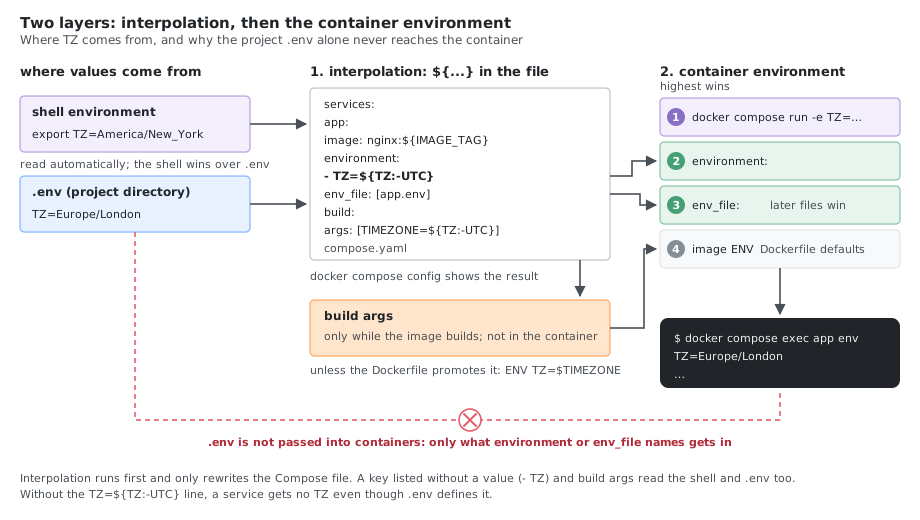
Docker Compose has several ways to configure a service, and they operate at two distinct layers that are easy to confuse:
- Interpolation substitutes
${VAR}inside the Compose file itself, before the file is parsed. Values come from your shell or the project.envfile. - Container environment sets variables inside the running container, using
environmentorenv_file.
This guide walks through both layers using timezone (TZ) as the running example, then covers build arguments, precedence, and debugging. Every example and command here was run with Docker Compose v5.6.1 and Docker Engine 29.9.2.
The most common mistake: assuming the project
.envfile is passed into containers. It is not..envfeeds${...}interpolation in the Compose file. To put a value inside the container you must reference it underenvironment, or load a file withenv_file.
Methods Overview
| Method | Layer | Use for |
|---|---|---|
environment | Container | Runtime variables the app reads, such as TZ |
env_file | Container | Loading many container variables from a file |
Project .env | Interpolation | Filling ${...} in the Compose file |
build.args | Build time | Values needed while building the image |
| Compose variables | Interpolation | Image tag, ports, project name |
Method 1: Container Environment Variables
environment sets variables inside the container. It accepts two equivalent forms.
List form:
services:
  app:
    image: alpine:3.20
    environment:
      - TZ=America/New_York
      - LOG_LEVEL=debug
Map form:
services:
  app:
    image: alpine:3.20
    environment:
      TZ: "America/New_York"
      LOG_LEVEL: "debug"
Both put TZ=America/New_York in the container, but on alpine:3.20 date still prints UTC: the image has no timezone database. See the timezone example below.
With defaults from interpolation
${TZ:-UTC} is resolved by Compose before the container starts, using the shell or project .env. If TZ is unset or empty, the default UTC is used:
services:
  app:
    image: alpine:3.20
    environment:
      - TZ=${TZ:-UTC}
      - NODE_ENV=${NODE_ENV:-production}
      - PORT=${PORT:-3000}
Interpolation default forms:
| Form | Behavior |
|---|---|
${VAR} | Value of VAR, or empty if unset |
${VAR:-default} | default if VAR is unset or empty |
${VAR-default} | default only if VAR is unset |
${VAR:?error} | Fail with error if VAR is unset or empty |
${VAR:+value} | value if VAR is set and not empty, otherwise empty |
Passing a variable through from the shell
Listing a key with no value passes it from the environment Compose was run in:
services:
  app:
    image: alpine:3.20
    environment:
      - TZ          # inherits TZ from the shell/.env, if set
Method 2: The Project .env File
Compose automatically reads a file named .env in the project directory and uses it for ${...} interpolation. This is interpolation only; it does not inject variables into containers by itself.
# .env (same directory as the compose file)
TZ=Europe/London
IMAGE_TAG=1.27.1
APP_PORT=8080
services:
  app:
    image: nginx:${IMAGE_TAG}
    ports:
      - "${APP_PORT}:80"
    environment:
      - TZ=${TZ}          # .env value reaches the container only via this line
Without the TZ=${TZ} line under environment, the container would not receive TZ even though it is defined in .env. docker compose config shows it: a service without the line has no environment key at all, while one with it shows TZ: Europe/London.
Method 3: Loading Container Variables from a File with env_file
env_file loads variables directly into the container, without needing a matching environment line for each one. This is the file-based counterpart to environment.
# app.env
TZ=Asia/Tokyo
LOG_LEVEL=debug
DATABASE_URL=postgres://localhost/app
services:
  app:
    image: alpine:3.20
    env_file:
      - app.env
      - secrets.env
env_file differs from the project .env:
| Aspect | Project .env | env_file |
|---|---|---|
| Purpose | Interpolation in the Compose file | Variables inside the container |
| Loaded | Automatically, one file | Explicitly, one or more files |
| Reaches container | Only if referenced under environment | Directly |
Every listed file must exist, or Compose stops with env file .../secrets.env not found. Mark a file as optional with the long syntax:
    env_file:
      - path: app.env
      - path: secrets.env
        required: false
When multiple env_file entries define the same key, later files win. Values set under environment override values from env_file.
services:
  app:
    image: alpine:3.20
    env_file:
      - ./base.env         # loaded first
      - ./override.env     # overrides base.env
    environment:
      - TZ=UTC             # overrides both files for TZ
Method 4: Build Arguments
Build arguments are available only while the image is built, not at runtime. Set runtime values separately with environment.
services:
  app:
    build:
      context: .
      args:
        - TIMEZONE=${TZ:-UTC}
        - USER_ID=${DOCKER_UID:-1000}
    environment:
      - TZ=${TZ:-UTC}       # runtime timezone for the app
# Dockerfile
FROM alpine:3.20
ARG TIMEZONE=UTC
RUN apk add --no-cache tzdata && \
    cp /usr/share/zoneinfo/$TIMEZONE /etc/localtime && \
    echo "$TIMEZONE" > /etc/timezone
ENV TZ=$TIMEZONE
A build ARG does not persist into the running container unless you promote it to an ENV, as shown with ENV TZ=$TIMEZONE.
Method 5: Compose Configuration Variables
Interpolation also configures the Compose file itself: image tags, ports, and Compose’s own settings such as COMPOSE_PROJECT_NAME.
# .env
COMPOSE_PROJECT_NAME=myapp
IMAGE_TAG=1.0.0
APP_PORT=3000
TZ=Europe/Berlin
services:
  app:
    image: myapp:${IMAGE_TAG}
    ports:
      - "${APP_PORT}:3000"
    environment:
      - TZ=${TZ}
Timezone Example: Four Approaches
A. Environment variable (recommended, most portable)
services:
  gitlab-runner:
    image: gitlab/gitlab-runner:v19.5.1
    environment:
      - TZ=${TZ:-UTC}
Most applications and language runtimes honor TZ. This requires the image to include the timezone database (tzdata). Minimal images such as alpine don’t have it: with TZ=America/New_York, alpine:3.20 prints UTC, and the same image with tzdata installed prints EDT.
B. Volume mount of host timezone files
services:
  gitlab-runner:
    image: gitlab/gitlab-runner:v19.5.1
    volumes:
      - /etc/localtime:/etc/localtime:ro
      - /etc/timezone:/etc/timezone:ro
This mirrors the host clock configuration into the container. Mount the files read-only. /etc/timezone is Debian-family specific. If the host doesn’t have it, the mount doesn’t fail: Docker creates an empty directory at that host path and mounts it, so /etc/timezone in the container is a directory (cat: read error: Is a directory). Only mount it on hosts that have the file.
C. Both (belt and suspenders)
services:
  gitlab-runner:
    image: gitlab/gitlab-runner:v19.5.1
    environment:
      - TZ=${TZ:-UTC}
    volumes:
      - /etc/localtime:/etc/localtime:ro
TZ covers applications that read the variable; the mount covers tools that read /etc/localtime.
D. Host network mode
services:
  gitlab-runner:
    image: gitlab/gitlab-runner:v19.5.1
    network_mode: host
network_mode: host shares the host network namespace. It does not by itself set the timezone; still use TZ or the mount. Host networking has broad security and portability implications, so use it only when the workload genuinely needs it.
Advanced Interpolation Patterns
Compose supports only a subset of Bash’s operators (no pattern replacement, case conversion or substrings: ${VAR/a/b}, ${VAR^^} and ${VAR:0:2} fail with invalid interpolation format), and a literal $ must be written as $$.
Compose nested defaults
services:
  app:
    image: alpine:3.20
    environment:
      - DATABASE_URL=postgres://${DB_USER:-user}:${DB_PASS:-pass}@${DB_HOST:-localhost}:${DB_PORT:-5432}/${DB_NAME:-app}
Profiles for environment-specific services
services:
  app:
    image: alpine:3.20
    profiles: ["production"]
    environment:
      - TZ=UTC
      - LOG_LEVEL=warn

  app-dev:
    image: alpine:3.20
    profiles: ["development"]
    environment:
      - TZ=America/New_York
      - LOG_LEVEL=debug
Activate a profile with docker compose --profile production up. Profiles select which services run; Compose does not compute one variable’s default from another variable’s value, so keep conditional logic in the application or in the .env you choose.
Precedence
When the same container variable is set in more than one place, Compose resolves it in this order (highest wins):
- Values set in the shell and passed via
docker compose run -eor the process environment for a passthrough key. environmentin the service.env_filein the service (later files override earlier ones).- Image
ENVdefaults from the Dockerfile.
The project .env file does not appear here because it feeds interpolation, not the container environment directly.
Handling Secrets
Keep sensitive values out of the committed Compose file and out of build arguments, since build args are visible in image history.
services:
  app:
    image: alpine:3.20
    environment:
      - TZ=${TZ:-UTC}       # non-sensitive
    env_file:
      - secrets.env          # sensitive values, git-ignored
Add secret files to .gitignore. For stronger handling, use Docker secrets or an external secrets manager rather than plain environment variables.
Debugging Variables
docker compose config renders the fully interpolated configuration, which is the fastest way to see what a ${...} resolved to:
# Show the resolved, merged configuration
docker compose config

# Validate syntax quietly (non-zero exit on error)
docker compose config --quiet

# Inspect a service's resolved environment as JSON
docker compose config --format json | jq '.services.app.environment'
Check what actually reached a running container. exec needs the service to be running: the alpine examples above exit at once, so give them a long-running command such as command: sleep infinity to try this.
# Environment inside the container
docker compose exec app env | grep TZ

# Confirm the effective time and zone
docker compose exec app date
If docker compose config shows an empty value, the variable was unset during interpolation. If config shows the value but the container does not have it, you likely set it in the project .env without referencing it under environment or env_file.
Real-World Example: GitLab Runner
services:
  gitlab-runner:
    image: gitlab/gitlab-runner:v19.5.1
    container_name: gitlab-runner
    restart: always
    environment:
      - TZ=${TZ:-UTC}
      - CI_SERVER_URL=${CI_SERVER_URL}
      - RUNNER_DEBUG=${RUNNER_DEBUG:-false}
    env_file:
      - .env.runner
    volumes:
      - ./config.toml:/etc/gitlab-runner/config.toml:ro
      - /etc/localtime:/etc/localtime:ro
      - /var/run/docker.sock:/var/run/docker.sock
This combines interpolation defaults (${TZ:-UTC}), a container variable file (env_file), and a read-only timezone mount. .env.runner and config.toml must exist next to the Compose file, and an unset CI_SERVER_URL only gives a warning (The "CI_SERVER_URL" variable is not set. Defaulting to a blank string.); use ${CI_SERVER_URL:?} to make it required. The top-level version: key is intentionally omitted; it is obsolete in current Compose and now only produces a warning.
Quick Reference
services:
  app:
    image: myapp:${IMAGE_TAG:-latest}      # interpolation from shell/.env
    environment:
      - TZ=${TZ:-UTC}                       # container variable with default
      - CI_SERVER_URL                       # passthrough from shell
    env_file:
      - app.env                             # bulk container variables
    build:
      args:
        - TIMEZONE=${TZ:-UTC}               # build-time only
# Resolve and inspect
docker compose config
docker compose config --format json | jq '.services.app.environment'

# Verify inside the container
docker compose exec app env | grep TZ
docker compose exec app date
See Also
- Docker Compose Cheatsheet
- Docker Cheatsheet
- How Docker Images Are Built: Layers, Cache and the Container on Top (
ARGvsENVin the Dockerfile)
Comments