
AWS IAM Concepts Guide
IAM fundamentals — roles, policy types, evaluation logic, Identity Center (SSO), federation, temporary credentials, permission boundaries, and root account vs admin user.
Best Practices
- Never use the root account for day-to-day tasks
- Enable MFA for all human users (especially root)
- Apply least privilege: grant only the permissions needed
- Use groups to assign permissions instead of attaching policies directly to users
- Rotate access keys regularly and remove unused credentials
- Use roles for applications and services (never embed long-term credentials in code)
- Use AWS Organizations SCPs for guardrails across accounts
Roles
A role is an AWS identity with permission policies. Unlike users, roles don’t have permanent credentials — they’re assumed temporarily by:
- AWS services (EC2, Lambda, ECS)
- Users from your account or other accounts
- Federated users from external identity providers
Think of a role as a “hat” that grants specific permissions when worn. When you assume a role, you get temporary security credentials.
Common use cases:
- EC2 instance accessing S3 buckets
- Lambda function writing to DynamoDB
- Cross-account access between AWS accounts
Policy Types
Inline Policies
Embedded directly in a single user, group, or role. Useful for strict 1:1 relationships.
aws iam put-user-policy \
  --user-name jsmith \
  --policy-name AllowS3ReadOnly \
  --policy-document '{
    "Version": "2012-10-17",
    "Statement": [
      {
        "Effect": "Allow",
        "Action": [
          "s3:GetObject",
          "s3:ListBucket"
        ],
        "Resource": [
          "arn:aws:s3:::my-bucket",
          "arn:aws:s3:::my-bucket/*"
        ]
      }
    ]
  }'
AWS Managed Policies
Created and maintained by AWS. Good starting point but can be overly broad.
Customer Managed Policies
Created by you, reusable across multiple identities. Preferred for most use cases.
# Create the policy
aws iam create-policy \
  --policy-name AllowS3ReadOnly \
  --policy-document '{
    "Version": "2012-10-17",
    "Statement": [
      {
        "Effect": "Allow",
        "Action": [
          "s3:GetObject",
          "s3:ListBucket"
        ],
        "Resource": [
          "arn:aws:s3:::my-bucket",
          "arn:aws:s3:::my-bucket/*"
        ]
      }
    ]
  }'

# Attach it to a user (reusable — can also attach to roles or groups)
aws iam attach-user-policy \
  --user-name jsmith \
  --policy-arn arn:aws:iam::123456789012:policy/AllowS3ReadOnly
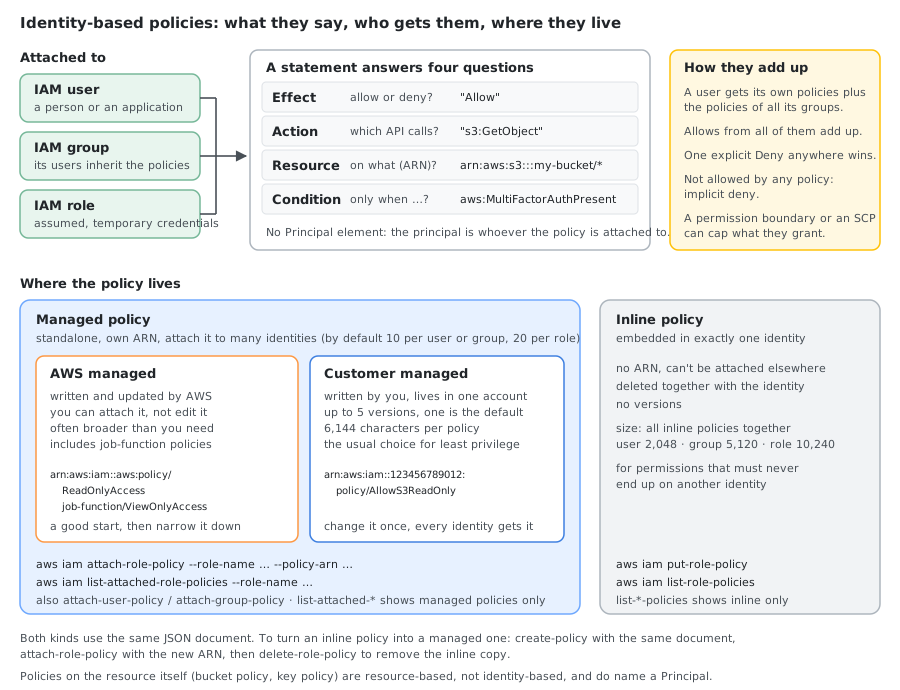
A managed policy is a standalone object with its own ARN, versioning, and can be attached to many identities. An inline policy lives inside a single identity and is deleted when that identity is deleted.
Inline vs Managed — Comparison
| Aspect | Managed Policy | Inline Policy |
|---|---|---|
| Reusability | Can attach to multiple identities | Tied to one identity |
| Lifecycle | Independent | Deleted with identity |
| Version control | Supports up to 5 versions | No versioning |
| Size limit | 6,144 characters per policy | Total of all inline policies: 2,048 (user), 5,120 (group), 10,240 (role) characters |
| Max per identity | User 10 (quota up to 20), role 20 (up to 25), group 10 | No count limit, only the total size above |
| Scope | Customer managed: one account. AWS managed: every account | One identity |
| Best for | Common, reusable permissions | Unique, one-off permissions |
When to use which:
- Use managed policies when permissions are reusable across multiple identities
- Use inline policies when permissions are unique to one identity and should never be accidentally applied elsewhere
Policy JSON Structure
{
  "Version": "2012-10-17",
  "Statement": [
    {
      "Effect": "Allow",
      "Action": [
        "s3:GetObject",
        "s3:PutObject"
      ],
      "Resource": "arn:aws:s3:::my-app-bucket/*"
    },
    {
      "Effect": "Allow",
      "Action": "s3:ListBucket",
      "Resource": "arn:aws:s3:::my-app-bucket"
    }
  ]
}
Identity-Based vs Resource-Based Policies
| Type | Attached To | Defines | Principal element |
|---|---|---|---|
| Identity-based | Users, groups, roles | What the identity can do | No — the principal is the identity the policy is attached to |
| Resource-based | Resources (S3, SQS, KMS) | Who can access the resource | Yes, required — names who the statement applies to |
Resource-based policies support cross-account access without assuming a role.
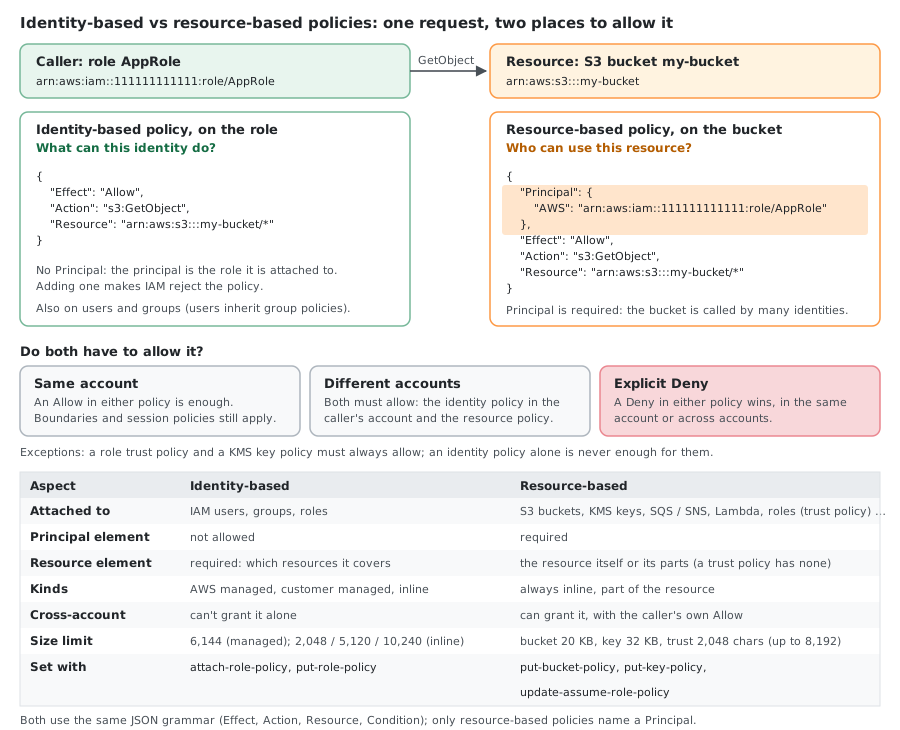
A resource-based policy must say who it applies to, so it uses the Principal element: an account, IAM user, role, role session, federated user, AWS service or "*" (everyone, including anonymous users). An IAM group can’t be a principal. An identity-based policy can’t use Principal at all, because its principal is the user, group or role it is attached to. A bucket policy that lets another account read objects:
{
  "Version": "2012-10-17",
  "Statement": [
    {
      "Effect": "Allow",
      "Principal": { "AWS": "arn:aws:iam::222222222222:root" },
      "Action": "s3:GetObject",
      "Resource": "arn:aws:s3:::my-bucket/*"
    }
  ]
}
arn:aws:iam::222222222222:root means the whole account 222222222222, not its root user: that account’s administrators still decide which of their users and roles get s3:GetObject through their own identity-based policies.
The Principal Element
Why it is required. An identity-based policy lives on the caller, so AWS already knows who it is about. A resource-based policy lives on the bucket, key, queue or role being accessed, and the same resource is called by many identities, so each statement has to name the callers it covers. Without Principal the statement wouldn’t say who it grants (or denies) access to, so AWS requires the element in every resource-based policy.
When it is needed:
| Policy | Principal? | Example of what it names |
|---|---|---|
| Role trust policy | Required | Who may assume the role: an account, a role, an AWS service, an OIDC or SAML provider |
| S3 bucket policy | Required | Accounts, roles or services that may use the bucket |
| KMS key policy | Required | Who may use and manage the key (including your own account) |
| SQS queue / SNS topic policy | Required | Services or accounts that may send or publish |
| Lambda function policy | Required (aws lambda add-permission --principal) | Services or accounts that may invoke the function |
| ECR repository, Secrets Manager secret, other resource policies | Required | Accounts or roles from other accounts |
| VPC endpoint policy | Required; must be "*" for gateway endpoints (S3, DynamoDB) | Narrowed with an aws:PrincipalArn condition instead |
| Identity-based policy, permission boundary, session policy | Not allowed | The principal is the identity or session |
| SCP | Not allowed | Use the aws:PrincipalArn condition key instead |
Principal formats:
| Who | Principal value |
|---|---|
| An AWS account (its admins decide further) | { "AWS": "arn:aws:iam::222222222222:root" } or { "AWS": "222222222222" } |
| An IAM role | { "AWS": "arn:aws:iam::222222222222:role/ProdDeployRole" } |
| One role session | { "AWS": "arn:aws:sts::222222222222:assumed-role/ProdDeployRole/deploy" } |
| An IAM user | { "AWS": "arn:aws:iam::222222222222:user/jsmith" } |
| An AWS service | { "Service": "lambda.amazonaws.com" } |
| An OIDC provider (role trust only) | { "Federated": "arn:aws:iam::123456789012:oidc-provider/token.actions.githubusercontent.com" } |
| A SAML provider (role trust only) | { "Federated": "arn:aws:iam::123456789012:saml-provider/ADFS" } |
| Everyone, including anonymous users | "*" or { "AWS": "*" } |
Several principals of the same type go in an array: { "AWS": ["111111111111", "222222222222"] }. They are alternatives (OR): the request comes from one principal at a time.
Example: let Lambda assume a role
The trust policy of a Lambda execution role. Without it, Lambda can’t use the role:
{
  "Version": "2012-10-17",
  "Statement": [
    {
      "Effect": "Allow",
      "Principal": { "Service": "lambda.amazonaws.com" },
      "Action": "sts:AssumeRole"
    }
  ]
}
Example: GitHub Actions (OIDC) assumes a role
The principal is the OIDC provider. The conditions decide which repository and branch may use it; without the sub condition, any GitHub repository could assume the role:
{
  "Version": "2012-10-17",
  "Statement": [
    {
      "Effect": "Allow",
      "Principal": {
        "Federated": "arn:aws:iam::123456789012:oidc-provider/token.actions.githubusercontent.com"
      },
      "Action": "sts:AssumeRoleWithWebIdentity",
      "Condition": {
        "StringEquals": {
          "token.actions.githubusercontent.com:aud": "sts.amazonaws.com",
          "token.actions.githubusercontent.com:sub": "repo:my-org/my-repo:ref:refs/heads/main"
        }
      }
    }
  ]
}
Example: S3 may publish to an SNS topic
An AWS service as the principal. aws:SourceAccount and aws:SourceArn stop other accounts’ buckets from using your topic (the confused deputy problem):
{
  "Version": "2012-10-17",
  "Statement": [
    {
      "Effect": "Allow",
      "Principal": { "Service": "s3.amazonaws.com" },
      "Action": "sns:Publish",
      "Resource": "arn:aws:sns:us-east-1:123456789012:uploads",
      "Condition": {
        "StringEquals": { "aws:SourceAccount": "123456789012" },
        "ArnLike": { "aws:SourceArn": "arn:aws:s3:::my-bucket" }
      }
    }
  ]
}
Example: let S3 invoke a Lambda function
For Lambda, the CLI writes the statement for you; --principal becomes its Principal:
aws lambda add-permission \
  --function-name my-function \
  --statement-id s3-invoke \
  --action lambda:InvokeFunction \
  --principal s3.amazonaws.com \
  --source-arn arn:aws:s3:::my-bucket \
  --source-account 123456789012
Example: only my organization may use the bucket
"*" with a Deny and a condition: everyone outside the organization is refused, whatever their own policies say. AWS services acting for you are left out of the deny:
{
  "Version": "2012-10-17",
  "Statement": [
    {
      "Sid": "OnlyMyOrganization",
      "Effect": "Deny",
      "Principal": "*",
      "Action": "s3:*",
      "Resource": [
        "arn:aws:s3:::my-bucket",
        "arn:aws:s3:::my-bucket/*"
      ],
      "Condition": {
        "StringNotEquals": { "aws:PrincipalOrgID": "o-a1b2c3d4e5" },
        "Bool": { "aws:PrincipalIsAWSService": "false" }
      }
    }
  ]
}
Principal gotchas
- No partial wildcards.
arn:aws:iam::123456789012:role/dev-*is not a valid principal. Use"Principal": "*"plus anArnLikecondition onaws:PrincipalArn. "*"withAllowmeans public, anonymous users included. Always narrow it with a condition.- Account vs role. Naming an account delegates to that account’s admins, who must still allow the action in an identity-based policy. Naming a role (in the same account) grants access by itself.
- Deleted and recreated roles or users. IAM stores a role or user named in a trust policy as its unique ID. Recreate it with the same name and the old trust policy no longer matches; edit the policy and save the ARN again.
- Groups can’t be principals. Name the roles or users, or the account with a condition.
- Prefer roles over role sessions. A role session ARN only matches one session name; AWS recommends the role ARN, or
aws:PrincipalArnin a condition. - Avoid
NotPrincipal. AWS recommends"Principal": "*"with aDenyand anaws:PrincipalArncondition instead.
Trust Policies vs Permission Policies
| Policy | Attached To | Purpose |
|---|---|---|
| Trust policy | Role | Defines who can assume the role (the principal) |
| Permission policy | Role | Defines what the role can do once assumed |
Permission Boundaries
- Sets the maximum permissions an identity can have
- Effective permissions = identity-based policy AND permission boundary (intersection)
- Useful for delegating user/role creation safely (letting developers create roles without escalating privileges)
Policy Evaluation Logic
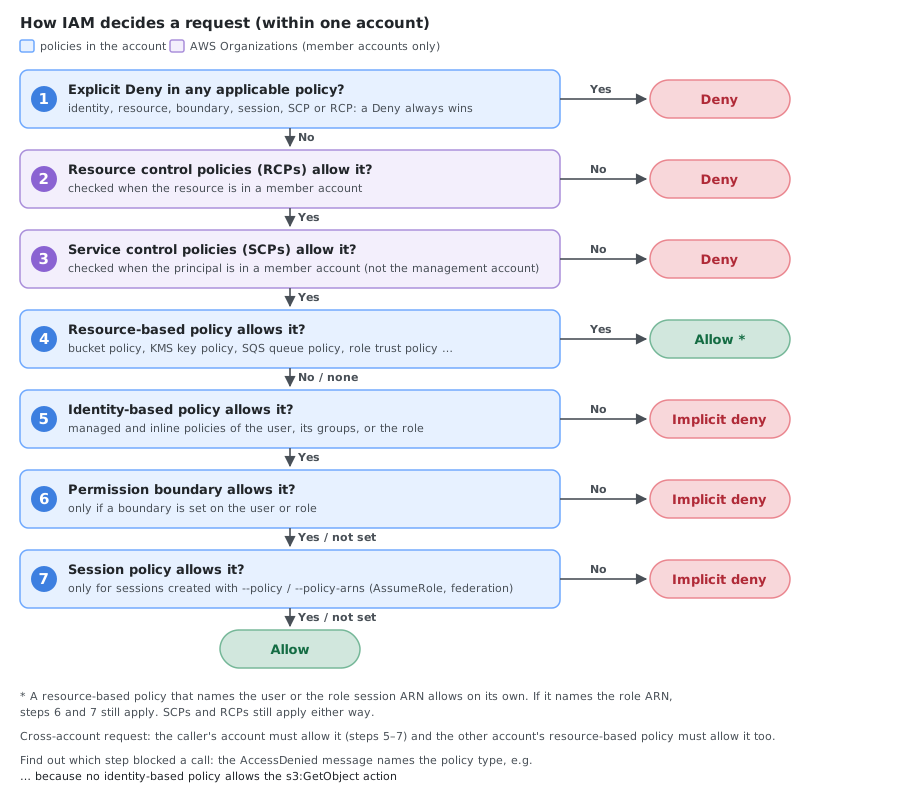
AWS evaluates a request (within one account) in this order:
- Explicit Deny — if any policy explicitly denies, the request is denied (always wins)
- RCPs (Organizations) — resource control policies must allow access to resources in member accounts
- SCPs (Organizations) — service control policies must allow the action for principals in member accounts
- Resource-based policies — an Allow here can grant access on its own, even without an identity-based Allow
- Identity-based policies — otherwise, at least one must explicitly allow the action
- Permission boundaries — if a boundary is set, it must also allow the action
- Session policies — for sessions created with a session policy, it must also allow the action
- Implicit Deny — if nothing explicitly allows it, the request is denied by default
Cross-account requests need an Allow on both sides: the identity-based policy in the caller’s account and the resource-based policy (or role trust policy) in the other account.
Conditions
Policies support conditions to restrict access further:
| Condition Key | Use Case |
|---|---|
aws:SourceIp | IP restriction |
aws:MultiFactorAuthPresent | MFA enforcement |
aws:CurrentTime | Time-based access |
aws:RequestTag / aws:ResourceTag | Tag-based access control |
aws:RequestedRegion | Region restriction |
Example:
"Condition": {
  "Bool": { "aws:MultiFactorAuthPresent": "true" },
  "IpAddress": { "aws:SourceIp": "203.0.113.0/24" }
}
aws:SourceIp is the public IP of the caller. Requests that come through a VPC endpoint carry the private address in aws:VpcSourceIp instead, so a private range such as 10.0.0.0/8 in aws:SourceIp never matches.
Service-Linked Roles
- Pre-defined roles created by AWS services (e.g.,
AWSServiceRoleForECS) - Cannot modify the permission policy — AWS manages it
- Automatically created when you enable certain service features
- Can only be deleted after removing the dependent resources
IRSA (IAM Roles for Service Accounts)
- Allows Kubernetes pods in EKS to assume IAM roles without node-level credentials
- Uses an OIDC provider to federate trust between Kubernetes service accounts and IAM roles
- The role trust policy references the OIDC provider ARN and the service account name/namespace
- Newer alternative: EKS Pod Identity (an EKS add-on), which needs no OIDC provider and uses the trust principal
pods.eks.amazonaws.com
IAM Identity Center (AWS SSO)
Recommended for human users. Authenticate via a central portal and get short-lived credentials for any account/role you’re granted.
How It Works
- Admin enables IAM Identity Center in the management account
- Users are defined in a directory (built-in, Active Directory, or external IdP like Okta/Azure AD)
- Permission sets define what users can do in each account (maps to IAM roles behind the scenes)
- Users log in via a portal URL, pick an account + permission set, and get temporary credentials
Key Benefits Over Access Keys
- No long-lived credentials on disk — credentials auto-expire (1–12 hours)
- No access keys to rotate or leak
- Centralized access management across all accounts
- MFA built-in — enforced at the IdP level
- Full audit trail in CloudTrail
CLI Setup
# One-time configuration (interactive)
aws configure sso --profile my-sso-profile
Creates a profile and an sso-session section in ~/.aws/config:
[profile my-sso-profile]
sso_session = mycompany
sso_account_id = 123456789012
sso_role_name = AdministratorAccess
region = eu-west-1
output = json

[sso-session mycompany]
sso_start_url = https://mycompany.awsapps.com/start
sso_region = eu-west-1
sso_registration_scopes = sso:account:access
Older guides put sso_start_url and sso_region directly in the profile. That legacy format still works, but it can’t refresh the token automatically.
Daily Usage
# Login (opens browser for IdP + MFA)
aws sso login --profile my-sso-profile

# Use normally
aws s3 ls --profile my-sso-profile
aws ec2 describe-instances --profile my-sso-profile

# Check identity
aws sts get-caller-identity --profile my-sso-profile
Multiple Accounts / Roles
[profile dev-readonly]
sso_session = mycompany
sso_account_id = 111111111111
sso_role_name = ReadOnlyAccess
region = eu-west-1

[profile prod-admin]
sso_session = mycompany
sso_account_id = 222222222222
sso_role_name = AdministratorAccess
region = eu-west-1
A single aws sso login authenticates once — all profiles that point to the same sso_session use the cached token (aws sso login --sso-session mycompany logs in without naming a profile).
Session Duration
| Type | Default | Configurable |
|---|---|---|
| Portal session | 8 hours | 15 minutes – 90 days |
| Permission set session | 1 hour | 1 – 12 hours |
SSO vs Access Keys
| Aspect | Access Keys + AssumeRole | IAM Identity Center (SSO) |
|---|---|---|
| Credentials on disk | Yes (~/.aws/credentials) | No (cached token, auto-expires) |
| MFA | Must pass manually per assume-role | Handled at IdP login (once per session) |
| Key rotation | Manual responsibility | Not needed |
| Multi-account | One assume-role call per account | One login, switch profiles freely |
| Revocation | Deactivate key + revoke sessions | Disable user in directory (instant) |
| Best for | Automation, legacy setups | Human users, daily CLI/console access |
GetSessionToken (MFA-Protected)
Exchange long-lived keys + MFA code for temporary credentials:
aws sts get-session-token \
  --serial-number arn:aws:iam::123456789012:mfa/jsmith \
  --token-code 123456 \
  --duration-seconds 3600
Useful when you can’t eliminate the IAM user yet but want MFA on every action. --duration-seconds accepts 900 (15 minutes) to 129,600 (36 hours) for IAM users, default 43,200 (12 hours); root user sessions are capped at 3,600 (1 hour).
OIDC Federation (AssumeRoleWithWebIdentity)
For CI/CD pipelines (GitHub Actions, GitLab CI) and Kubernetes (IRSA). No stored secrets.
aws sts assume-role-with-web-identity \
  --role-arn arn:aws:iam::123456789012:role/GitHubActionsRole \
  --role-session-name github-run \
  --web-identity-token "$OIDC_TOKEN"
SAML Federation (AssumeRoleWithSAML)
For corporate SSO (Active Directory, Okta) federated to AWS. Users authenticate against the IdP, receive a SAML assertion, and exchange it for temporary credentials.
Instance / Task / Execution Roles
For workloads on AWS (EC2, ECS, Lambda, EKS). The service automatically provides and rotates temporary credentials via the metadata service — no configuration beyond assigning the role.
All Authentication Methods
Every way to prove who you are to AWS, grouped by what you end up holding. Access key IDs tell them apart: AKIA… is a long-term key, ASIA… is a temporary key that only works together with a session token.
Long-Term Credentials
Valid until someone deletes or rotates them, so they are what leaks.
| Method | Used by | What you present | Lifetime | Notes |
|---|---|---|---|---|
| Root user sign-in | Account owner, root-only tasks | Email + password + MFA | Console session | Enable MFA; with centralized root access, member accounts have no root password at all |
| Root access keys | Nobody | AKIA… + secret key | Until deleted | Never create them; delete any that exist |
| IAM user password | People without Identity Center | User name + password (create-login-profile) + MFA | Console session up to 12 h | Sign in at https://<account-id>.signin.aws.amazon.com/console |
| IAM user access keys | Legacy scripts, tools outside AWS | AKIA… + secret key | Until rotated or deleted | Max 2 per user; check use with aws iam get-access-key-last-used |
| Service-specific credentials | CodeCommit over HTTPS, Amazon Keyspaces | Generated user name + password | Until deleted | aws iam create-service-specific-credential, only valid for that one service |
| SSH public key | CodeCommit over SSH | SSH key uploaded to an IAM user | Until deleted | aws iam upload-ssh-public-key |
| X.509 signing certificate | Legacy SOAP APIs | Certificate uploaded to an IAM user | Until deleted | Rarely needed today |
Temporary Credentials for People
| Method | Used by | What you present | Lifetime | Notes |
|---|---|---|---|---|
IAM Identity Center (aws sso login) | People, across many accounts | Portal sign-in: Identity Center directory or external IdP, with MFA | Permission set 1–12 h; portal session 15 min – 90 days | The recommended way for people |
aws login | Console users (root, IAM user or federated) who also need the CLI | Browser sign-in with the console credentials | Refreshed every 15 min, up to the session duration of the principal (max 12 h) | AWS CLI 2.32.0+; needs the SignInLocalDevelopmentAccess policy; Identity Center users use aws sso login instead |
sts get-session-token | IAM user that must use MFA on the CLI | Access key + MFA code | 15 min – 36 h (root: 1 h) | Can’t call IAM APIs unless MFA was included; of STS only assume-role and get-caller-identity |
sts assume-role | Cross-account access, switching to a stronger role | Existing credentials (optionally + MFA, external ID) | 15 min – role’s MaxSessionDuration (max 12 h); 1 h when chained | The role’s trust policy decides who may assume it |
sts assume-role-with-saml | Corporate IdP (AD FS, Okta, Entra ID) | SAML assertion from the IdP | 15 min – 12 h, capped by the assertion’s SessionNotOnOrAfter | Console or CLI via the IdP |
sts get-federation-token | Old custom identity brokers | IAM user’s access keys | 15 min – 36 h (root: 1 h) | Prefer roles; without --policy / --policy-arns the session has no permissions; can’t call IAM or STS (except get-caller-identity) |
sts assume-root | Admins in the management or delegated administrator account | IAM user or role with sts:AssumeRoot (not root credentials) + a root-task/… task policy | Max 15 min | Only for root-only tasks in member accounts; regional STS endpoint only |
Temporary Credentials for Workloads
| Method | Used by | What you present | Lifetime | Notes |
|---|---|---|---|---|
| EC2 instance profile | Apps on EC2 | Nothing: the SDK reads the instance metadata service (use IMDSv2) | Rotated automatically | Role attached to the instance |
| ECS task role | Containers on ECS / Fargate | Nothing: container credentials endpoint | Rotated automatically | Separate from the task execution role (pulls images, writes logs) |
| Lambda execution role | Lambda functions | Nothing: environment variables | Managed by Lambda | Role set on the function |
| EKS Pod Identity | Pods on EKS | Nothing: Pod Identity Agent on the node | Rotated automatically | Association between a service account and a role, no OIDC provider |
IRSA (sts assume-role-with-web-identity) | Pods on EKS | Service account token (OIDC JWT) | 15 min – 12 h, refreshed by the SDK | Needs the cluster’s OIDC provider in IAM |
OIDC federation (sts assume-role-with-web-identity) | GitHub Actions, GitLab CI, other CI | OIDC token (JWT) from the CI provider | 15 min – 12 h | No secrets stored in the CI system |
| IAM Roles Anywhere | On-premises servers, other clouds | X.509 certificate from your CA (trust anchor) | 15 min – 12 h, default 1 h | aws_signing_helper as credential_process |
| Cognito identity pools | Users of mobile and web apps | Token from a user pool or social IdP, or guest access | 1 h | GetCredentialsForIdentity |
Which Temporary Credential Method to Use
| Scenario | Solution |
|---|---|
| Human console/CLI access | IAM Identity Center (SSO) |
| CI/CD pipelines | OIDC federation |
| Cross-account access | sts assume-role |
| App on EC2/ECS/Lambda | Instance/task/execution role |
| Existing IAM user + MFA | sts get-session-token |
| Corporate SSO | SAML federation |
Key Points
- Temporary credentials cannot be revoked individually — revoke all sessions via IAM console (inline deny on
aws:TokenIssueTime) - Maximum
AssumeRolesession: the role’sMaxSessionDuration(1–12 hours, default 1 hour); role chaining (assuming a role from a role session) is limited to 1 hour - Maximum
GetSessionTokensession: 36 hours for IAM users - Always prefer roles and federation over IAM users — the goal is zero long-lived credentials
Root Account vs IAM User with AdministratorAccess
The root account is tied to the email that created the AWS account. It exists outside IAM — no identity-based policy or permission boundary can restrict it. SCPs do apply to the root user of member accounts in AWS Organizations, but never to the root user of the management account.
With centralized root access (aws iam enable-organizations-root-credentials-management and enable-organizations-root-sessions), the management account can remove the root credentials of member accounts and run the few root-only tasks through aws sts assume-root.
Actions Only Root Can Perform
- Change account name, email, or root password
- Close the AWS account
- Change the AWS support plan
- Enable MFA Delete on S3 buckets
- Create a CloudFront key pair (legacy)
- Configure billing (activate IAM access, modify payment methods)
- Restore IAM permissions when all access is locked out
- Edit or delete an S3 bucket policy or SQS queue policy that denies all principals
- Register as a seller in the Reserved Instance Marketplace
- Sign up for GovCloud
- View certain tax invoices
Root vs Admin — Comparison
| Aspect | Root Account | IAM User + AdministratorAccess |
|---|---|---|
| Restricted by IAM policies | No | Yes |
| Restricted by SCPs | Only in member accounts | Yes (in member accounts) |
| Restricted by permission boundaries | No | Yes |
| Account-level operations | Full access | Cannot perform |
| MFA enforcement | Self-managed | Enforced via policies/SCPs |
| Blast radius if compromised | Unrestricted, no guardrails | Can be limited after the fact |
| Recommended for daily use | Never | Yes (with MFA + temporary credentials) |
Root is the only identity that can recover an account where all IAM access has been removed. This is why it should never be used for daily tasks — unrestricted blast radius with no guardrails.
Migrating Inline to Managed Policies
- Audit — identify common permission patterns across inline policies
- Create managed policies — develop standardized policies for common patterns
- Gradual migration — replace inline policies with managed policies incrementally
- Test — verify permissions still work after each change
- Document — record the purpose and scope of each managed policy
IAM Access Analyzer
Identifies resources shared with external entities and finds unused permissions. Can also generate least-privilege policies from CloudTrail activity and validate policy documents for errors.
Credential Report
A CSV report of all IAM users showing access key status, MFA enabled, password last used/rotated, and creation time. Useful for auditing compliance.
Last Accessed Information
Shows which AWS services each identity has accessed and when. Use it to find unused permissions and tighten policies — services never accessed are candidates for removal.
Cross-Account Role Patterns
External ID (Confused Deputy Prevention)
When granting a third party access to your account, use an external ID to prevent the confused deputy problem :
Trust policy on the role:
{
  "Version": "2012-10-17",
  "Statement": [
    {
      "Effect": "Allow",
      "Principal": {
        "AWS": "arn:aws:iam::999999999999:root"
      },
      "Action": "sts:AssumeRole",
      "Condition": {
        "StringEquals": {
          "sts:ExternalId": "unique-id-from-third-party"
        }
      }
    }
  ]
}
Cross-Account Access (Your Own Accounts)
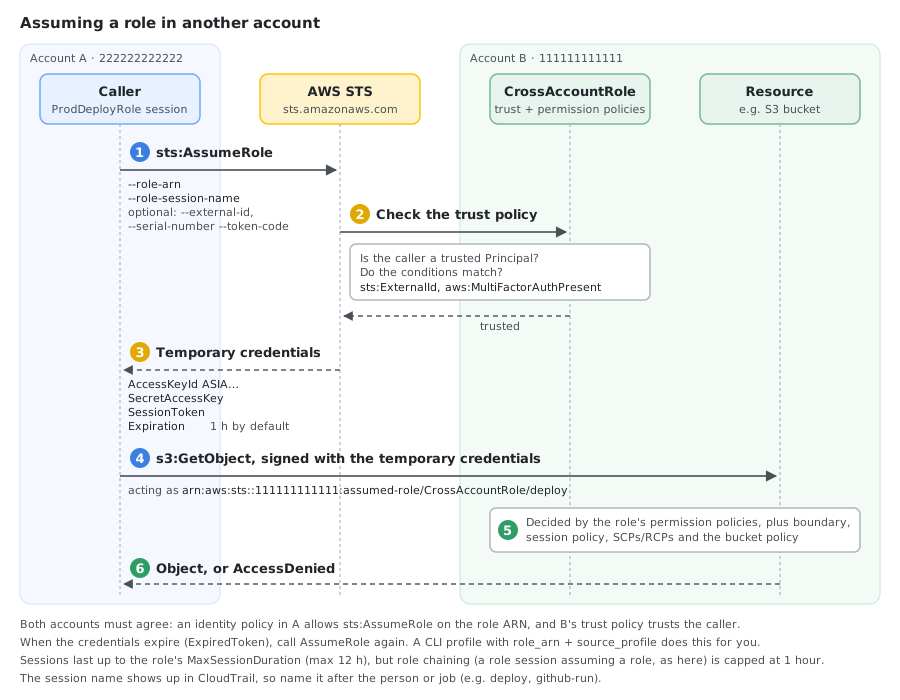
Trust policy allowing a role from another account you own:
{
  "Version": "2012-10-17",
  "Statement": [
    {
      "Effect": "Allow",
      "Principal": {
        "AWS": "arn:aws:iam::222222222222:role/ProdDeployRole"
      },
      "Action": "sts:AssumeRole"
    }
  ]
}
With this trust policy on CrossAccountRole in account 111111111111, a ProdDeployRole session in account 222222222222 can assume it:
See Also
- Policy evaluation logic — the full decision flow, including cross-account requests
- IAM and STS quotas — policy sizes, attachment limits and session durations
- Tasks that require root user credentials
- Configuring IAM Identity Center authentication with the AWS CLI
Comments