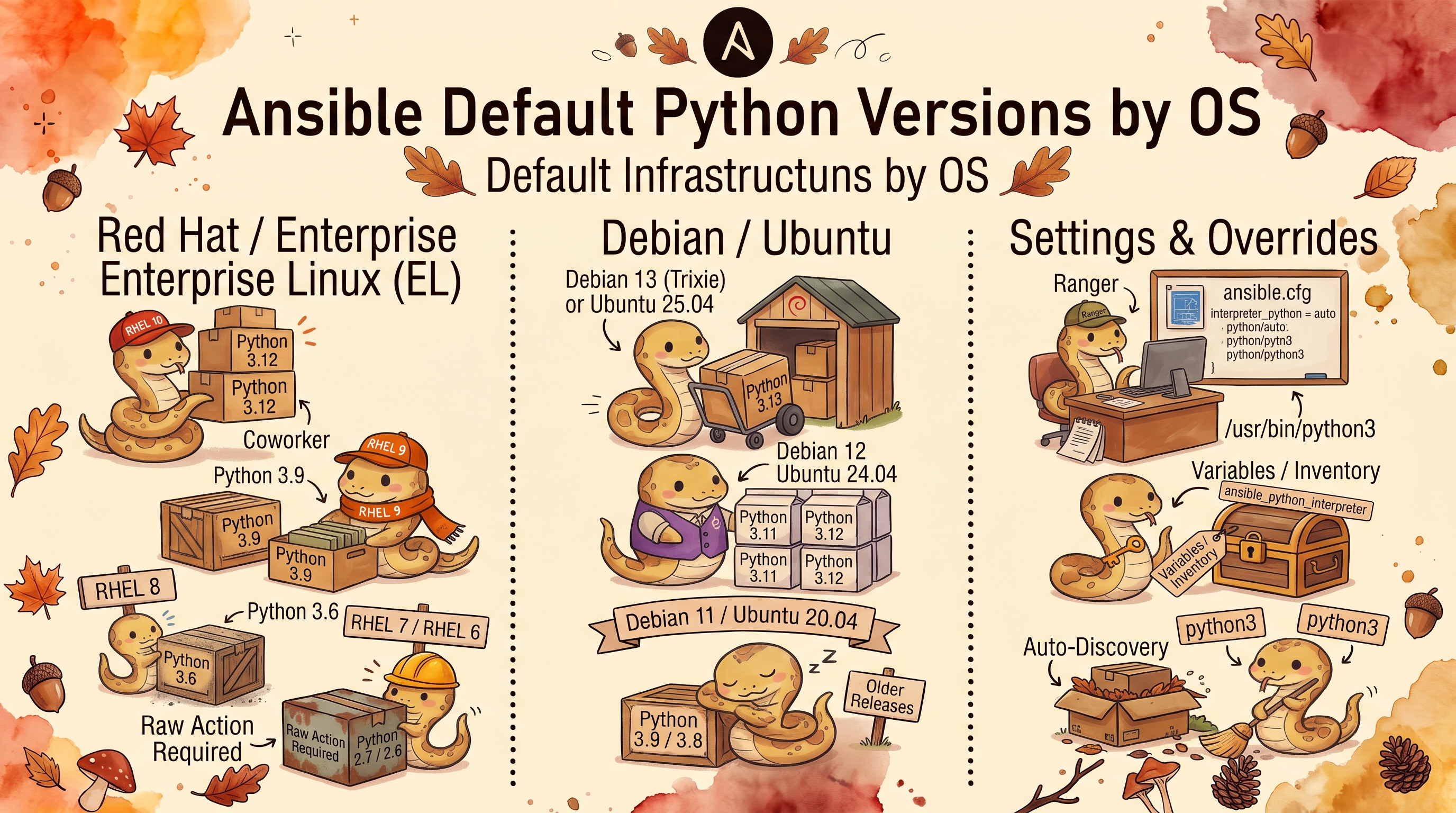
Ansible and the Target’s Python: Versions by OS
Ansible runs its modules with Python on the managed host, and each ansible-core release supports only a range of target Python versions. Newer releases drop old Pythons, so an upgrade of the controller can suddenly break the oldest servers. This is what each OS ships and which ansible-core versions work with it.
Default Python by OS
| OS | Default Python | Path | Python 3.9+ from the vendor? |
|---|---|---|---|
| RHEL 7.9 | 2.7.5 | /usr/bin/python | No. python3 (3.6.8) since 7.7; Software Collections stop at rh-python38 (3.8.18) |
| RHEL 8.10 | 3.6.8 | /usr/libexec/platform-python | Yes: python39 (3.9.25), python3.11, python3.12 |
| RHEL 9.8 | 3.9.25 | /usr/bin/python3 → python3.9 | Yes (default); also python3.11, python3.12, python3.14 |
| RHEL 10.2 | 3.12.15 | /usr/bin/python3 → python3.12 | Yes (default); also python3.14 |
| Ubuntu 20.04 | 3.8.10 | /usr/bin/python3 → python3.8 | Yes: python3.9 (3.9.5) in universe |
| Ubuntu 22.04 | 3.10.12 | /usr/bin/python3 → python3.10 | Yes (default) |
| Ubuntu 24.04 | 3.12.3 | /usr/bin/python3 → python3.12 | Yes (default) |
| Ubuntu 26.04 | 3.14.4 | /usr/bin/python3 → python3.14 | Yes (default) |
None of them has /usr/bin/python (unversioned) except RHEL 7, where it is Python 2.7.
RHEL 7
- Ships with Python 2.7.5:
/usr/bin/python→python2.7 /usr/bin/python3doesn’t exist by default- Since RHEL 7.7 the base repositories have a
python3package: Python 3.6.8. Too old for ansible-core 2.17 and later. - The newest Python from Red Hat is
rh-python38(3.8.18) from Red Hat Software Collections. There is norh-python39.
Installing Python 3.8 on RHEL 7
# Software Collections repository (RHEL 7 with a subscription)
subscription-manager repos --enable rhel-server-rhscl-7-rpms
yum install -y rh-python38

# Path: /opt/rh/rh-python38/root/usr/bin/python3.8
# Interactive use: scl enable rh-python38 bash
centos-release-scl, which older guides use, is the CentOS repository package, not RHEL’s. On RHEL 7 the SCL Python is enough for ansible-core up to 2.19 (target Python 3.8+); no release from 2.20 on can manage RHEL 7, because nothing from Red Hat provides Python 3.9 there.
RHEL 8
- Ships with Python 3.6.8 as
/usr/libexec/platform-python, used bydnfand other system tools /usr/bin/python3doesn’t exist until a Python package is installed- Python 2.7 available via the
python2package
Installing Python 3.9 on RHEL 8
dnf install -y python39

# Path: /usr/bin/python3.9
# Also available: dnf install python3.11 / python3.12
RHEL 9
- Ships with Python 3.9.25:
/usr/bin/python3→python3.9 /usr/libexec/platform-pythonexists too and also points to 3.9- Newer versions as extra packages:
python3.11,python3.12,python3.14 - No Python 2
RHEL 10
- Ships with Python 3.12.15:
/usr/bin/python3→python3.12 python3.14available as an extra package- No Python 2
Ubuntu 20.04 (Focal)
- Ships with Python 3.8.10:
/usr/bin/python3→python3.8 /usr/bin/pythondoesn’t exist (installpython-is-python3)- No Python 2 by default
Installing Python 3.9 on Ubuntu 20.04
python3.9 is in Ubuntu’s own universe repository, so no PPA is needed:
apt update
apt install -y python3.9
# Path: /usr/bin/python3.9  (Python 3.9.5)
python3.9-distutils doesn’t exist in Ubuntu’s repositories (only in the deadsnakes PPA), and Ansible doesn’t need it.
The apt module needs two extra symlinks. python3-apt is built for the system Python 3.8 only. With ansible_python_interpreter=/usr/bin/python3.9, the apt module can’t import it, starts itself again under /usr/bin/python3 (3.8), and ansible-core 2.21 (2.20 has the same range) refuses that: Ansible requires Python 3.9 or newer on the target. Current version: 3.8.10. Linking only apt_pkg, as older guides do, isn’t enough: the module also imports apt.debfile, which needs apt_inst (ModuleNotFoundError: No module named 'apt_inst'). With both, the module works:
cd /usr/lib/python3/dist-packages
ln -sf apt_pkg.cpython-38-x86_64-linux-gnu.so  apt_pkg.cpython-39-x86_64-linux-gnu.so
ln -sf apt_inst.cpython-38-x86_64-linux-gnu.so apt_inst.cpython-39-x86_64-linux-gnu.so
# on ARM servers the files are named ...-aarch64-linux-gnu.so
This is a workaround, not something Ubuntu supports: an update of python3-apt can change the files.
Ubuntu 22.04 (Jammy)
- Ships with Python 3.10.12:
/usr/bin/python3→python3.10 - No Python 2 by default
Ubuntu 24.04 (Noble)
- Ships with Python 3.12.3:
/usr/bin/python3→python3.12 - No Python 2 by default
Ubuntu 26.04 (Resolute)
- Ships with Python 3.14.4 (26.04.1):
/usr/bin/python3→python3.14 - No Python 2, no
/usr/bin/pythonunlesspython-is-python3is installed - Python 3.14 is newer than most ansible-core releases support: only 2.20 and 2.21 list it as a target. Older releases still ran
setup,pingandaptagainst it here, and none of them warned, but they were never meant to run on 3.14, so use 2.20+ for 26.04 hosts.
How to Check Python Version Remotely
# raw runs a shell command without Python on the target, so it works everywhere.
# Python 2 prints --version to stderr, hence 2>&1 on the fallbacks.
ansible all -i inventory.ini -m raw -a "python3 --version 2>/dev/null || /usr/libexec/platform-python --version 2>&1 || python --version 2>&1"

# Check specific Python paths
ansible all -i inventory.ini -m raw -a "ls /usr/bin/python3*"

# Python version and the interpreter Ansible picked (needs a Python the ansible-core version supports)
ansible all -i inventory.ini -m setup -a "filter=ansible_python_version"
The setup output also shows discovered_interpreter_python: ansible-core 2.14 and 2.16 pick /usr/bin/python3, 2.17 and later pick the versioned path, for example /usr/bin/python3.12.
Setting the Interpreter
Ansible picks the target’s Python through interpreter discovery, controlled by interpreter_python in ansible.cfg, the ANSIBLE_PYTHON_INTERPRETER environment variable, or the ansible_python_interpreter variable per host or group. The variable wins over the other two.
Discovery modes
| Value | 2.14 – 2.19 | 2.20 – 2.21 |
|---|---|---|
auto (default) | Discover, and warn when the result came from the fallback list | Same |
auto_silent | Discover without the warning | Same |
auto_legacy, auto_legacy_silent | Accepted; in 2.19 auto_legacy “now has the same effect as ‘auto’” and is deprecated | Removed: taken as a path, The module interpreter 'auto_legacy' was not found. |
/usr/bin/python3.9 (a path) | Always that interpreter, no discovery | Same |
With auto, ansible-core 2.21 printed this on Ubuntu 26.04 (2.19 the same, naming /usr/bin/python3):
[WARNING]: Host 't-u2604' is using the discovered Python interpreter at '/usr/bin/python3.14', but future installation of another Python interpreter could cause a different interpreter to be discovered.
auto_silent removes the warning but not the risk it describes: installing another Python later can change which one Ansible picks. For hosts where that matters, set the path.
The fallback list
When discovery has no better answer it tries a fixed list of interpreters, in order (INTERPRETER_PYTHON_FALLBACK, shown by ansible-config list):
| ansible-core | Fallback list |
|---|---|
| 2.14 | python3.11 … python3.5, /usr/bin/python3, /usr/libexec/platform-python, python2.7, /usr/bin/python, python |
| 2.16 | python3.12 … python3.6, /usr/bin/python3, /usr/libexec/platform-python, python2.7, /usr/bin/python, python |
| 2.17 | python3.12 … python3.7, /usr/bin/python3, python3 |
| 2.19 | python3.13 … python3.8, /usr/bin/python3, python3 |
| 2.21 | python3.14 … python3.9, /usr/bin/python3, python3 |
That is the whole story of the RHEL 7 and 8 failures: from 2.17 on the list has no platform-python and no Python 2, so discovery ends at /usr/bin/python3, which those hosts don’t have. It also explains the paths in the results: 2.17+ walks the versioned names first and finds /usr/bin/python3.12, while 2.14 and 2.16 use their per-distribution table and pick /usr/bin/python3.
Setting it per group
Put the hosts that need a specific Python in their own inventory group, and set the interpreter in group_vars:
# inventory.ini
[rhel8]
rhel8-host

[ubuntu2004]
focal-host

[modern]
rhel9-host
noble-host
# group_vars/rhel8.yml and group_vars/ubuntu2004.yml
ansible_python_interpreter: /usr/bin/python3.9
# ansible.cfg: everything else uses discovery, without the warning
[defaults]
inventory = inventory.ini
interpreter_python = auto_silent
Group by OS in the inventory, not by facts: facts are gathered with Python, so the interpreter has to be known before the first fact exists.
OS End of Life Dates
| OS | Standard / maintenance support | Extended support | Action |
|---|---|---|---|
| RHEL 7.9 | ended 30 June 2024 | until 31 May 2029 (ELS) | Plan migration to RHEL 9+ |
| RHEL 8.10 | until May 2029 | until May 2033 (ELCP) | Supported; install Python 3.9 for current Ansible |
| RHEL 9.8 | until May 2032 | until May 2036 (ELCP) | Fully supported |
| RHEL 10.2 | until May 2035 | until May 2039 (ELCP) | Fully supported |
| Ubuntu 20.04 | ended May 2025 | until May 2030 (Ubuntu Pro), May 2035 (Legacy add-on) | Supported only with Pro |
| Ubuntu 22.04 | until May 2027 | until May 2032 (Ubuntu Pro) | Fully supported |
| Ubuntu 24.04 | until May 2029 | until May 2034 (Ubuntu Pro) | Fully supported |
| Ubuntu 26.04 | until May 2031 | until May 2036 (Ubuntu Pro), May 2041 (Legacy add-on) | Fully supported; needs ansible-core 2.20+ |
Red Hat’s Extended Life Cycle Premium (ELCP) replaces ELS from RHEL 8.10 on and adds up to four years. When a host reaches end of standard support, consider:
- Upgrading to the next LTS/major version
- Removing it from automation if no longer needed
- Extended support subscriptions add time but not new features
Ansible Controller Requirements
The machine you run Ansible from (your Mac, a CI server, etc.) has its own Python range:
| ansible-core | Controller Python | Status |
|---|---|---|
| 2.14 | 3.9 – 3.11 | End of life (May 2024) |
| 2.16 | 3.10 – 3.12 | End of life (July 2025) |
| 2.17 | 3.10 – 3.12 | End of life (Nov 2025) |
| 2.18 | 3.11 – 3.13 | End of life (May 2026) |
| 2.19 | 3.11 – 3.13 | Security fixes ended May 2026, end of life Nov 2026 |
| 2.20 | 3.12 – 3.14 | Supported until May 2027 |
| 2.21 | 3.12 – 3.14 | Supported until Nov 2027 |
pip enforces the lower bound: installing ansible-core 2.21.5 on Python 3.11 fails with depends on Python>=3.12. The upper bound is not enforced: 2.16.19 installs and runs on Python 3.14, but that combination isn’t supported, so pin a Python the release lists (for example in a virtual environment).
Check your controller Python
python3 --version
ansible --version | grep "python version"
macOS note
macOS 12.3 removed Python 2.7. /usr/bin/python3 still exists, but it comes with the Command Line Tools and is Python 3.9.6, too old for any current ansible-core. Install a newer one:
# Homebrew: python3 is currently 3.15, newer than ansible-core 2.21 supports (3.12 – 3.14)
brew install python@3.12

# Or use the Python.org installer
# https://www.python.org/downloads/
Installing Ansible on the controller
# Latest
pip install ansible-core

# Specific version (for older target compatibility)
pip install ansible-core==2.16.14

# With pipx (isolated)
pipx install ansible-core
pipx install ansible-core==2.16.14
Ansible Compatibility
Target Python ranges from the ansible-core support matrix, and what that means for the default Python of each OS:
| ansible-core | Target Python | Works out of the box on |
|---|---|---|
| 2.14 | 2.7, 3.5 – 3.11 | RHEL 7 to 10, Ubuntu 20.04 to 24.04 (not 26.04: Python 3.14) |
| 2.16 | 2.7, 3.6 – 3.12 | RHEL 7 to 10, Ubuntu 20.04 to 24.04 (not 26.04) |
| 2.17 | 3.7 – 3.12 | RHEL 9+, Ubuntu 20.04 to 24.04 |
| 2.18, 2.19 | 3.8 – 3.13 | RHEL 9+, Ubuntu 20.04 to 24.04 |
| 2.20, 2.21 | 3.9 – 3.14 | RHEL 9+, Ubuntu 22.04+ (including 26.04) |
“Not 26.04” means outside the supported range: the old releases still ran against Python 3.14 here (see below), but nothing guarantees that every module does.
Every Combination, Run
ansible-core 2.14.18, 2.16.19, 2.17.14, 2.19.14 and 2.21.5 against Red Hat’s UBI images (RHEL 7.9, 8.10, 9.8, 10.2) and Ubuntu 20.04, 22.04, 24.04 and 26.04, with ansible -m setup and interpreter discovery left on auto:
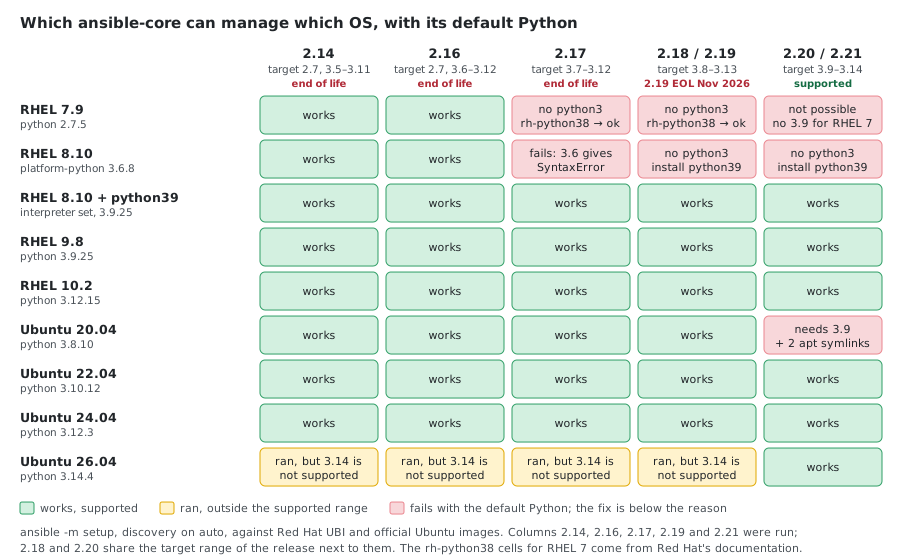
The failures, as Ansible reports them:
- RHEL 7 and 8, 2.17:
/bin/sh: /usr/bin/python3: No such file or directory. Pointing 2.17 at RHEL 8’splatform-pythondoesn’t help: Python 3.6 can’t even load the module code,SyntaxError: future feature annotations is not defined. - RHEL 7 and 8, 2.19 and 2.21:
The module interpreter '/usr/bin/python3' was not found. - Ubuntu 20.04, 2.21:
Ansible requires Python 3.9 or newer on the target. Current version: 3.8.10 - Ubuntu 26.04, 2.14 to 2.19 (⚠️):
setupandaptsucceeded, with no warning about the version, but Python 3.14 is outside these releases’ supported range. 2.19 printed only its usual notice that the interpreter was discovered. 2.21 discovered/usr/bin/python3.14; the older ones fell back to/usr/bin/python3.
What This Means for Each Ansible Version
Ansible 2.14 / 2.16 (supports Python 2.7)
RHEL 7 to 10 and Ubuntu 20.04 to 24.04 work with no Python changes; Ubuntu 26.04 (Python 3.14) ran too, but is outside their supported range. Interpreter discovery picks /usr/bin/python on RHEL 7, /usr/libexec/platform-python on RHEL 8 and /usr/bin/python3 everywhere else. Both releases are end of life, so they get no more fixes.
Ansible 2.17 (target Python 3.7+)
| OS | Works? | Action needed |
|---|---|---|
| RHEL 7 | No | rh-python38 from Software Collections, interpreter set to it |
| RHEL 8 | No | dnf install python39, interpreter /usr/bin/python3.9. platform-python (3.6) fails with a SyntaxError |
| RHEL 9 / 10 | Yes | None |
| Ubuntu 20.04 / 22.04 / 24.04 | Yes | None |
| Ubuntu 26.04 | Not supported (3.14) | Ran here, but use 2.20+ |
Ansible 2.18 / 2.19 (target Python 3.8+)
The same as 2.17: RHEL 7 needs rh-python38, RHEL 8 needs python39, everything else up to Ubuntu 24.04 works as is; Ubuntu 26.04’s Python 3.14 is outside the range. Ubuntu 20.04 still works with its own Python 3.8. 2.19 is the last release line that can manage RHEL 7 and Ubuntu 20.04 without adding a Python 3.9.
Ansible 2.20 / 2.21 (target Python 3.9+)
| OS | Works? | Action needed |
|---|---|---|
| RHEL 7 | No | Not possible: Red Hat ships no Python 3.9 for RHEL 7 |
| RHEL 8 | No (default) | dnf install python39, interpreter /usr/bin/python3.9 |
| RHEL 9 / 10 | Yes | None |
| Ubuntu 20.04 | No (default) | apt install python3.9, interpreter /usr/bin/python3.9, plus the two apt symlinks |
| Ubuntu 22.04 / 24.04 / 26.04 | Yes | None |
Practical Recommendation
| Scenario | Recommended Ansible |
|---|---|
| Fleet still includes RHEL 7 | 2.16 (end of life) as is, or 2.19 with rh-python38 on RHEL 7 |
| RHEL 8+ and Ubuntu 20.04+ | 2.19, with python39 on RHEL 8 |
| Modern only (RHEL 9+, Ubuntu 22.04+), or any Ubuntu 26.04 | 2.21 |
| Latest features on older hosts | 2.21 + Python 3.9 on RHEL 8 and Ubuntu 20.04 |
A fleet can also use two controllers (or two virtual environments): an old ansible-core for the legacy hosts and a current one for the rest.
Downgrading Ansible (if needed)
# Install a specific version
pip install ansible-core==2.16.14

# Or use pipx for isolation
pipx install ansible-core==2.16.14
Key Takeaways
- RHEL 7 is the hardest: its newest Red Hat Python is 3.8 (
rh-python38), so ansible-core 2.20+ can’t manage it at all - RHEL 8 is straightforward:
dnf install python39and set the interpreter.platform-pythonis not enough for 2.17+ - Ubuntu 20.04 has
python3.9in its own repositories, but theaptmodule then needs symlinks for bothapt_pkgandapt_inst - RHEL 9+, Ubuntu 22.04+: no action needed, Python 3.9+ is the default
- Ubuntu 26.04 ships Python 3.14: only ansible-core 2.20 and 2.21 support it
- Controller (your Mac) needs Python 3.12 – 3.14 for ansible-core 2.20 and 2.21; the system Python 3.9.6 is too old
- Plan for EOL: RHEL 7 and Ubuntu 20.04 standard support has ended, and ansible-core 2.14 to 2.18 are end of life
Where the Numbers Come From
- Python versions and paths: Red Hat’s Universal Base Images (
ubi7= RHEL 7.9,ubi8= 8.10,ubi9= 9.8,ubi10= 10.2) and the officialubuntu:20.04,22.04,24.04and26.04images (26.04.1), with their package repositories. - The compatibility table: those images as containers, managed with each ansible-core version through the
community.docker.dockerconnection. - The discovery modes: ansible-core 2.21.5 and 2.19.14 against an Ubuntu 26.04 container; the fallback lists from
ansible-config listof each version. - The
aptsymlinks: Ubuntu 20.04 on x86_64 with ansible-core 2.21.5. With both symlinks,aptinstalled a package and refreshed the cache. - Not shown here:
rh-python38on RHEL 7. Its runtime package isn’t in the free UBI repositories, so that path comes from Red Hat’s documentation. - Python 3 on RHEL 7.7+: the RHEL 7.7 release notes. macOS 12.3: Apple’s 12.3 release notes (“Python 2.7 was removed from macOS in this update”).
- Support ranges and dates: the ansible-core support matrix, Ubuntu’s release cycle page, Red Hat’s RHEL 7 end-of-maintenance page, and endoflife.date for RHEL 8 to 10.
Comments