Ansible Inventory Guide
The inventory defines which hosts Ansible manages and how to connect to them. It can be a simple INI or YAML file, a directory of files, or a dynamic script that queries cloud APIs. This guide covers all common patterns with real-world examples.
The outputs below come from ansible-core 2.21.4 (the Ansible 14.4 package) with amazon.aws 11.4.0, azure.azcollection 3.21.0, google.cloud 1.14.0, community.docker 5.3.0 and cloud.terraform 4.0.0. The AWS inventory ran against moto, a local AWS emulator, not real AWS.
Inventory Basics
# Default location
/etc/ansible/hosts

# Specify custom inventory
ansible-playbook -i inventory.ini playbook.yml
ansible-playbook -i inventory/ playbook.yml    # Directory of inventory files

# Test inventory
ansible-inventory -i inventory.ini --list
ansible-inventory -i inventory.ini --graph
ansible all -i inventory.ini -m ping
Basic Host Definitions
# Simple hosts (using default SSH settings)
web01.example.com
web02.example.com
db01.example.com

# Hosts with IP addresses
192.168.1.10
192.168.1.11

# Hosts with custom SSH port
web03.example.com ansible_port=2222
web04.example.com ansible_port=2223

# Hosts with aliases (alias + real address)
web-server ansible_host=192.168.1.20
db-server ansible_host=192.168.1.30
Host Groups
[webservers]
web01.example.com
web02.example.com
web03.example.com ansible_port=2222

[databases]
db01.example.com
db-server ansible_host=192.168.1.30

[loadbalancers]
lb01.example.com
lb02.example.com
Ranges
# Numeric range — expands to app01, app02, app03, app04, app05
[app_servers]
app[01:05].example.com

# Letter range — expands to testa, testb, testc, testd, teste, testf
[test_servers]
test[a:f].example.com

# Kubernetes workers with range
[kubernetes_workers]
k8s-worker[01:05].example.com
Group Variables
# Variables applied to all hosts in a group
[webservers]
web01.example.com
web02.example.com

[databases]
db01.example.com

[webservers:vars]
http_port=80
ansible_user=deploy

[databases:vars]
db_port=5432
backup_enabled=true
A :vars section needs its group in the same inventory. On its own, [webservers:vars] fails with Section [webservers:vars] not valid for undefined group 'webservers'.
$ ansible-inventory -i inventory.ini --host web01.example.com
{
    "ansible_user": "deploy",
    "http_port": 80
}
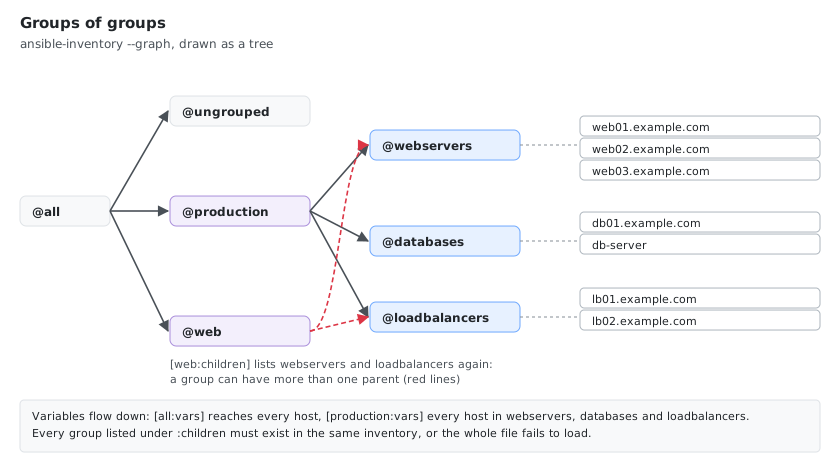
Group of Groups (Children)
[web:children]
webservers
loadbalancers

[database:children]
mysql_servers
postgresql_servers
mongodb_servers

[production:children]
webservers
databases
loadbalancers

[all_servers:children]
web
database
monitoring
logging
Every group listed under :children must exist in the same inventory, here the groups from the other sections of this guide. A missing one stops the whole file from loading: Section [web:children] includes undefined group 'missing_group'.
Global Variables
# Applied to ALL hosts in the inventory
[all:vars]
ansible_ssh_common_args='-o StrictHostKeyChecking=no -o UserKnownHostsFile=/dev/null'
ansible_python_interpreter=/usr/bin/python3
timezone=UTC
common_packages=['vim', 'curl', 'wget', 'htop', 'git']
The INI parser turns common_packages into a real list (ansible-inventory --host shows "common_packages": ["vim", "curl", ...]), and timezone stays a string.
Become / Sudo Configuration
Ubuntu (Passwordless Sudo)
[ubuntu_servers]
ubuntu01.example.com
ubuntu02.example.com
ubuntu03.example.com

[ubuntu_servers:vars]
ansible_become=yes
ansible_become_method=sudo
# Ubuntu typically doesn't need become_pass if user is in sudo group
RHEL / CentOS (May Need Password)
[rhel_servers]
rhel01.example.com
rhel02.example.com
rhel03.example.com

[rhel_servers:vars]
ansible_become=yes
ansible_become_method=sudo
ansible_become_user=root
# Uncomment if password is needed:
# ansible_become_pass="{{ vault_sudo_password }}"
SSH Connection Configurations
Key-Based Authentication
[ssh_key_auth]
secure01.example.com ansible_ssh_private_key_file=~/.ssh/id_rsa
secure02.example.com ansible_ssh_private_key_file=~/.ssh/custom_key
Password Authentication (Use Vault!)
[ssh_password_auth]
legacy01.example.com ansible_ssh_pass="{{ vault_ssh_password }}"
legacy02.example.com ansible_ssh_pass="{{ vault_ssh_password }}"
Custom SSH Users
[custom_ssh_users]
custom01.example.com ansible_user=deploy
custom02.example.com ansible_user=ansible
custom03.example.com ansible_user=serviceaccount
Windows Hosts
[windows_servers]
win01.example.com
win02.example.com

[windows_servers:vars]
ansible_connection=winrm
ansible_winrm_server_cert_validation=ignore
ansible_winrm_transport=basic
ansible_winrm_port=5985
# For HTTPS:
# ansible_winrm_port=5986
# ansible_winrm_transport=credssp
Cloud Environments
AWS
[aws_instances]
aws-web01 ansible_host=ec2-1-2-3-4.compute-1.amazonaws.com
aws-web02 ansible_host=ec2-5-6-7-8.compute-1.amazonaws.com
aws-db01 ansible_host=ec2-9-10-11-12.compute-1.amazonaws.com

[aws_instances:vars]
ansible_user=ec2-user
ansible_ssh_private_key_file=~/.ssh/aws-key.pem
ansible_become=yes
Azure
[azure_instances]
azure-web01 ansible_host=azure-vm1.eastus.cloudapp.azure.com
azure-web02 ansible_host=azure-vm2.eastus.cloudapp.azure.com

[azure_instances:vars]
ansible_user=azureuser
ansible_ssh_private_key_file=~/.ssh/azure-key.pem
ansible_become=yes
GCP
[gcp_instances]
gcp-web01 ansible_host=gcp-vm1.us-central1-a.c.project-id.internal
gcp-web02 ansible_host=gcp-vm2.us-central1-a.c.project-id.internal

[gcp_instances:vars]
ansible_user=gcpuser
ansible_ssh_private_key_file=~/.ssh/gcp-key.pem
ansible_become=yes
Environment Separation
[development]
dev-web01.example.com
dev-db01.example.com

[development:vars]
env=development
debug=true

[staging]
stage-web01.example.com
stage-web02.example.com
stage-db01.example.com

[staging:vars]
env=staging
debug=false

[production]
prod-web01.example.com
prod-web02.example.com
prod-web03.example.com
prod-db01.example.com
prod-db02.example.com

[production:vars]
env=production
debug=false
Container & Kubernetes Hosts
[docker_hosts]
docker01.example.com
docker02.example.com

[docker_hosts:vars]
ansible_become=yes
docker_enabled=true

[kubernetes_masters]
k8s-master01.example.com
k8s-master02.example.com
k8s-master03.example.com

[kubernetes_workers]
k8s-worker[01:05].example.com

[kubernetes:children]
kubernetes_masters
kubernetes_workers

[kubernetes:vars]
ansible_user=k8s-admin
ansible_become=yes
Database Hosts
[mysql_servers]
mysql01.example.com mysql_root_password="{{ vault_mysql_root_password }}"
mysql02.example.com mysql_root_password="{{ vault_mysql_root_password }}"

[postgresql_servers]
pg01.example.com
pg02.example.com

[postgresql_servers:vars]
postgresql_version=13
postgresql_data_dir=/var/lib/postgresql/13/main

[mongodb_servers]
mongo01.example.com
mongo02.example.com
mongo03.example.com

[mongodb_servers:vars]
mongodb_version=4.4
Load Balancers
[nginx_lb]
nginx-lb01.example.com
nginx-lb02.example.com

[haproxy_lb]
haproxy-lb01.example.com
haproxy-lb02.example.com

[load_balancers:children]
nginx_lb
haproxy_lb
Monitoring & Logging
[monitoring]
prometheus01.example.com
grafana01.example.com
alertmanager01.example.com

[logging]
elasticsearch01.example.com
logstash01.example.com
kibana01.example.com

[elk:children]
logging
YAML Inventory Format
# inventory.yml
all:
  vars:
    ansible_python_interpreter: /usr/bin/python3
    timezone: UTC
  children:
    webservers:
      hosts:
        web01.example.com:
        web02.example.com:
          ansible_port: 2222
      vars:
        http_port: 80
    databases:
      hosts:
        db01.example.com:
          ansible_host: 192.168.1.30
        db02.example.com:
    production:
      children:
        webservers:
        databases:
      vars:
        env: production
    aws:
      hosts:
        aws-web01:
          ansible_host: ec2-1-2-3-4.compute-1.amazonaws.com
      vars:
        ansible_user: ec2-user
        ansible_ssh_private_key_file: ~/.ssh/aws-key.pem
        ansible_become: yes
Directory-Based Inventory (Recommended for Large Environments)
inventory/
├── production/
│   ├── hosts.ini              # Or hosts.yml
│   ├── group_vars/
│   │   ├── all/
│   │   │   ├── main.yml       # Variables for all production hosts
│   │   │   └── vault.yml      # Encrypted secrets (see below)
│   │   ├── webservers.yml     # Variables for production webservers
│   │   └── databases.yml
│   └── host_vars/
│       ├── web01.example.com.yml
│       └── db01.example.com.yml
├── staging/
│   ├── hosts.ini
│   ├── group_vars/
│   │   └── all.yml
│   └── host_vars/
└── development/
    ├── hosts.ini
    └── group_vars/
        └── all.yml
Use either group_vars/all.yml or a group_vars/all/ directory, not both. With both present, Ansible loaded only the files in the directory and silently ignored all.yml. A group that needs a vault file next to its normal variables therefore becomes a directory.
group_vars/all/main.yml
# inventory/production/group_vars/all/main.yml
---
ansible_user: deploy
ansible_become: yes
ntp_server: ntp.example.com
dns_servers:
  - 10.0.0.1
  - 10.0.0.2
env: production
host_vars/web01.example.com.yml
# inventory/production/host_vars/web01.example.com.yml
---
nginx_worker_processes: 4
ssl_certificate: /etc/ssl/certs/web01.pem
custom_vhosts:
  - server_name: app.example.com
    root: /var/www/app
Vault Variables in Inventory
Store sensitive values encrypted with ansible-vault:
# group_vars/all/vault.yml (encrypted with ansible-vault)
---
vault_sudo_password: your_sudo_password
vault_ssh_password: your_ssh_password
vault_mysql_root_password: your_mysql_password
vault_api_key: your_api_key
# Encrypt the vault file
ansible-vault encrypt inventory/production/group_vars/all/vault.yml

# Run playbook with vault
ansible-playbook -i inventory/production site.yml --ask-vault-pass

# Or read the password from a file (CI)
ansible-playbook -i inventory/production site.yml --vault-password-file ~/.vault_pass
The encrypted file starts with $ANSIBLE_VAULT;1.1;AES256. Without a vault password, even ansible-inventory -i inventory/production --host db01.example.com fails with Attempting to decrypt but no vault secrets found, because the inventory loads all group_vars.
Variable Precedence
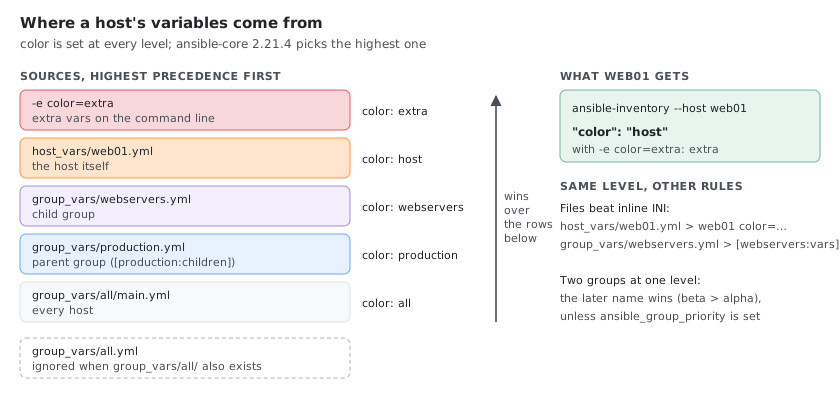
The same variable can be set in several places. To see who wins, color was set at every level of a directory inventory where web01 is in webservers, and webservers is a child of production:
inventory/
├── hosts.ini                    # [webservers] web01 / [production:children] webservers
├── group_vars/
│   ├── all/
│   │   └── main.yml             # color: all
│   ├── production.yml           # color: production
│   └── webservers.yml           # color: webservers
└── host_vars/
    └── web01.yml                # color: host
Removing the files one at a time, starting with host_vars, ansible-inventory -i inventory --host web01 returned:
| Set in | color for web01 |
|---|---|
| all five places | host |
without host_vars/web01.yml | webservers |
without webservers.yml too | production |
only all/main.yml | all |
And -e color=extra on the command line beats all of them. ansible-inventory --graph --vars shows every level at once:
@all:
  |--@ungrouped:
  |--@production:
  |  |--@webservers:
  |  |  |--web01
  |  |  |  |--{color = host}
  |  |  |--{color = webservers}
  |  |--{color = production}
  |--{color = all}
Two more rules, from the same kind of test:
- Files beat inline INI. With
web01 color=ini_hostinhosts.iniandcolor: file_hostinhost_vars/web01.yml, web01 gotfile_host.group_vars/webservers.ymllikewise wins over[webservers:vars]. - Two groups at the same level: the later name wins. For a host in both
alphaandbeta,beta’s value won. The order in the file doesn’t matter:zetabeatalphaeven when[zeta]came first.ansible_group_prioritychanges it; withansible_group_priority=10in[alpha:vars],alpha’s value won.
Host Variables Reference
| Variable | Description | Example |
|---|---|---|
ansible_host | IP or hostname to connect to | 192.168.1.10 |
ansible_port | SSH port | 2222 |
ansible_user | SSH username | deploy |
ansible_password | SSH password (use vault!); ansible_ssh_pass is an alias | "{{ vault_pass }}" |
ansible_ssh_private_key_file | Path to SSH key | ~/.ssh/id_rsa |
ansible_become | Enable privilege escalation | yes |
ansible_become_method | Escalation method (pbrun is in community.general) | sudo, su, pbrun |
ansible_become_user | User to become | root |
ansible_become_pass | Sudo password (use vault!) | "{{ vault_sudo }}" |
ansible_connection | Connection type (docker is in community.docker) | ssh, local, winrm, docker |
ansible_python_interpreter | Python path on target | /usr/bin/python3 |
ansible_shell_type | Shell type (csh and fish are in ansible.posix) | sh, csh, fish |
ansible_ssh_common_args | Extra SSH arguments | '-o ProxyJump=bastion' |
Special Connection Types
Local Connection (Control Node)
# Run tasks on the Ansible control node itself
[local]
localhost ansible_connection=local

# Or in a playbook:
# hosts: localhost
# connection: local
Docker Connection (Running Containers)
The docker connection comes from the community.docker collection (ansible-galaxy collection install community.docker).
# Manage running Docker containers directly (no SSH needed)
[containers]
my-nginx ansible_connection=docker ansible_docker_extra_args="--tlsverify"
my-redis ansible_connection=docker

# The host name must match the container name or ID
# YAML format
all:
  hosts:
    web-container:
      ansible_connection: docker
      ansible_docker_extra_args: "--host=unix:///var/run/docker.sock"
Jump Host / Bastion (SSH ProxyJump)
# All hosts behind a bastion/jump host
[private_network]
internal01.example.com
internal02.example.com
internal03.example.com

[private_network:vars]
ansible_ssh_common_args='-o ProxyJump=bastion.example.com'

# Or with full bastion user and key:
# ansible_ssh_common_args='-o ProxyJump=jumpuser@bastion.example.com:22'
# Different bastions for different environments
[staging_servers]
stage01.internal

[staging_servers:vars]
ansible_ssh_common_args='-o ProxyJump=deploy@bastion-stage.example.com'

[production_servers]
prod01.internal

[production_servers:vars]
ansible_ssh_common_args='-o ProxyJump=deploy@bastion-prod.example.com'
Dynamic Inventory
Dynamic inventory scripts or plugins query external sources (cloud APIs, CMDBs, Terraform state) at runtime instead of using a static file.
AWS EC2 Plugin
# aws_ec2.yml (place in your inventory directory)
---
plugin: amazon.aws.aws_ec2

regions:
  - us-east-1
  - eu-west-1

filters:
  tag:Environment:
    - production
  instance-state-name:
    - running

keyed_groups:
  # Create groups from EC2 tags
  - key: tags.Role
    prefix: role
    separator: "_"
  - key: tags.Environment
    prefix: env
  - key: placement.availability_zone
    prefix: az

hostnames:
  # How to name hosts (tries in order)
  - tag:Name
  - private-ip-address
  - dns-name

compose:
  # Set connection variables from instance data
  ansible_host: private_ip_address
  ansible_user: "'ec2-user'"
  ansible_ssh_private_key_file: "'~/.ssh/aws-key.pem'"
# Install the AWS collection
ansible-galaxy collection install amazon.aws

# Test dynamic inventory
ansible-inventory -i aws_ec2.yml --graph
ansible-inventory -i aws_ec2.yml --list

# Use with playbook
ansible-playbook -i aws_ec2.yml playbook.yml
The plugin is amazon.aws.aws_ec2. With plugin: amazon.aws.ec2, Ansible answers specifies unknown plugin 'amazon.aws.ec2'. The file name must end in aws_ec2.yml or aws_ec2.yaml (for example prod.aws_ec2.yml), and the plugin needs boto3 and botocore 1.35 or newer on the control node.
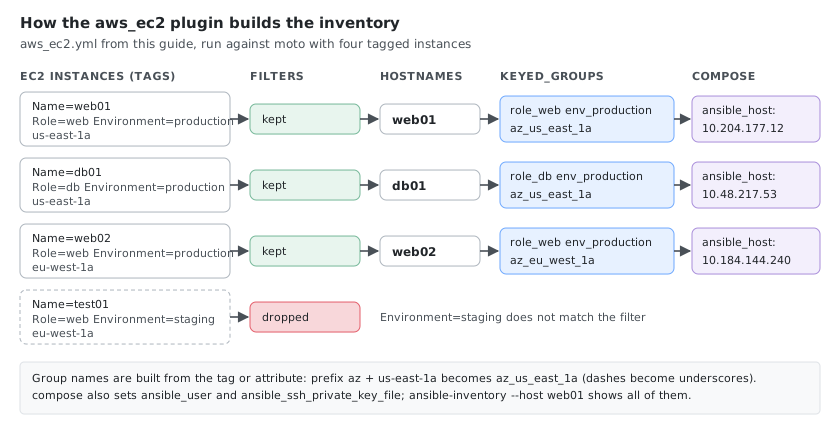
With four instances (three tagged Environment=production, one staging), the inventory above gave:
@all:
  |--@ungrouped:
  |--@aws_ec2:
  |  |--web02
  |  |--db01
  |  |--web01
  |--@role_web:
  |  |--web02
  |  |--web01
  |--@env_production:
  |  |--web02
  |  |--db01
  |  |--web01
  |--@az_eu_west_1a:
  |  |--web02
  |--@role_db:
  |  |--db01
  |--@az_us_east_1a:
  |  |--db01
  |  |--web01
The staging instance is filtered out, hosts are named after their Name tag, and the dashes of the availability zone become underscores in the group name (az_us_east_1a). ansible-inventory -i aws_ec2.yml --host web01 shows the composed variables: ansible_host is the instance’s private IP, plus ansible_user and ansible_ssh_private_key_file.
Azure Plugin
# azure_rm.yml
---
plugin: azure.azcollection.azure_rm

auth_source: auto  # Uses az login, env vars, or managed identity

include_vm_resource_groups:
  - my-resource-group

keyed_groups:
  - key: tags.Environment
    prefix: env
  - key: location
    prefix: region

hostnames:
  - name
  - private_ipv4_addresses

compose:
  ansible_host: private_ipv4_addresses[0]
  ansible_user: "'azureuser'"
# Install the Azure collection and its Python dependencies
ansible-galaxy collection install azure.azcollection
pip3 install -r ~/.ansible/collections/ansible_collections/azure/azcollection/requirements.txt

# Test
ansible-inventory -i azure_rm.yml --graph
The file name must end in azure_rm.yml or azure_rm.yaml, otherwise the plugin refuses it (azure_rm inventory filename must end with 'azure_rm.yml' or 'azure_rm.yaml'). The requirements.txt path depends on where the collection is installed; ansible-galaxy collection list azure.azcollection shows it. Without credentials, the plugin stops with Failed to get credentials. Either pass as parameters, set environment variables, define a profile in ~/.azure/credentials, or log in with Azure CLI (az login).
GCP Plugin
# gcp_compute.yml
---
plugin: google.cloud.gcp_compute

projects:
  - my-gcp-project

zones:
  - us-central1-a
  - us-central1-b

filters:
  - status = RUNNING

keyed_groups:
  - key: labels.env
    prefix: env
  - key: zone
    prefix: zone

hostnames:
  - name
  - private_ip

compose:
  ansible_host: networkInterfaces[0].networkIP
  ansible_user: "'gcpuser'"
# Install the GCP collection
ansible-galaxy collection install google.cloud
pip3 install google-auth requests

# Test
ansible-inventory -i gcp_compute.yml --graph
Without google-auth, the plugin stops with gce inventory plugin cannot start: Failed to import the required Python library (google-auth). It has to be installed in the Python that runs Ansible, which isn’t always pip3’s (ansible --version shows the interpreter).
Terraform State as Inventory
The cloud.terraform collection reads a Terraform state. terraform_provider builds the inventory from ansible_host and ansible_group resources of the ansible/ansible Terraform provider; terraform_state builds it from cloud resources such as aws_instance.
# main.tf
terraform {
  required_providers {
    ansible = {
      source  = "ansible/ansible"
      version = "~> 1.3"
    }
  }
}

resource "ansible_host" "web01" {
  name   = "web01"
  groups = ["webservers"]
  variables = {
    ansible_host = "10.0.1.10"
    ansible_user = "deploy"
  }
}

resource "ansible_host" "db01" {
  name   = "db01"
  groups = ["databases"]
  variables = {
    ansible_host = "10.0.2.20"
  }
}

resource "ansible_group" "production" {
  name     = "production"
  children = ["webservers", "databases"]
}
# inventory.yml, in the Terraform directory
---
plugin: cloud.terraform.terraform_provider
binary_path: /usr/local/bin/terraform
ansible-galaxy collection install cloud.terraform
terraform init && terraform apply
ansible-inventory -i inventory.yml --graph
@all:
  |--@ungrouped:
  |--@production:
  |  |--@webservers:
  |  |  |--web01
  |  |--@databases:
  |  |  |--db01
binary_path is needed with cloud.terraform 4.0.0 on ansible-core 2.21: without it, the plugin fails while looking for the terraform binary with get_bin_path() got an unexpected keyword argument 'required'. Point it at which terraform.
Custom Script Inventory
#!/usr/bin/env python3
# custom_inventory.py — must output JSON when called with --list
import json
import sys

inventory = {
    "webservers": {
        "hosts": ["web01", "web02"],
        "vars": {"http_port": 80}
    },
    "databases": {
        "hosts": ["db01"],
        "vars": {"db_port": 5432}
    },
    "_meta": {
        "hostvars": {
            "web01": {"ansible_host": "192.168.1.10"},
            "web02": {"ansible_host": "192.168.1.11"},
            "db01": {"ansible_host": "192.168.1.20"}
        }
    }
}

if "--list" in sys.argv:
    print(json.dumps(inventory, indent=2))
elif "--host" in sys.argv:
    host = sys.argv[sys.argv.index("--host") + 1]
    hostvars = inventory.get("_meta", {}).get("hostvars", {}).get(host, {})
    print(json.dumps(hostvars, indent=2))
# Make executable and use
chmod +x custom_inventory.py
ansible-inventory -i custom_inventory.py --graph
ansible all -i custom_inventory.py -m ping
The execute bit matters: without it, Ansible doesn’t run the script but parses it as an INI file and fails (Expected key=value host variable assignment).
Enable Inventory Plugins
# In ansible.cfg
[inventory]
enable_plugins = host_list, script, auto, yaml, ini, toml, amazon.aws.aws_ec2, azure.azcollection.azure_rm, google.cloud.gcp_compute
A wrong name here only prints a warning (Failed to load inventory plugin, skipping amazon.aws.ec2), easy to miss in a long output.
Usage Examples
# Test connectivity to all hosts
ansible -i inventory.ini all -m ping

# Test specific group
ansible -i inventory.ini webservers -m ping

# Run playbook on production
ansible-playbook -i inventory.ini site.yml --limit production

# Run with vault password (for encrypted variables)
ansible-playbook -i inventory.ini site.yml --ask-vault-pass

# Run with sudo password prompt
ansible-playbook -i inventory.ini site.yml --ask-become-pass

# Run on specific host only
ansible-playbook -i inventory.ini site.yml --limit web01.example.com

# Run on group excluding specific hosts
ansible -i inventory.ini 'webservers:!web03.example.com' -m ping

# List all hosts that would be targeted
ansible -i inventory.ini webservers --list-hosts

# Show inventory as graph
ansible-inventory -i inventory.ini --graph

# Show all variables for a host
ansible-inventory -i inventory.ini --host web01.example.com
Tips
- Never store passwords in plain text — always use
ansible-vaultor reference vault variables - Use directory-based inventory for anything beyond a handful of hosts
- Separate environments — different inventory files/dirs for dev, staging, production
- Use
ansible_hostwhen the inventory name differs from the connection address - Use ranges (
[01:20]) instead of listing hosts one by one - Test with
--list-hostsbefore running to confirm targeting - Use
group_vars/andhost_vars/directories instead of inline:varsfor complex configs - Default to key-based auth — only use
ansible_ssh_passfor legacy systems - Set
ansible_python_interpreterexplicitly when interpreter discovery picks the wrong Python; see Ansible and the Target’s Python - Use
[all:vars]for settings that truly apply to every host (SSH args, Python path)
Comments