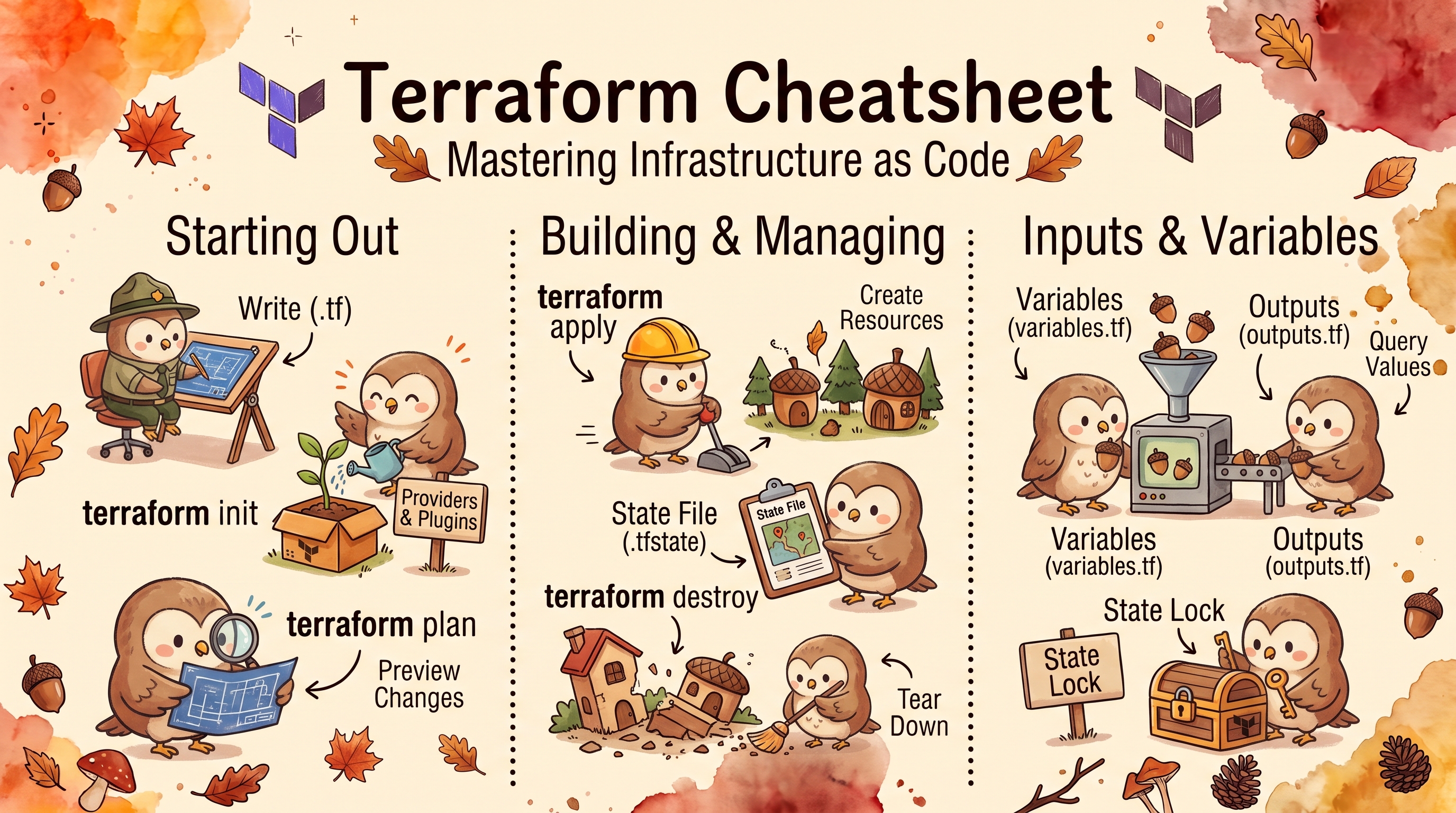
Terraform Cheatsheet
Comprehensive Terraform reference guide featuring installation instructions across multiple platforms, core commands, state management, workspace operations, debugging techniques, and essential utilities for infrastructure as code.
Installation Commands
| Platform | Method | Command |
|---|---|---|
| Ubuntu/Debian | Package Manager | wget -O - https://apt.releases.hashicorp.com/gpg | sudo gpg --dearmor -o /usr/share/keyrings/hashicorp-archive-keyring.gpgecho "deb [arch=$(dpkg --print-architecture) signed-by=/usr/share/keyrings/hashicorp-archive-keyring.gpg] https://apt.releases.hashicorp.com $(grep -oP '(?<=UBUNTU_CODENAME=).*' /etc/os-release || lsb_release -cs) main" | sudo tee /etc/apt/sources.list.d/hashicorp.listsudo apt update && sudo apt install terraform |
| CentOS/RHEL | Package Manager | sudo yum install -y yum-utilssudo yum-config-manager --add-repo https://rpm.releases.hashicorp.com/RHEL/hashicorp.reposudo yum -y install terraform |
| Amazon Linux | Package Manager | sudo yum install -y yum-utils shadow-utilssudo yum-config-manager --add-repo https://rpm.releases.hashicorp.com/AmazonLinux/hashicorp.reposudo yum -y install terraform |
| macOS | Homebrew | brew tap hashicorp/tapbrew install hashicorp/tap/terraform |
| macOS (Intel) | Manual | curl -O https://releases.hashicorp.com/terraform/1.16.6/terraform_1.16.6_darwin_amd64.zipunzip terraform_1.16.6_darwin_amd64.zipsudo mv terraform /usr/local/bin/ |
| macOS (Apple Silicon) | Manual | curl -O https://releases.hashicorp.com/terraform/1.16.6/terraform_1.16.6_darwin_arm64.zipunzip terraform_1.16.6_darwin_arm64.zipsudo mv terraform /usr/local/bin/ |
| All Platforms | Autocomplete | terraform -install-autocomplete |
Core Commands
| Command | Description |
|---|---|
terraform version | Get the terraform version |
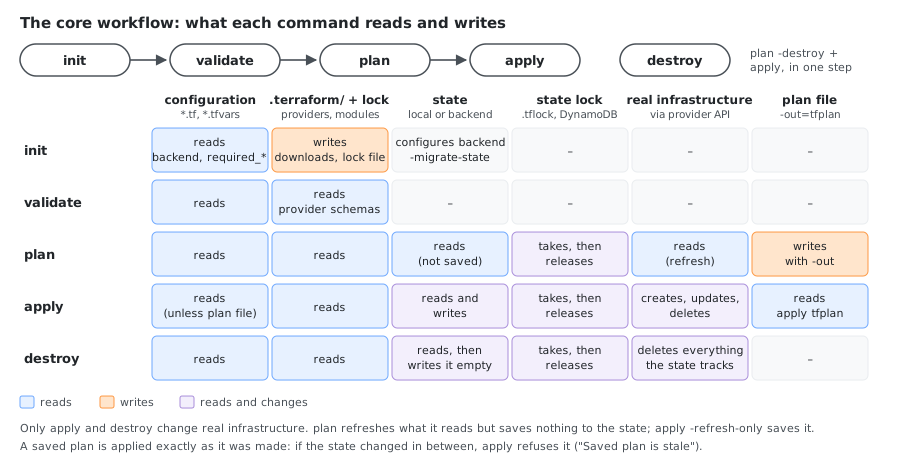
terraform init | Initialize configuration (generate .terraform & .terraform.lock.hcl) |
terraform init -backend-config="key=value" | Initialize with backend configuration |
terraform init -backend-config="backend.conf" | Initialize with backend configuration file |
terraform init -backend=false | Skip backend initialization entirely |
terraform init -upgrade | Initialize and upgrade providers |
terraform init -get=false | Skip getting/updating modules |
terraform init -reconfigure | Reconfigure backend ignoring saved configuration |
terraform init -migrate-state | Migrate state from another backend |
terraform init -force-copy | Force copying state during migration without prompting (implies -migrate-state) |
terraform init -lockfile=readonly | Initialize without modifying the lock file |
terraform init -from-module=SOURCE | Copy a source module into the current directory and initialize |
terraform init -json | Output in machine-readable JSON format |
terraform init -input=false | Skip interactive prompts |
terraform init -plugin-dir=PATH | Force plugin installation from a specific directory only |
terraform init -lock=false | Don’t hold state lock during migration (dangerous) |
terraform init -lock-timeout=120s | Change state lock timeout |
Getting Help
| Command | Description |
|---|---|
terraform -help or terraform -h | List all commands (main workflow commands first) |
terraform <command> -help | Options of one command, e.g. terraform plan -h |
terraform -version | Version, same as terraform version |
Authentication
| Command | Description |
|---|---|
terraform login | Log in to Terraform Cloud |
terraform logout | Log out from Terraform Cloud |
terraform login <hostname> | Log in to a different host |
terraform logout <hostname> | Remove the stored credentials for one host (the default is app.terraform.io) |
Module Management
| Command | Description |
|---|---|
terraform get | Get modules |
terraform get -update | Update modules |
terraform graph -type=plan | grep module | Filter graph output for module dependencies |
terraform init already downloads modules, so terraform get is rarely needed on its own.
Planning & Validation
| Command | Description |
|---|---|
terraform plan | Create an execution plan |
terraform plan -out=tfplan | Save plan to a file |
terraform plan -var-file="prod.tfvars" | Plan with variable files |
terraform plan -var="region=us-west-2" | Plan with inline variables |
terraform plan -replace aws_instance.example | Replace selected resources |
terraform plan -target=module.vpc | Target specific resources |
terraform plan -detailed-exitcode | Exit code 0=no changes, 1=error, 2=changes present |
terraform plan -refresh=false | Skip refresh of remote objects |
terraform validate | Validate configuration files |
terraform fmt | Format configuration files |
terraform fmt -check | Check if input is formatted |
terraform fmt -diff | Display formatting differences |
terraform fmt -recursive | Format files in subdirectories |
Apply & Deploy
| Command | Description |
|---|---|
terraform apply | Apply changes |
terraform apply tfplan | Apply a saved plan |
terraform apply -auto-approve | Auto-approve without confirmation |
terraform apply -target=aws_instance.example | Apply with specific targets |
terraform apply -var="key=value" | Apply with specific variable |
terraform apply -var-file="prod.tfvars" | Apply with variable files |
terraform apply --parallelism=5 | Set number of simultaneous operations |
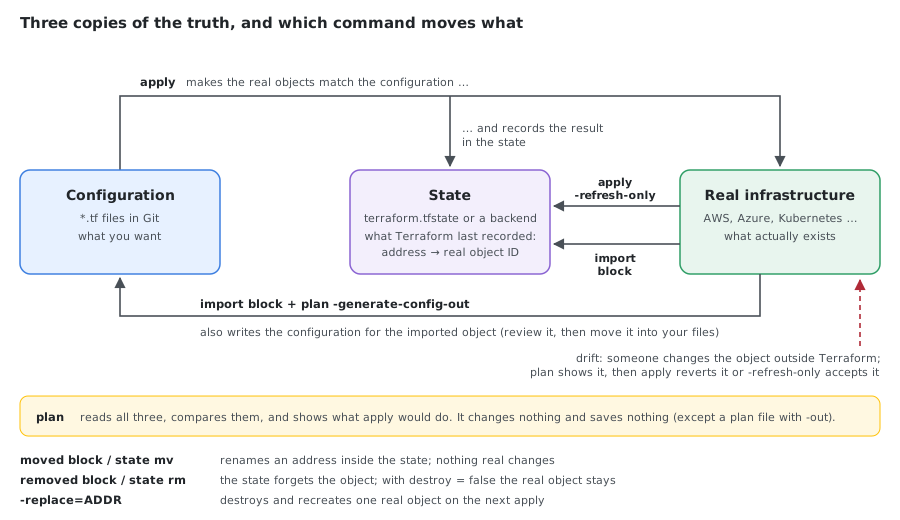
terraform apply -refresh-only | Refresh state without changing resources (detect drift) |
Destroy & Cleanup
| Command | Description |
|---|---|
terraform destroy | Destroy all resources |
terraform destroy -auto-approve | Destroy with auto-approve |
terraform destroy -target=aws_instance.example | Destroy specific resources |
terraform destroy -target='aws_instance.example["key"]' | Destroy one instance of a for_each resource. Use single quotes so the shell keeps the double quotes |
terraform plan -destroy | Plan destruction |
terraform plan -destroy -out=destroy.tfplan | Save destroy plan to file |
terraform apply destroy.tfplan | Apply destroy plan |
Taint, Untaint, and Replace
| Command | Description |
|---|---|
terraform taint aws_instance.example | Mark a resource to be destroyed and recreated on the next apply |
terraform untaint aws_instance.example | Remove the taint |
terraform plan -replace=aws_instance.example | Preferred: plan a replacement without editing state (the plan says will be replaced, as requested) |
terraform apply -replace=aws_instance.example | Replace the resource in one step |
terraform refresh | Update state from real infrastructure. Prefer terraform apply -refresh-only, which shows the changes first |
On Terraform 1.16, taint, untaint, and refresh still work and print no deprecation warning, but the -replace and -refresh-only forms are the recommended ones. taint writes to state immediately, so a mistake changes the next plan for everyone using that state. -replace is visible in the plan before anything is changed.
State Management
| Command | Description |
|---|---|
terraform show | Show current state |
terraform show my.plan | Inspect the plan |
terraform show terraform.tfstate | Show a specific state file instead of the current state |
terraform state list | List resources in state |
terraform state list | wc -l | Count resources |
terraform state list | cut -d. -f1 | sort | uniq -c | Count resources by type |
terraform show -json | jq '.values.root_module.resources[] | {address: .address, depends_on: .depends_on}' | Get all resource dependencies |
terraform state show aws_instance.example | Show specific resource |
terraform state rm aws_instance.example | Remove resource from state |
terraform import aws_instance.example i-1234567890abcdef0 | Import existing resource |
terraform plan -generate-config-out=generated.tf | With an import block in the configuration, write the matching resource configuration (the terraform import command does not generate any) |
terraform state mv aws_instance.example aws_instance.new_name | Move resource in state |
terraform state replace-provider hashicorp/aws registry.acme.corp/acme/aws | Replace provider in state. A private registry address needs all three parts, host/namespace/type; registry.acme.corp/aws fails with dots are not allowed |
terraform state pull | Pull remote state |
terraform state pull > terraform.tfstate | Save remote state to file |
terraform state push terraform.tfstate | Push local state to remote |
terraform force-unlock -force my_lock_id | Manually unlock state |
Workspace Management
| Command | Description |
|---|---|
terraform workspace list | List workspaces |
terraform workspace new dev | Create new workspace |
terraform workspace select prod | Select workspace |
terraform workspace show | Show current workspace |
terraform workspace delete dev | Delete workspace |
Output & Variables
| Command | Description |
|---|---|
terraform output | Show outputs |
terraform output instance_ip | Show specific output |
terraform output -json | Show outputs in JSON format |
terraform output -raw <name> | Show specific output value without quotes |
terraform output -state=terraform.tfstate <name> | Read an output from a specific local state file (ignored when the state is remote) |
Debugging & Troubleshooting
| Command | Description |
|---|---|
export TF_LOG=DEBUG; terraform plan | Enable debug logging |
TF_LOG=DEBUG terraform init | Enable debug logging for specific command |
export TF_LOG_PATH=./terraform.log; terraform apply | Log to file |
unset TF_LOG or export TF_LOG= | Disable logging |
Available Log Levels: TRACE, DEBUG, INFO, WARN, ERROR (in order of decreasing verbosity)
Common Errors and Fixes
All four reproduced on Terraform 1.16.6.
State lock held: another run is in progress (or crashed while holding the lock):
Error: Error acquiring the state lock
Error message: resource temporarily unavailable
Lock Info:
  ID:        5655ac73-41b8-8922-6280-797c64a5ba18
  Path:      terraform.tfstate
  Operation: OperationTypeApply
  Who:       user@host
Wait, or pass -lock-timeout=5m to wait automatically. Only if the run that holds it is really gone: terraform force-unlock 5655ac73-41b8-8922-6280-797c64a5ba18.
Provider checksum mismatch: the downloaded provider doesn’t match .terraform.lock.hcl:
Error: Failed to install provider
Error while installing hashicorp/random v3.7.2: the current package for
registry.terraform.io/hashicorp/random 3.7.2 doesn't match any of the
checksums previously recorded in the dependency lock file
terraform init -upgrade does not fix it (it fails the same way), and terraform providers lock with the bad file in place only adds hashes next to the wrong one. Find out why the hash differs first (a lock file made on another OS has only that OS’s hashes; a changed package is a security problem). Then delete the provider’s entry or the whole lock file and record hashes for every platform you use:
rm .terraform.lock.hcl
terraform providers lock -platform=linux_amd64 -platform=darwin_arm64
terraform init
Dependency cycle: two resources reference each other:
Error: Cycle:
  terraform_data.a
  terraform_data.b
terraform validate reports it too. Break the loop: move the shared value into a variable or a third resource, or use a separate attachment resource (for example aws_security_group_rule instead of inline rules on two security groups that reference each other).
for_each with values known only after apply:
resource "terraform_data" "per_id" {
  for_each = toset(terraform_data.ids[*].id) # IDs don't exist until apply
  input    = each.value
}
Error: Invalid for_each argument
The "for_each" set includes values derived from resource attributes that
cannot be determined until apply, and so Terraform cannot determine the full
set of keys that will identify the instances of this resource.
The keys of for_each must be known at plan time; only the values may be unknown. Key by something from the configuration instead: for_each = terraform_data.ids when ids itself uses for_each = toset(local.names), or a map with static keys. The error also suggests -target to apply the dependency first, as a one-off.
Terraform Console: Expressions and State
| Command | Description |
|---|---|
terraform console | Interactive console |
echo '1 + 5' | terraform console | Evaluate an expression (prints 6) |
echo 'terraform_data.example.output' | terraform console | Read an attribute of a resource from the current state (needs an initialized directory with state) |
echo 'var.region' | terraform console -var="region=eu-west-1" | Evaluate with a variable value |
Terraform Console Functions
| Function | Command | Description |
|---|---|---|
upper() | echo 'upper("hello")' | terraform console | Convert string to uppercase |
lower() | echo 'lower("HELLO")' | terraform console | Convert string to lowercase |
title() | echo 'title("hello world")' | terraform console | Convert to title case |
trim() | echo 'trim(" hello ", " ")' | terraform console | Remove leading/trailing characters |
trimspace() | echo 'trimspace(" hello ")' | terraform console | Remove leading/trailing whitespace |
join() | echo 'join(",",["a","b","c"])' | terraform console | Join list elements with delimiter |
split() | echo 'split(",","a,b,c")' | terraform console | Split string into list |
replace() | echo 'replace("hello world", "world", "terraform")' | terraform console | Replace substring in string |
substr() | echo 'substr("hello world", 0, 5)' | terraform console | Extract substring |
length() | echo 'length(["a","b","c"])' | terraform console | Get length of list/map/string |
element() | echo 'element(["a","b","c"], 1)' | terraform console | Get element at index |
index() | echo 'index(["a","b","c"], "b")' | terraform console | Find index of element |
contains() | echo 'contains(["a","b","c"], "b")' | terraform console | Check if list contains value |
concat() | echo 'concat(["a","b"],["c","d"])' | terraform console | Concatenate lists |
flatten() | echo 'flatten([["a","b"],["c","d"]])' | terraform console | Flatten nested lists |
distinct() | echo 'distinct(["a","b","a","c"])' | terraform console | Remove duplicate values |
sort() | echo 'sort(["c","a","b"])' | terraform console | Sort list alphabetically |
reverse() | echo 'reverse(["a","b","c"])' | terraform console | Reverse list order |
slice() | echo 'slice(["a","b","c","d"], 1, 3)' | terraform console | Extract slice from list |
merge() | echo 'merge({a=1},{b=2},{c=3})' | terraform console | Merge maps together |
keys() | echo 'keys({a=1,b=2,c=3})' | terraform console | Get map keys as list |
values() | echo 'values({a=1,b=2,c=3})' | terraform console | Get map values as list |
lookup() | echo 'lookup({a=1,b=2}, "a", "default")' | terraform console | Get map value with default |
zipmap() | echo 'zipmap(["a","b"],[1,2])' | terraform console | Create map from two lists |
base64encode() | echo 'base64encode("hello")' | terraform console | Encode string to base64 |
base64decode() | echo 'base64decode("aGVsbG8=")' | terraform console | Decode base64 string |
jsonencode() | echo 'jsonencode({name="test"})' | terraform console | Encode value as JSON |
jsondecode() | echo 'jsondecode("{\"name\":\"test\"}")' | terraform console | Decode JSON string |
yamlencode() | echo 'yamlencode({name="test"})' | terraform console | Encode value as YAML |
yamldecode() | echo 'yamldecode("name: test")' | terraform console | Decode YAML string |
format() | echo 'format("Hello, %s!", "World")' | terraform console | Format string with placeholders |
formatlist() | echo 'formatlist("Hello, %s!", ["Alice","Bob"])' | terraform console | Format list of strings |
regex() | echo 'regex("[a-z]+", "abc123")' | terraform console | Extract regex match |
regexall() | echo 'regexall("[0-9]+", "a1b2c3")' | terraform console | Extract all regex matches |
can() | echo 'can(regex("^[a-z]+$", "abc"))' | terraform console | Test if expression succeeds |
try() | echo 'try(tonumber("abc"), 0)' | terraform console | First argument that doesn’t fail (prints 0). Note 1/0 is not an error in Terraform: it is +Inf |
coalesce() | echo 'coalesce("", null, "default")' | terraform console | Return first non-null/empty value |
coalescelist() | echo 'coalescelist([], ["default"])' | terraform console | Return first non-empty list |
compact() | echo 'compact(["a","","b",null,"c"])' | terraform console | Remove empty strings from list |
chunklist() | echo 'chunklist(["a","b","c","d"], 2)' | terraform console | Split list into chunks |
setproduct() | echo 'setproduct(["a","b"],[1,2])' | terraform console | Cartesian product of sets |
setunion() | echo 'setunion(["a","b"],["b","c"])' | terraform console | Union of sets |
setintersection() | echo 'setintersection(["a","b"],["b","c"])' | terraform console | Intersection of sets |
setsubtract() | echo 'setsubtract(["a","b","c"],["b"])' | terraform console | Subtract one set from another |
abs() | echo 'abs(-5)' | terraform console | Absolute value |
ceil() | echo 'ceil(4.3)' | terraform console | Round up to nearest integer |
floor() | echo 'floor(4.7)' | terraform console | Round down to nearest integer |
max() | echo 'max(5, 12, 9)' | terraform console | Maximum value |
min() | echo 'min(5, 12, 9)' | terraform console | Minimum value |
pow() | echo 'pow(2, 3)' | terraform console | Power (2^3) |
log() | echo 'log(100, 10)' | terraform console | Logarithm: log(number, base), prints 2 |
parseint() | echo 'parseint("100", 10)' | terraform console | Parse string to integer |
timestamp() | echo 'timestamp()' | terraform console | Current timestamp |
formatdate() | echo 'formatdate("YYYY-MM-DD", timestamp())' | terraform console | Format timestamp |
timeadd() | echo 'timeadd(timestamp(), "1h")' | terraform console | Add duration to timestamp |
timecmp() | echo 'timecmp(timestamp(), "2024-01-01T00:00:00Z")' | terraform console | Compare timestamps |
uuid() | echo 'uuid()' | terraform console | Generate UUID |
uuidv5() | echo 'uuidv5("dns", "terraform.io")' | terraform console | Generate UUIDv5 |
md5() | echo 'md5("hello")' | terraform console | MD5 hash |
sha1() | echo 'sha1("hello")' | terraform console | SHA1 hash |
sha256() | echo 'sha256("hello")' | terraform console | SHA256 hash |
sha512() | echo 'sha512("hello")' | terraform console | SHA512 hash |
bcrypt() | echo 'bcrypt("password")' | terraform console | Bcrypt hash |
fileexists() | echo 'fileexists("main.tf")' | terraform console | Check if file exists |
file() | echo 'file("main.tf")' | terraform console | Read file content |
filebase64() | echo 'filebase64("main.tf")' | terraform console | Read file as base64 |
basename() | echo 'basename("/path/to/file.txt")' | terraform console | Get filename from path |
dirname() | echo 'dirname("/path/to/file.txt")' | terraform console | Get directory from path |
pathexpand() | echo 'pathexpand("~/.ssh/id_rsa")' | terraform console | Expand ~ in path |
cidrhost() | echo 'cidrhost("10.0.0.0/24", 5)' | terraform console | Calculate IP address in CIDR |
cidrnetmask() | echo 'cidrnetmask("10.0.0.0/24")' | terraform console | Get netmask from CIDR |
cidrsubnet() | echo 'cidrsubnet("10.0.0.0/16", 8, 2)' | terraform console | Calculate subnet address |
cidrsubnets() | echo 'cidrsubnets("10.0.0.0/16", 4, 4, 8)' | terraform console | Calculate multiple subnets |
tobool() | echo 'tobool("true")' | terraform console | Convert to boolean |
tolist() | echo 'tolist(["a","b"])' | terraform console | Convert to list |
tomap() | echo 'tomap({a=1,b=2})' | terraform console | Convert to map |
tonumber() | echo 'tonumber("42")' | terraform console | Convert to number |
toset() | echo 'toset(["a","b","a"])' | terraform console | Convert to set |
tostring() | echo 'tostring(42)' | terraform console | Convert to string |
type() | echo 'type("hello")' | terraform console | Get type of value |
Commands That Fail or Mislead
Some older cheatsheets still list these. On Terraform 1.16:
| Old command | What happens | Use instead |
|---|---|---|
terraform validate -backend=false | Failed to parse command-line flags: validate has no -backend option | terraform init -backend=false && terraform validate |
terraform init -get-plugins=false | Failed to parse command-line flags (removed) | terraform init -plugin-dir=PATH to control the source |
terraform init -verify-plugins=false | Failed to parse command-line flags (removed) | Provider signatures are always verified through the lock file |
terraform apply refresh=false | Treated as a plan file: Failed to load "refresh=false" as a plan file (stat refresh=false: no such file or directory) | terraform apply -refresh=false (the dash is required) |
terraform state mv aws_iam_role.x module.custom_module | Invalid target address: the target must include the resource | terraform state mv aws_iam_role.x module.custom_module.aws_iam_role.x |
terraform apply -lock=true | Works, but is the default | Only -lock=false changes behavior |
Newer Commands and Features (1.10 to 1.16)
| Command or feature | Since | What it does |
|---|---|---|
terraform modules / terraform modules -json | 1.10 | List the modules the configuration declares and the versions installed |
terraform query | 1.14 | Search existing infrastructure with list blocks in *.tfquery.hcl files |
terraform query -generate-config-out=found.tf | 1.14 | Write resource blocks for everything found, ready to import |
ephemeral resources | 1.10 | Values that exist during a run but are never saved in the plan or state |
Write-only arguments (*_wo) | 1.11 | Arguments sent to the provider but never stored in the state |
use_lockfile = true in the s3 backend | 1.10 | State locking without DynamoDB (see below) |
terraform modules on a configuration with a registry module and a local one:
Modules declared by configuration:
.
├── "vpc"[registry.terraform.io/terraform-aws-modules/vpc/aws] 6.7.3 (~> 6.0)
└── "web_servers"[./modules/web-server]
terraform query reads list blocks. The provider must support listing that type: AWS provider 6.69 supports 253 of them, including aws_s3_bucket and aws_iam_role.
# buckets.tfquery.hcl
list "aws_s3_bucket" "all" {
  provider = aws
}
$ terraform query
list.aws_s3_bucket.all   account_id=,bucket=reports-2024,region=us-east-1   reports-2024
list.aws_s3_bucket.all   account_id=,bucket=reports-2025,region=us-east-1   reports-2025
With -generate-config-out=found.tf it writes one resource "aws_s3_bucket" "all_0", "all_1", … block per result.
Ephemeral resources and write-only arguments keep a secret out of the state entirely. Here a password is generated for one run and sent to Secrets Manager:
ephemeral "random_password" "db" {
  length  = 20
  special = false
}

resource "aws_secretsmanager_secret" "db" {
  name = "prod/db/password"
}

resource "aws_secretsmanager_secret_version" "db" {
  secret_id                = aws_secretsmanager_secret.db.id
  secret_string_wo         = ephemeral.random_password.db.result
  secret_string_wo_version = 1
}
ephemeral.random_password.db: Opening...
ephemeral.random_password.db: Opening complete after 0s
ephemeral.random_password.db: Closing...
After apply, the secret in Secrets Manager holds the 20-character password, but the state has no random_password at all, and terraform state show prints secret_string_wo = (write-only attribute); in the state file both secret_string and secret_string_wo are empty. Increase secret_string_wo_version to send a new value: Terraform can’t compare a value it never stored. Ephemeral values can’t be used in outputs or regular arguments; output "pw" { value = ephemeral.random_password.db.result } fails with Error: Ephemeral value not allowed.
Graph & Dependencies
| Command | Description |
|---|---|
terraform graph | Generate dependency graph |
terraform graph > graph.dot | Save graph to file |
terraform graph | dot -Tpng > graph.png | Convert to PNG (requires Graphviz) |
terraform graph -draw-cycles | Highlight any cycles in the graph with colored edges (requires -type flag) |
terraform graph -plan=tfplan | Graph from a saved plan file (terraform plan -out=tfplan) |
terraform graph -type=TYPE | TYPE is plan, plan-refresh-only, plan-destroy, or apply. Anything else is rejected |
Common Flags
| Flag | Description |
|---|---|
-chdir=DIR | Change to directory before running |
-no-color | Disable colored output |
-input=false | Disable interactive input prompts |
-lock=false | Don’t hold state lock |
-lock-timeout=60s | Duration to wait for lock |
-parallelism=n | Limit concurrent operations |
-refresh=false | Skip refresh of remote objects |
-target=resource | Target specific resource |
-var="key=value" | Set variable |
-var-file="file.tfvars" | Load variables from file |
-auto-approve | Skip interactive approval |
-backup="path" | Path to backup state file |
-state="path" | Path to read/write state |
Provider Management
| Command | Description |
|---|---|
terraform providers | Show providers |
terraform providers schema -json | Show provider schemas (requires -json) |
terraform providers lock | Lock provider versions |
terraform providers lock -platform=linux_amd64 -platform=darwin_amd64 -platform=windows_amd64 | Pre-populate hashes for multiple platforms |
terraform providers mirror /path/to/mirror | Mirror providers for offline use |
State File Operations
| Command | Description |
|---|---|
cp terraform.tfstate terraform.tfstate.backup | Backup state file |
cp terraform.tfstate.backup terraform.tfstate | Restore state file |
terraform show -json > state.json | Convert state to JSON |
diff terraform.tfstate.backup terraform.tfstate | Compare state files |
terraform plan -refresh-only | Inspect resource drift without updating state |
terraform apply -refresh-only | Plan and refresh the state file |
Testing & Validation
| Command | Description |
|---|---|
terraform validate | Validate syntax (requires terraform init) |
terraform init -backend=false && terraform validate | Validate code without backend credentials |
terraform validate -json | Output in machine-readable JSON format |
terraform test | Run the tests in *.tftest.hcl files, found in the working directory and in tests/ |
terraform test -test-directory=PATH | Look for test files in a different directory (the root files still run too) |
terraform test -filter=tests/my_test.tftest.hcl | Run only one test file |
terraform test -verbose | Print the plan or state of each run block |
terraform test -junit-xml=report.xml | Save a JUnit XML report for CI |
Testing with Mock Providers
mock_provider (Terraform 1.7+) replaces a real provider in terraform test, so tests run without credentials or cloud resources. expect_failures checks that a validation rejects bad input.
# main.tf
variable "environment" {
  type = string
  validation {
    condition     = contains(["dev", "staging", "prod"], var.environment)
    error_message = "Environment must be dev, staging, or prod."
  }
}

resource "aws_s3_bucket" "logs" {
  bucket = "myapp-${var.environment}-logs"
}

output "bucket_arn" {
  value = aws_s3_bucket.logs.arn
}
# tests/bucket.tftest.hcl
mock_provider "aws" {
  mock_resource "aws_s3_bucket" {
    defaults = {
      arn = "arn:aws:s3:::mocked"
    }
  }
}

variables {
  environment = "dev"
}

run "bucket_name_follows_environment" {
  command = plan

  assert {
    condition     = aws_s3_bucket.logs.bucket == "myapp-dev-logs"
    error_message = "Unexpected bucket name"
  }
}

run "apply_with_mocked_aws" {
  assert {
    condition     = output.bucket_arn == "arn:aws:s3:::mocked"
    error_message = "Mock ARN not used"
  }
}

run "rejects_unknown_environment" {
  command = plan

  variables {
    environment = "qa"
  }

  expect_failures = [
    var.environment,
  ]
}
$ terraform test
tests/bucket.tftest.hcl... in progress
  run "bucket_name_follows_environment"... pass
  run "apply_with_mocked_aws"... pass
  run "rejects_unknown_environment"... pass
tests/bucket.tftest.hcl... tearing down
tests/bucket.tftest.hcl... pass

Success! 3 passed, 0 failed.
The second run has no command, so it applies, against the mock. With environment = "prod" in the last run, the validation passes and the test fails as it should:
  run "rejects_unknown_environment"... fail
Error: Missing expected failure
The checkable object, var.environment, was expected to report an error but
did not.
Failure! 2 passed, 1 failed.
Terraform Variables
# String variables
export TF_VAR_region="us-west-2"
export TF_VAR_instance_type="t3.micro"
export TF_VAR_environment="production"
export TF_VAR_project_name="my-app"
export TF_VAR_ami_id="ami-0d26eb3972b7f8c96"

# Number variables
export TF_VAR_instance_count="3"
export TF_VAR_max_size="10"
export TF_VAR_port="8080"
export TF_VAR_timeout="300"

# Boolean variables
export TF_VAR_enable_monitoring="true"
export TF_VAR_enable_backup="false"
export TF_VAR_create_dns_record="true"
export TF_VAR_enable_encryption="true"

# List variables (same type elements)
export TF_VAR_availability_zones='["us-west-2a","us-west-2b","us-west-2c"]'
export TF_VAR_allowed_ips='["192.168.1.0/24","10.0.0.0/8"]'
export TF_VAR_subnet_ids='["subnet-abc123","subnet-def456"]'

# Map variables (key-value pairs)
export TF_VAR_tags='{"Environment":"prod","Team":"devops","CostCenter":"engineering"}'
export TF_VAR_instance_types='{"dev":"t3.micro","staging":"t3.small","prod":"t3.large"}'

# Object variables (structured data with different types)
export TF_VAR_server_config='{"name":"web-server","port":8080,"enabled":true}'
export TF_VAR_database='{"engine":"postgres","version":"14.5","multi_az":true,"allocated_storage":100}'

# Tuple variables (fixed-length, mixed types)
export TF_VAR_deployment_info='["v1.2.3",8080,true]'

# Set variables (unique values, unordered)
export TF_VAR_security_groups='["sg-123456","sg-789012","sg-345678"]'

# Complex nested structures
export TF_VAR_vpc_config='{"cidr":"10.0.0.0/16","enable_dns":true,"subnets":[{"cidr":"10.0.1.0/24","az":"us-west-2a"},{"cidr":"10.0.2.0/24","az":"us-west-2b"}]}'

# Map of objects (multiple structured items)
export TF_VAR_subnets='{"subnet_a":{"name":"Public-A","cidr":"10.0.1.0/24","public":true},"subnet_b":{"name":"Private-B","cidr":"10.0.2.0/24","public":false}}'

# List of objects (ordered structured items)
export TF_VAR_instances='[{"name":"web-1","type":"t3.micro","az":"us-west-2a"},{"name":"web-2","type":"t3.micro","az":"us-west-2b"}]'

# Sensitive variables (passwords, keys, tokens)
export TF_VAR_db_password="super-secret-password"
export TF_VAR_api_key="your-api-key-here"
export TF_VAR_private_key="-----BEGIN RSA PRIVATE KEY-----..."

# Terraform-specific environment variables
export TF_LOG=DEBUG                                    # Log level: TRACE, DEBUG, INFO, WARN, ERROR
export TF_LOG_PATH="./terraform.log"                   # Log file path
export TF_LOG_CORE=TRACE                               # Core Terraform logging
export TF_LOG_PROVIDER=DEBUG                           # Provider plugin logging

# Configuration and behavior
export TF_CLI_CONFIG_FILE="$HOME/.terraformrc"         # CLI configuration file
export TF_DATA_DIR=".terraform"                        # Data directory for plugins and modules
export TF_PLUGIN_CACHE_DIR="$HOME/.terraform.d/plugin-cache"  # Plugin cache directory
export TF_INPUT=false                                  # Disable interactive input prompts
export TF_IN_AUTOMATION=true                           # Indicate running in CI/CD
export TF_WORKSPACE="production"                       # Set active workspace

# Terraform Cloud/Enterprise
export TF_TOKEN_app_terraform_io="your-token-here"     # Terraform Cloud token
export TF_CLOUD_ORGANIZATION="my-org"                  # Organization name
export TF_CLOUD_HOSTNAME="app.terraform.io"            # Terraform Cloud hostname

# CLI behavior customization
export TF_CLI_ARGS="-no-color"                         # Global CLI arguments
export TF_CLI_ARGS_plan="-refresh=false"               # Arguments for plan command
export TF_CLI_ARGS_apply="-auto-approve"               # Arguments for apply command

# Provider-specific variables (examples)
export TF_VAR_aws_access_key="AKIAIOSFODNN7EXAMPLE"
export TF_VAR_aws_secret_key="wJalrXUtnFEMI/K7MDENG/bPxRfiCYEXAMPLEKEY"
export TF_VAR_azure_subscription_id="00000000-0000-0000-0000-000000000000"
export TF_VAR_gcp_project_id="my-gcp-project"
Variable Precedence Order
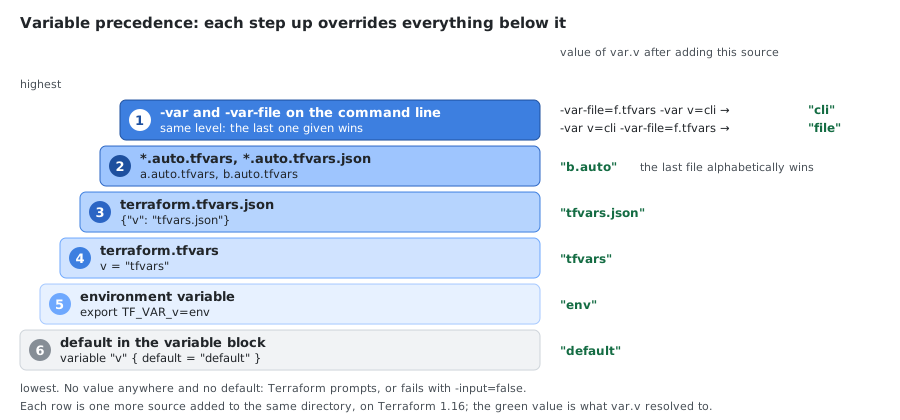
Terraform sources are listed here from highest to lowest priority. A higher row overrides every row below it:
| Priority | Source | Example | Notes |
|---|---|---|---|
| 1 (Highest) | Command-line -var and -var-file flags | terraform apply -var-file="prod.tfvars" -var="region=us-east-1" | Same level: they are applied in the order given and the last one on the command line wins, whether it is -var or -var-file |
| 2 | *.auto.tfvars or *.auto.tfvars.json files | production.auto.tfvars | Loaded automatically in lexical order |
| 3 | terraform.tfvars.json file | terraform.tfvars.json | Loaded automatically if present |
| 4 | terraform.tfvars file | terraform.tfvars | Loaded automatically if present |
| 5 | Environment variables | export TF_VAR_region="us-west-2" | Must use TF_VAR_ prefix |
| 6 (Lowest) | Default values in variable blocks | variable "region" { default = "us-east-1" } | Used only if no other source provides a value |
Key Points:
- CLI flags (
-varand-var-file) always take precedence over everything else - If a variable is not set by any method, Terraform will prompt interactively (unless
-input=falseis set) *.auto.tfvarsfiles are processed in alphabetical order-varand-var-fileare processed left to right as written:-var-file=f.tfvars -var v=xgivesx,-var v=x -var-file=f.tfvarsgives the value inf.tfvars- On Terraform 1.16 with one variable set in every place: environment variable <
terraform.tfvars<terraform.tfvars.json<*.auto.tfvars(the last file alphabetically wins) < command line, and the order of-varagainst-var-filedecides between those two - Environment variables are useful for CI/CD pipelines and sensitive values
Different Ways to Set Variables
| Method | Command | Use Case |
|---|---|---|
| Inline variable | terraform plan -var="instance_type=t2.large" | Quick one-off changes |
| Multiple inline variables | terraform apply -var="image_id=ami-abc123" -var="instance_type=t2.micro" | Setting multiple values at once |
| List variable inline | terraform apply -var='image_id_list=["ami-abc123","ami-def456"]' | Passing list values |
| Map variable inline | terraform apply -var='image_id_map={"us-east-1":"ami-abc123","us-east-2":"ami-def456"}' | Passing map values |
| Variable file | terraform plan -var-file="prod.tfvars" | Environment-specific configurations |
| Environment variable | export TF_VAR_instance_type="t2.small" | CI/CD pipelines, sensitive values |
| Environment variable with command | TF_VAR_instance_type="t2.small" terraform plan | One-time environment variable |
| Default in variable block | variable "region" { default = "us-east-1" } | Fallback values |
Auto-Loading Variable Files
Terraform automatically loads variable files without requiring the -var-file flag:
| File Name Pattern | Auto-Loaded | Example |
|---|---|---|
terraform.tfvars | ✅ Yes | terraform.tfvars |
terraform.tfvars.json | ✅ Yes | terraform.tfvars.json |
*.auto.tfvars | ✅ Yes | dev.auto.tfvars, prod.auto.tfvars |
*.auto.tfvars.json | ✅ Yes | dev.auto.tfvars.json |
Custom name (e.g., prod.tfvars) | ❌ No | Requires -var-file="prod.tfvars" |
Best Practices:
- Use
terraform.tfvarsfor default/common values - Use
*.auto.tfvarsfor environment-specific values (e.g.,dev.auto.tfvars,prod.auto.tfvars) - Use custom-named
.tfvarsfiles with-var-fileflag for explicit control - Never commit sensitive values in
.tfvarsfiles to version control - Use environment variables (
TF_VAR_*) for secrets and CI/CD pipelines
State Management Best Practices
# Backup state before major operations
cp terraform.tfstate terraform.tfstate.backup.$(date +%Y%m%d_%H%M%S)

# Use remote state
terraform init -backend-config="bucket=my-tf-state" -backend-config="key=prod/terraform.tfstate"

# Enable state locking (S3 native lock file, Terraform 1.10+)
terraform init -backend-config="use_lockfile=true"
Useful Aliases
Add these to your ~/.zshrc or ~/.bashrc:
alias tf="terraform"
alias tfi="terraform init"
alias tfp="terraform plan"
alias tfa="terraform apply"
alias tfd="terraform destroy"
alias tfs="terraform show"
alias tfo="terraform output"
alias tfv="terraform validate"
alias tff="terraform fmt"
alias tfw="terraform workspace"
alias tfws="terraform workspace show"
alias tfsl="terraform state list"
Useful Functions
# Generic function for any base64 string
tf_base64_decode() {
    if [ $# -eq 0 ]; then
        echo "Usage: tf_base64_decode '<base64_string>'"
        return 1
    fi
    echo "base64decode(\"$1\")" | terraform console
}
Best Practices
Project Structure
terraform-project/
├── environments/
│   ├── dev/
│   │   ├── main.tf
│   │   ├── variables.tf
│   │   ├── outputs.tf
│   │   ├── terraform.tfvars
│   │   └── versions.tf
│   ├── staging/
│   └── prod/
├── modules/
│   ├── vpc/
│   │   ├── main.tf
│   │   ├── variables.tf
│   │   ├── outputs.tf
│   │   └── versions.tf
│   ├── ec2/
│   └── rds/
├── .gitignore
├── README.md
└── Makefile
File Organization
| File | Purpose |
|---|---|
main.tf | Primary resource definitions and backend config |
variables.tf | Input variable declarations |
outputs.tf | Output value definitions |
versions.tf | Provider version constraints |
locals.tf | Local values and computed expressions |
terraform.tfvars | Environment-specific variable values |
*.auto.tfvars | Auto-loaded variable values |
Naming Conventions
# Resources: snake_case
resource "aws_instance" "web_server" {}

# Resource tags: kebab-case pattern <project>-<environment>-<resource>-<purpose>
tags = {
  Name = "${var.project_name}-${var.environment}-web-server"
}

# Variables: snake_case with descriptive names
variable "database_instance_class" {}

# Modules: snake_case
module "vpc_network" {}
Tagging Strategy
locals {
  mandatory_tags = {
    Project     = var.project_name
    Environment = var.environment
    ManagedBy   = "Terraform"
    Owner       = var.team_name
    CostCenter  = var.cost_center
  }

  common_tags = merge(local.mandatory_tags, {
    Application = var.application_name
  })
}

# Apply to resources
resource "aws_instance" "web" {
  # ...
  tags = merge(local.common_tags, {
    Name = "${var.project_name}-${var.environment}-web-server"
    Role = "web-server"
  })
}
Input Validation
variable "environment" {
  description = "Environment name"
  type        = string

  validation {
    condition     = can(regex("^(dev|staging|prod)$", var.environment))
    error_message = "Environment must be dev, staging, or prod."
  }
}

variable "instance_type" {
  description = "EC2 instance type"
  type        = string
  default     = "t3.micro"

  validation {
    condition = contains([
      "t3.micro", "t3.small", "t3.medium", "t3.large",
      "t3.xlarge", "t3.2xlarge"
    ], var.instance_type)
    error_message = "Instance type must be a valid t3 instance type."
  }
}

variable "cidr_block" {
  description = "VPC CIDR block"
  type        = string

  validation {
    condition     = can(cidrhost(var.cidr_block, 0))
    error_message = "CIDR block must be a valid IPv4 CIDR."
  }
}
Sensitive Data Management
# Mark variables as sensitive
variable "database_password" {
  description = "Database master password"
  type        = string
  sensitive   = true
}

# Use AWS Secrets Manager
data "aws_secretsmanager_secret_version" "db_password" {
  secret_id = "prod/database/password"
}

locals {
  db_password = jsondecode(
    data.aws_secretsmanager_secret_version.db_password.secret_string
  )["password"]
}

# Mark outputs as sensitive
output "database_endpoint" {
  description = "Database endpoint"
  value       = aws_db_instance.main.endpoint
  sensitive   = true
}
Remote State with Encryption and Locking
terraform {
  backend "s3" {
    bucket       = "company-terraform-state"
    key          = "environments/prod/terraform.tfstate"
    region       = "us-east-1"
    encrypt      = true
    kms_key_id   = "arn:aws:kms:us-east-1:123456789012:key/..."
    use_lockfile = true
    assume_role = {
      role_arn = "arn:aws:iam::123456789012:role/TerraformStateRole"
    }
  }
}
On Terraform 1.16, a top-level role_arn in the s3 backend fails with Error: Unsupported argument; it belongs in assume_role. use_lockfile = true locks with a <key>.tflock object next to the state, so no DynamoDB table is needed.
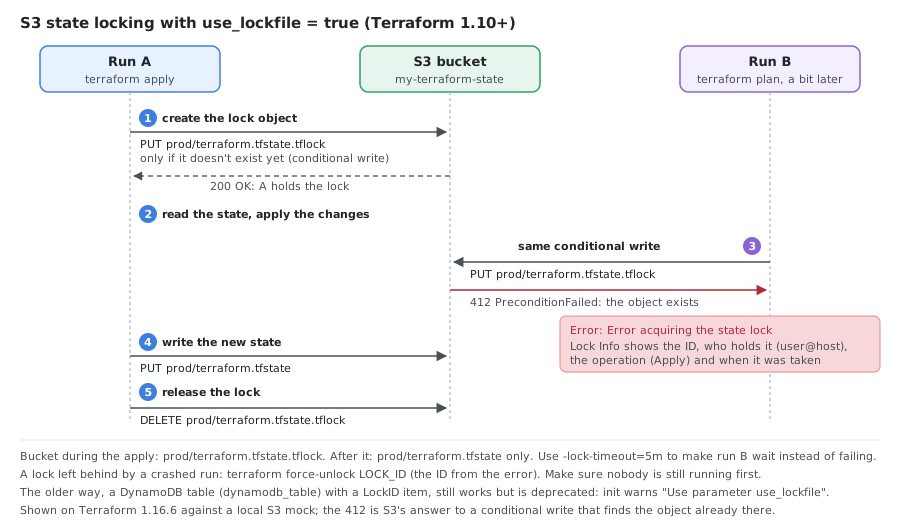
On Terraform 1.16.6 against a local S3 mock, the bucket held prod/terraform.tfstate.tflock during the apply and only prod/terraform.tfstate after it. A second run started during the apply got:
Error: Error acquiring the state lock
Error message: operation error S3: PutObject, https response error
StatusCode: 412, RequestID: ..., api error PreconditionFailed: At least one of the pre-conditions you
specified did not hold
Lock Info:
  ID:        c8a60fa0-3031-3c98-3a8c-90fe837e19e8
  Path:      my-terraform-state/prod/terraform.tfstate
  Operation: OperationTypeApply
  Who:       user@host
  Version:   1.16.6
-lock-timeout=5m makes the second run wait for the lock instead of failing.
DynamoDB Lock Table (deprecated)
dynamodb_table still works, but terraform init warns The parameter "dynamodb_table" is deprecated. Use parameter "use_lockfile", and HashiCorp says DynamoDB locking will be removed in a future minor version. Keep the table only while older Terraform versions (before 1.10) share the state; both settings can be on at the same time during the move.
resource "aws_dynamodb_table" "terraform_locks" {
  name         = "terraform-state-locks"
  billing_mode = "PAY_PER_REQUEST"
  hash_key     = "LockID"

  attribute {
    name = "LockID"
    type = "S"
  }

  tags = {
    Name = "Terraform State Lock Table"
  }
}
Alternative Backends
# Azure
terraform {
  backend "azurerm" {
    resource_group_name  = "terraform-rg"
    storage_account_name = "terraformstate"
    container_name       = "tfstate"
    key                  = "prod.terraform.tfstate"
  }
}

# Google Cloud
terraform {
  backend "gcs" {
    bucket = "my-terraform-state"
    prefix = "prod"
  }
}

# Consul
terraform {
  backend "consul" {
    address = "consul.example.com:8500"
    scheme  = "https"
    path    = "terraform/prod"
  }
}
HCP Terraform (cloud block)
For HCP Terraform (the former Terraform Cloud) use a cloud block inside terraform {} instead of a backend. The organization must already exist:
terraform {
  cloud {
    organization = "example-org"

    workspaces {
      name = "app-production" # or: tags = ["app", "prod"] to select by tag
    }
  }
}
terraform login        # stores an API token in ~/.terraform.d/credentials.tfrc.json
terraform init         # connects to the workspace; asks to migrate local state if there is any
A configuration with this cloud block passes terraform init -backend=false and terraform validate; logging in and connecting need an HCP Terraform account. Do not put access keys in the configuration (some older tutorials do, in backend "s3" blocks); use environment variables or a role, and TF_TOKEN_app_terraform_io for the HCP Terraform token in CI.
Backend Configuration File (backend.hcl)
bucket       = "my-terraform-state"
key          = "prod/terraform.tfstate"
region       = "us-east-1"
encrypt      = true
use_lockfile = true
terraform init -backend-config=backend.hcl
terraform init -migrate-state -force-copy
Remote State Data Source
# Access outputs from another state file
data "terraform_remote_state" "vpc" {
  backend = "s3"

  config = {
    bucket = "my-terraform-state"
    key    = "vpc/terraform.tfstate"
    region = "us-east-1"
  }
}

# Use outputs from remote state
resource "aws_instance" "example" {
  ami           = "ami-0c55b159cbfafe1d0"
  instance_type = "t2.micro"
  subnet_id     = data.terraform_remote_state.vpc.outputs.private_subnet_id

  vpc_security_group_ids = [
    data.terraform_remote_state.vpc.outputs.default_security_group_id
  ]
}
Import with count/for_each
# Import resource with count index
terraform import 'aws_instance.example[0]' i-1234567890abcdef0

# Import resource with for_each key
terraform import 'aws_instance.example["web"]' i-1234567890abcdef0

# Import into module
terraform import module.database.aws_db_instance.main mydb-instance
Move Resources Between Modules
# Move resource into a module
terraform state mv aws_instance.example module.web.aws_instance.example

# Move resource out of a module
terraform state mv module.web.aws_instance.example aws_instance.example

# Move between count and for_each
terraform state mv 'aws_instance.example[0]' 'aws_instance.example["web"]'
State Drift Detection and Fix
# Detect drift (show what changed outside Terraform)
terraform plan -refresh-only

# Update state to match real infrastructure (without changing resources)
terraform apply -refresh-only

# Fix drift by updating infrastructure to match config
terraform apply
IAM Policy for State Access
{
  "Version": "2012-10-17",
  "Statement": [
    {
      "Effect": "Allow",
      "Action": "s3:ListBucket",
      "Resource": "arn:aws:s3:::my-terraform-state"
    },
    {
      "Effect": "Allow",
      "Action": [
        "s3:GetObject",
        "s3:PutObject"
      ],
      "Resource": "arn:aws:s3:::my-terraform-state/prod/terraform.tfstate"
    },
    {
      "Effect": "Allow",
      "Action": [
        "s3:GetObject",
        "s3:PutObject",
        "s3:DeleteObject"
      ],
      "Resource": "arn:aws:s3:::my-terraform-state/prod/terraform.tfstate.tflock"
    }
  ]
}
s3:ListBucket on the bucket, read and write on the state object (Terraform never deletes it), and read, write and delete on the .tflock lock file. With the deprecated DynamoDB locking, add dynamodb:DescribeTable, GetItem, PutItem and DeleteItem on the table.
State file path convention:
company-terraform-state/
├── environments/
│   ├── dev/terraform.tfstate
│   ├── staging/terraform.tfstate
│   └── prod/terraform.tfstate
└── global/
    ├── iam.tfstate
    └── route53.tfstate
Lifecycle Rules
resource "aws_instance" "web" {
  ami           = var.ami_id
  instance_type = var.instance_type

  lifecycle {
    create_before_destroy = true # Zero-downtime replacements
    prevent_destroy       = true # Protect production resources
    ignore_changes = [
      ami, # Ignore AMI drift
      tags["LastUpdated"],
    ]
  }
}

# Controlled replacements with replace_triggered_by
resource "aws_instance" "web" {
  ami           = var.ami_id
  instance_type = var.instance_type

  lifecycle {
    replace_triggered_by = [
      aws_launch_template.web.latest_version
    ]
  }
}

# Preconditions and postconditions (Terraform 1.2+)
resource "aws_instance" "app" {
  ami           = data.aws_ami.example.id
  instance_type = var.instance_type

  lifecycle {
    precondition {
      condition     = data.aws_ami.example.architecture == "x86_64"
      error_message = "AMI must be x86_64 architecture."
    }

    postcondition {
      condition     = self.public_ip != ""
      error_message = "Instance must have a public IP."
    }
  }
}
Moved Blocks (Refactoring)
# Rename a resource (Terraform 1.1+)
moved {
  from = aws_instance.old_name
  to   = aws_instance.new_name
}

# Move a resource into a module
moved {
  from = aws_instance.example
  to   = module.compute.aws_instance.example
}

# Move a resource out of a module
moved {
  from = module.compute.aws_instance.example
  to   = aws_instance.example
}
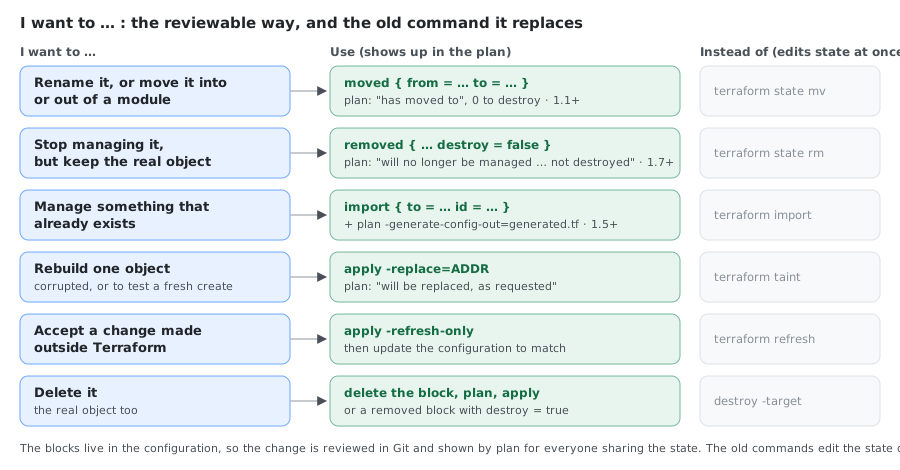
Import, Moved and Removed Blocks in Practice
Run on Terraform 1.16.6 with AWS provider 6.69, against a local S3 mock with an existing bucket legacy-logs.
Import an existing object, and let Terraform write its configuration (Terraform 1.5+):
import {
  to = aws_s3_bucket.logs
  id = "legacy-logs"
}
terraform plan -generate-config-out=generated.tf
aws_s3_bucket.logs: Preparing import... [id=legacy-logs]
aws_s3_bucket.logs: Refreshing state... [id=legacy-logs]
  # aws_s3_bucket.logs will be imported
  # (config will be generated)
# __generated__ by Terraform
# Please review these resources and move them into your main configuration files.

# __generated__ by Terraform from "legacy-logs"
resource "aws_s3_bucket" "logs" {
  bucket              = "legacy-logs"
  bucket_namespace    = "global"
  force_destroy       = false
  object_lock_enabled = false
  region              = "us-east-1"
  tags                = {}
  tags_all            = {}
}
-generate-config-out only works while the resource block doesn’t exist yet. After terraform apply, the bucket is in the state; the import block can be deleted then (keeping it does no harm).
Rename with a moved block. The old resource block must be gone, otherwise plan fails with Error: Moved object still exists:
resource "aws_s3_bucket" "app_logs" {
  bucket = "legacy-logs"
}

moved {
  from = aws_s3_bucket.logs
  to   = aws_s3_bucket.app_logs
}
  # aws_s3_bucket.logs has moved to aws_s3_bucket.app_logs
Plan: 0 to add, 0 to change, 0 to destroy.
Stop managing an object but keep it, with a removed block (Terraform 1.7+) and no resource block:
removed {
  from = aws_s3_bucket.app_logs

  lifecycle {
    destroy = false
  }
}
 # aws_s3_bucket.app_logs will no longer be managed by Terraform, but will not be destroyed
 # (destroy = false is set in the configuration)
Plan: 0 to add, 0 to change, 0 to destroy.

Warning: Some objects will no longer be managed by Terraform
After apply the state is empty and the bucket still exists. Without the removed block, deleting the resource block plans will be destroyed (because aws_s3_bucket.logs is not in configuration); with destroy = true the removed block destroys it too.
Check Blocks (Terraform 1.5+)
check "health_check" {
  data "http" "app" {
    url = "https://${aws_instance.app.public_ip}:8080/health"
  }

  assert {
    condition     = data.http.app.status_code == 200
    error_message = "Health check failed."
  }
}
Provisioners
resource "aws_instance" "app" {
  ami           = data.aws_ami.latest.id
  instance_type = "t3.micro"

  # File provisioner
  provisioner "file" {
    content = templatefile("${path.module}/templates/app.conf.tpl", {
      db_host     = aws_db_instance.main.endpoint
      environment = var.environment
    })
    destination = "/tmp/app.conf"

    connection {
      type        = "ssh"
      user        = "ec2-user"
      private_key = file(var.private_key_path)
      host        = self.public_ip
    }
  }

  # Remote-exec provisioner
  provisioner "remote-exec" {
    inline = [
      "sudo mv /tmp/app.conf /etc/app/app.conf",
      "sudo systemctl enable app",
      "sudo systemctl start app",
    ]

    connection {
      type        = "ssh"
      user        = "ec2-user"
      private_key = file(var.private_key_path)
      host        = self.public_ip
    }
  }
}

# Local-exec provisioner (runs on the machine running Terraform).
# terraform_data (built in since 1.4) replaces null_resource without the null provider
resource "terraform_data" "ansible" {
  triggers_replace = [aws_instance.cluster[*].id]

  provisioner "local-exec" {
    command = "ansible-playbook -i ${aws_instance.cluster[0].public_ip}, playbooks/setup.yml"
  }
}
for_each vs count
# Use for_each when resources are identified by name/key (safer for additions/removals)
resource "aws_instance" "web" {
  for_each = toset(var.availability_zones)

  ami               = data.aws_ami.ubuntu.id
  instance_type     = var.instance_type
  availability_zone = each.value

  tags = merge(local.common_tags, {
    Name = "${var.project_name}-web-${each.value}"
  })
}

# Use count only for conditional creation
resource "aws_eip" "web" {
  count    = var.create_eip ? 1 : 0
  instance = aws_instance.web.id
  domain   = "vpc"
}
Error Handling
# Conditional resources with count
resource "aws_eip" "web" {
  count    = var.create_eip ? 1 : 0
  instance = aws_instance.web.id
  domain   = "vpc"
}

# Safe references to conditional resources
output "eip_public_ip" {
  value = var.create_eip ? aws_eip.web[0].public_ip : aws_instance.web.public_ip
}

# Fallback values with try(): for attributes that may be missing,
# not for data sources that fail (a failed lookup still stops the plan)
locals {
  ami_id = try(var.overrides.ami_id, var.default_ami_id)
}
Network Security
# Reference security groups instead of CIDR blocks where possible
resource "aws_security_group" "web" {
  name_prefix = "${var.project_name}-${var.environment}-web-"
  vpc_id      = var.vpc_id

  ingress {
    description     = "HTTPS from ALB"
    from_port       = 443
    to_port         = 443
    protocol        = "tcp"
    security_groups = [aws_security_group.alb.id]
  }

  egress {
    description = "HTTPS to internet"
    from_port   = 443
    to_port     = 443
    protocol    = "tcp"
    cidr_blocks = ["0.0.0.0/0"]
  }

  tags = local.common_tags
}
CI/CD — GitHub Actions
name: Terraform
on:
  push:
    branches: [main]
  pull_request:
    branches: [main]

jobs:
  terraform:
    runs-on: ubuntu-latest
    steps:
    - uses: actions/checkout@v7
    - uses: hashicorp/setup-terraform@v4
      with:
        terraform_version: 1.16.6
    - run: terraform init
    - run: terraform validate
    - run: terraform fmt -check
    - run: terraform plan -var-file="prod.tfvars"
    - name: Apply (main only)
      if: github.ref == 'refs/heads/main'
      run: terraform apply -auto-approve -var-file="prod.tfvars"
CI/CD — GitLab CI
stages: [validate, plan, apply]

variables:
  TF_ROOT: ${CI_PROJECT_DIR}/environments/prod

before_script:
  - cd ${TF_ROOT}
  - terraform init

validate:
  stage: validate
  script:
    - terraform validate
    - terraform fmt -check

plan:
  stage: plan
  script:
    - terraform plan -var-file="prod.tfvars" -out=tfplan
  artifacts:
    paths: [environments/prod/tfplan]
  rules:
    - if: $CI_COMMIT_BRANCH == "main"

apply:
  stage: apply
  script:
    - terraform apply tfplan
  dependencies: [plan]
  rules:
    - if: $CI_COMMIT_BRANCH == "main"
      when: manual
Artifact paths are relative to the project directory. Written as [${TF_ROOT}/tfplan], the { starts a YAML mapping and the file doesn’t parse.
Pre-commit Checklist
terraform fmt -recursive
terraform validate
terraform plan -var-file="dev.tfvars"
terraform plan -refresh-only        # Check for drift
General Rules
- Always commit
.terraform.lock.hclto version control. - Never commit
.tfvarsfiles with secrets. - Store state files remotely with encryption and locking.
- Use separate directories or separate backend state keys to isolate environments such as dev, staging and prod. Workspaces are better for testing a variation of the same code, and some guides advise against using them to separate stages.
- Use modules for reusable components.
- Pin provider versions in production.
- Always run
terraform planbeforeapply. - Review and understand the execution plan before applying.
- Use
for_eachovercountfor named resources. - Add
validationblocks to all input variables. - Mark sensitive outputs and variables with
sensitive = true. - Use
create_before_destroyfor zero-downtime replacements. - Use
prevent_destroyon critical production resources.
Common Workflows
# Complete workflow
terraform init
terraform plan -var-file="prod.tfvars" -out=prod.tfplan
terraform apply prod.tfplan

# Quick development cycle
terraform fmt && terraform validate && terraform plan

# Emergency destroy
terraform plan -destroy -out=destroy.tfplan
terraform apply destroy.tfplan

# Import and apply
terraform import aws_s3_bucket.example my-bucket-name
terraform plan
terraform apply

# Detect drift without making changes
terraform plan -refresh-only

# Backup state before major operations
cp terraform.tfstate terraform.tfstate.backup.$(date +%Y%m%d_%H%M%S)
HCL Syntax Reference
Comments
# Single line comment
// Also single line comment

/*
Multi-line
comment
*/
Data Types
# String
variable "name" {
  type    = string
  default = "example"
}

# Number
variable "port" {
  type    = number
  default = 80
}

# Boolean
variable "enabled" {
  type    = bool
  default = true
}

# List
variable "availability_zones" {
  type    = list(string)
  default = ["us-east-1a", "us-east-1b"]
}

# Map
variable "tags" {
  type = map(string)
  default = {
    Environment = "dev"
    Project     = "example"
  }
}

# Object
variable "server" {
  type = object({
    name = string
    port = number
  })
  default = {
    name = "web"
    port = 8080
  }
}

# Tuple (fixed-length, mixed types)
variable "mixed_list" {
  type    = tuple([string, number, bool])
  default = ["hello", 42, true]
}
Data Sources
data "aws_ami" "ubuntu" {
  most_recent = true
  owners      = ["099720109477"]

  filter {
    name   = "name"
    values = ["ubuntu/images/hvm-ssd-gp3/ubuntu-noble-24.04-amd64-server-*"]
  }
}

data "aws_availability_zones" "available" {
  state = "available"
}

resource "aws_instance" "example" {
  ami           = data.aws_ami.ubuntu.id
  instance_type = "t2.micro"
}
Conditional Expressions
locals {
  # Ternary operator
  instance_type = var.environment == "prod" ? "t3.large" : "t2.micro"

  # Conditional list
  security_groups = var.environment == "prod" ? [
    aws_security_group.prod.id
    ] : [
    aws_security_group.dev.id,
    aws_security_group.debug.id
  ]
}
For Expressions
locals {
  # Transform list
  uppercase_names = [for name in var.names : upper(name)]

  # Filter and transform
  prod_instances = [
    for instance in var.instances : instance.name
    if instance.environment == "prod"
  ]

  # Create map from list
  instance_map = {
    for instance in var.instances : instance.id => instance.name
  }

  # Transform map values
  uppercase_tags = {
    for key, value in var.tags : key => upper(value)
  }

  # Filter map
  env_tags = {
    for key, value in var.tags : key => value
    if key != "temporary"
  }

  # Flatten nested structures (common pattern for security group rules)
  security_rules = flatten([
    for group_name, group in var.security_groups : [
      for rule in group.rules : {
        group_name  = group_name
        from_port   = rule.from_port
        to_port     = rule.to_port
        protocol    = rule.protocol
        cidr_blocks = rule.cidr_blocks
      }
    ]
  ])
}
Splat Expressions
[*] is a shorter form of a for expression that collects one attribute from every element of a list (or from every instance created with count):
locals {
  servers = [
    { name = "web-1", ip = "10.0.0.1" },
    { name = "web-2", ip = "10.0.0.2" },
  ]
}

output "ips" {
  value = local.servers[*].ip # same as [for s in local.servers : s.ip]
}

output "private_addresses" {
  value = aws_instance.server[*].private_ip # one value per count instance
}
On Terraform 1.16:
| Expression | Result |
|---|---|
local.servers[*].ip | ["10.0.0.1", "10.0.0.2"] |
local.servers.*.name (legacy attribute-only splat) | ["web-1", "web-2"]; prefer [*] |
local.single[*].name where single is one object | ["solo"] (a single value is wrapped in a list) |
local.nothing[*].name where nothing is null | [] (null becomes an empty list) |
(local.servers[*].name)[0] | "web-1" |
local.servers[*].name[0] | Error: Invalid index, because the [0] is applied to each name, not to the list |
Use [*] only for a simple attribute path; for filters, conditions or maps use a for expression. Put the splat in parentheses before indexing the result.
Dynamic Blocks
variable "ingress_rules" {
  type = list(object({
    from_port   = number
    to_port     = number
    protocol    = string
    cidr_blocks = list(string)
  }))

  default = [
    {
      from_port   = 80
      to_port     = 80
      protocol    = "tcp"
      cidr_blocks = ["0.0.0.0/0"]
    },
    {
      from_port   = 443
      to_port     = 443
      protocol    = "tcp"
      cidr_blocks = ["0.0.0.0/0"]
    }
  ]
}

resource "aws_security_group" "example" {
  name = "example"

  dynamic "ingress" {
    for_each = var.ingress_rules
    content {
      from_port   = ingress.value.from_port
      to_port     = ingress.value.to_port
      protocol    = ingress.value.protocol
      cidr_blocks = ingress.value.cidr_blocks
    }
  }
}
The loop variable inside content is named after the block label (ingress.value, ingress.key). Use iterator to give it another name, for example when the label is long or when dynamic blocks are nested:
  dynamic "ingress" {
    for_each = var.ingress_ports        # list(number)
    iterator = port

    content {
      from_port   = port.value
      to_port     = port.value
      protocol    = "tcp"
      cidr_blocks = ["10.0.0.0/16"]
    }
  }
Both forms, with iterator = port and with ingress.value, pass terraform validate (AWS provider 6.69). for_each can be a list, a set or a map; inside content, <label>.key is the list index or the map key. Dynamic blocks are supported in resource, data, provider and provisioner blocks.
String Interpolation and Templates
locals {
  # Interpolation
  message = "Hello, ${var.name}!"

  # Templatefile
  user_data = templatefile("${path.module}/user_data.sh", {
    db_host = var.database_host
    app_env = var.environment
  })
}
Provider Aliases
provider "aws" {
  region = "us-east-1"
}

provider "aws" {
  alias  = "us_west"
  region = "us-west-2"
}

# Use alias in resource
resource "aws_instance" "west" {
  provider      = aws.us_west
  ami           = "ami-0c55b159cbfafe1d0"
  instance_type = "t2.micro"
}
Complex Outputs
output "instance_id" {
  description = "ID of the EC2 instance"
  value       = aws_instance.example.id
}

output "instances" {
  description = "Instance details"
  value = {
    for instance in aws_instance.example : instance.id => {
      private_ip = instance.private_ip
      public_ip  = instance.public_ip
    }
  }
}
Environment-specific Configuration Pattern
locals {
  config = {
    dev = {
      instance_type  = "t2.micro"
      instance_count = 1
    }
    staging = {
      instance_type  = "t3.small"
      instance_count = 2
    }
    prod = {
      instance_type  = "t3.large"
      instance_count = 3
    }
  }

  env_config = local.config[var.environment]
}

resource "aws_instance" "web" {
  count         = local.env_config.instance_count
  ami           = data.aws_ami.ubuntu.id
  instance_type = local.env_config.instance_type
}
Providers and Modules
Version Constraint Syntax
| Operator | Meaning | Example |
|---|---|---|
= 3.2.1 | Exactly this version | version = "= 3.2.1" |
>= 3.1.0 | At least this version | version = ">= 3.1.0" |
~> 5.0 | >= 5.0, < 6.0 (minor releases) | version = "~> 5.0" |
~> 5.1.0 | >= 5.1.0, < 5.2.0 (patch releases) | version = "~> 5.1.0" |
>= 2.0, < 3.0 | Range constraint | version = ">= 2.0, < 3.0" |
Provider with assume_role and default_tags
provider "aws" {
  region  = var.aws_region
  profile = "default"

  assume_role {
    role_arn = "arn:aws:iam::123456789012:role/TerraformRole"
  }

  default_tags {
    tags = {
      Project     = "MyApp"
      Environment = var.environment
      ManagedBy   = "Terraform"
    }
  }
}
Kubernetes Provider
provider "kubernetes" {
  config_path = "~/.kube/config"

  # Or use explicit config
  # host                   = var.cluster_endpoint
  # token                  = var.cluster_token
  # cluster_ca_certificate = base64decode(var.cluster_ca_cert)
}
Module Sources
# Local path
source = "./modules/vpc"
source = "../shared-modules/database"

# Terraform Registry
source  = "terraform-aws-modules/vpc/aws"
version = "~> 6.0"

# Git HTTPS
source = "git::https://example.com/vpc.git"
source = "git::https://example.com/network.git?ref=v1.2.0"
source = "git::https://example.com/network.git//modules/vpc?ref=v1.2.0"

# Git SSH
source = "git::ssh://git@github.com/company/terraform-modules.git//database?ref=v1.0.0"

# S3 bucket
source = "s3::https://s3-eu-west-1.amazonaws.com/terraform-modules/vpc.zip"

# HTTP URL
source = "https://example.com/vpc-module.zip"
Using Registry Modules
module "vpc" {
  source  = "terraform-aws-modules/vpc/aws"
  version = "~> 6.0"

  name = "my-vpc"
  cidr = "10.0.0.0/16"

  azs             = ["us-east-1a", "us-east-1b", "us-east-1c"]
  private_subnets = ["10.0.1.0/24", "10.0.2.0/24", "10.0.3.0/24"]
  public_subnets  = ["10.0.101.0/24", "10.0.102.0/24", "10.0.103.0/24"]

  enable_nat_gateway = true

  tags = {
    Terraform   = "true"
    Environment = "dev"
  }
}

resource "aws_instance" "example" {
  ami           = "ami-0c02fb55956c7d316"
  instance_type = "t3.micro"
  subnet_id     = module.vpc.private_subnets[0]
}
Creating a Module
modules/web-server/
├── main.tf
├── variables.tf
├── outputs.tf
├── versions.tf
└── README.md
# modules/web-server/main.tf
resource "aws_instance" "web" {
  ami           = var.ami_id
  instance_type = var.instance_type
  subnet_id     = var.subnet_id

  vpc_security_group_ids = var.security_group_ids

  user_data = templatefile("${path.module}/user_data.sh", {
    app_name = var.app_name
  })

  tags = merge(var.tags, {
    Name = "${var.app_name}-web-server"
  })
}

# modules/web-server/variables.tf
variable "app_name" {
  description = "Name of the application"
  type        = string
}

variable "ami_id" {
  description = "AMI ID for the instance"
  type        = string
}

variable "instance_type" {
  description = "EC2 instance type"
  type        = string
  default     = "t3.micro"
}

variable "subnet_id" {
  description = "Subnet ID for the instance"
  type        = string
}

variable "security_group_ids" {
  description = "Security groups for the instance"
  type        = list(string)
  default     = []
}

variable "tags" {
  description = "Tags to apply to resources"
  type        = map(string)
  default     = {}
}

# modules/web-server/outputs.tf
output "instance_id" {
  description = "ID of the EC2 instance"
  value       = aws_instance.web.id
}

output "instance_public_ip" {
  description = "Public IP of the EC2 instance"
  value       = aws_instance.web.public_ip
}
Module Composition
module "vpc" {
  source  = "terraform-aws-modules/vpc/aws"
  version = "~> 6.0"

  name = var.vpc_name
  cidr = var.vpc_cidr

  azs             = var.availability_zones
  private_subnets = var.private_subnets
  public_subnets  = var.public_subnets

  enable_nat_gateway   = true
  enable_dns_hostnames = true
}

module "web_servers" {
  source = "./modules/web-server"
  count  = var.web_server_count

  app_name      = "${var.app_name}-${count.index}"
  ami_id        = data.aws_ami.ubuntu.id
  subnet_id     = module.vpc.private_subnets[count.index % length(module.vpc.private_subnets)]
  instance_type = var.web_instance_type

  depends_on = [module.vpc]
}
ami_id has no default in the module, so leaving it out fails terraform validate with The argument "ami_id" is required. user_data is plain text: the AWS provider encodes it, and passing base64encode(...) makes it warn Value is base64 encoded (use user_data_base64 for that).
Private Registry Module
module "internal_vpc" {
  source  = "app.terraform.io/your-org/vpc/aws"
  version = "~> 1.0"

  name = "internal-vpc"
  cidr = "10.0.0.0/16"
}
Provider Mirror (.terraformrc)
provider_installation {
  network_mirror {
    url     = "https://terraform-mirror.company.com/"
    include = ["*/*"]
  }

  direct {
    exclude = ["*/*"]
  }
}
Comments