k9s is a terminal UI for Kubernetes: launch flags, resource commands, keys for pods and logs, filters, namespaces, cluster views and configuration. Everything below was checked on k9s 0.51.0 against a k3s v1.35.9 cluster. Keys can differ between versions: ? in any view lists the keys that view really has.
Installation Platform Package Manager Command macOS / Linux Homebrew brew install k9s (or brew install derailed/k9s/k9s from the k9s tap)Linux (Snap) Snap sudo snap install k9s --devmodeArch Linux pacman sudo pacman -S k9sWindows winget / Scoop / Chocolatey winget install k9s, scoop install k9s, choco install k9sGo go install go install github.com/derailed/k9s@latestAny Binary Download from GitHub Releases
Verify Installation Version 0.51.0
Commit 558caafe7ba067467de46b320cc22ef11fef9c34
Date n/a
Launch & General Command Details k9sStart k9s (current context) k9s -n <namespace>Start in a specific namespace k9s -AStart in all namespaces k9s --context <ctx>Start with a specific kubeconfig context k9s --kubeconfig <path>Use a specific kubeconfig file k9s -c <resource>Start directly in a resource view (e.g. k9s -c pod) k9s --readonlyRead-only mode: the header shows [R], and delete, edit, kill, shell and attach are gone k9s --writeWrite mode, overriding readOnly in the config k9s --headlessStart without the header k9s --logolessStart without the logo k9s --crumbslessStart without the crumbs k9s --splashlessStart without the splash screen k9s -r <seconds>Refresh rate (default 2) k9s --screen-dump-dir <dir>Where Ctrl+s saves files k9s infoShow the config, skins, logs and screen dump paths :q / Ctrl+cQuit k9s ?Show help / keys of the current view Ctrl+a / :aliasesShow all resource aliases (92 on a plain k3s cluster)
Navigation Resource Commands k9s accepts the singular, plural, short name or alias of any resource:
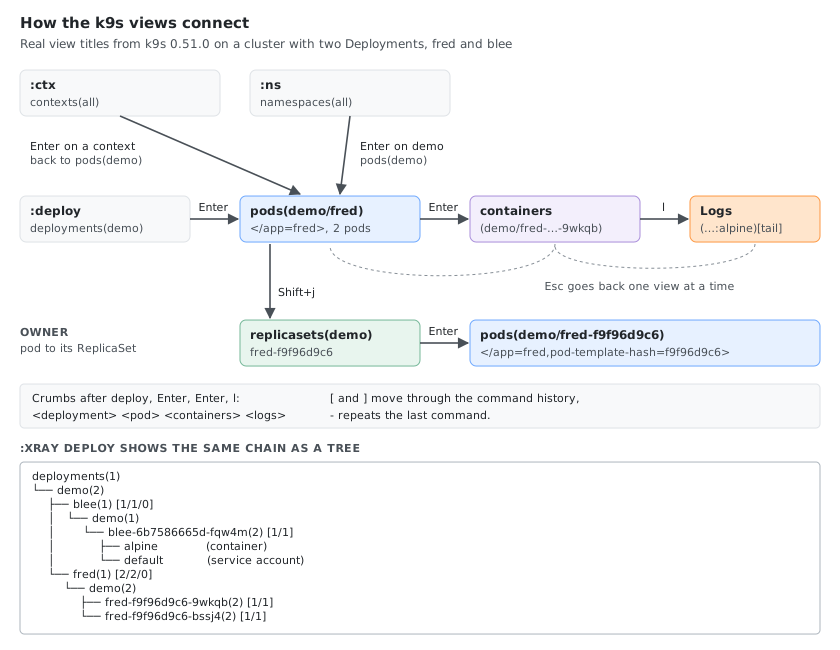
Command Details :podJump to Pods view :pod ns-xView pods in namespace ns-x :pod /fredView pods filtered by fred :pod app=fred,env=devView pods matching labels app=fred and env=dev :pod @ctx1View pods in context ctx1 (switches context) -Repeat the last command [ / ]Back / forward in command history
Core Resources Command Details :podPods :svcServices :deployDeployments :nsNamespaces :nodeNodes :secSecrets :cmConfigMaps :ingIngresses :epEndpoints :rsReplicaSets
Workloads Command Details :cjCronJobs :jobJobs :dsDaemonSets :stsStatefulSets :rcReplicationControllers
Storage Command Details :pvPersistentVolumes :pvcPersistentVolumeClaims :scStorageClasses
RBAC & Security Command Details :saServiceAccounts :rbRoleBindings :crbClusterRoleBindings :roleRoles :crClusterRoles :npNetworkPolicies
Scaling & Config Command Details :hpaHorizontalPodAutoscalers :eventsEvents :limitsLimitRanges :quotaResourceQuotas
Custom Resources Command Details :crdCustomResourceDefinitions :<crd-short-name>Any custom resource by its short name or full name
Pod Keys The keys of the pods view, from its ? help:
Key Details EnterView the pod’s containers dDescribe yYAML eEdit (opens in $EDITOR) Ctrl+dDelete: a dialog with Propagation, Force, and Cancel / OK Ctrl+kKill the pod at once, no confirmation lLogs pLogs of the previous container instance sShell into a container aAttach to a container Shift+fPort-forward fShow the port-forward of the pod Shift+jJump to the owner (ReplicaSet, Job, …) oShow the node the pod runs on tTransfer files (copy to or from a container) iSet image wWarp to the pod’s namespace zSanitize (remove completed and failed pods) c / nCopy the name / copy the namespace Ctrl+zShow only pods with problems (toggle faults) Ctrl+rRefresh Ctrl+sSave the table as CSV (in the screen dump directory) SpaceMark a row (actions apply to all marked rows)
Ctrl+s in a YAML view saves the YAML instead (demo-blee-…--yaml). :screendump (:sd) lists the saved files.
Logs View Key Details 0Tail (follow the log) 1Head (from the start) 2Last 1 minute 3Last 5 minutes 4Last 15 minutes 5Last 30 minutes 6Last 1 hour tToggle timestamps wToggle line wrap sToggle auto-scroll fToggle fullscreen Shift+lToggle column lock cCopy mMark a line Shift+cClear the view Ctrl+sSave the logs to a file Esc / qBack to the previous view
The status line shows the current state: Autoscroll:On ColumnLock:Off FullScreen:Off Timestamps:Off Wrap:Off.
Filtering & Searching Key Details /Filter by name (regex, e.g. fred|blee) /!<term>Inverse filter (exclude matches) /-l <label>=<value>Filter by label selector /-f <term>Fuzzy find (/-f frd finds fred) EscClear the filter
Sorting & Display Key Details Shift+n / Shift+a / Shift+sSort by name / age / status (pods) Shift+→ / Shift+← then Shift+oSelect a column, then sort by it Ctrl+eToggle the header Ctrl+gToggle the crumbs Ctrl+wToggle wide view
Namespace Key Details :nsNamespaces view 0All namespaces 1, 2, …Recently used namespaces, shown at the top left (<1> demo, <2> default)
Cluster Views Command Details :pulse / :puCluster pulse (overview dashboard) :xray <resource> [namespace]Resource tree, e.g. :xray deploy, :xray svc ns-x, :xray po
:popeye is gone: k9s 0.51.0 answers Ruroh? `popeye` command not found. Run the Popeye CLI on its own instead.
Context & Cluster Key Details :ctxContexts view :ctx <context-name>Switch directly to a context :screendump / :sdSaved files (Ctrl+s) :aliasesAll resource aliases :dir <path>Browse a directory
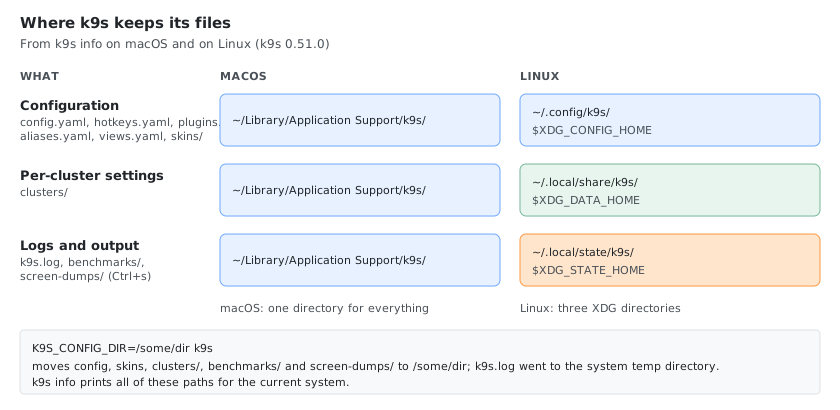
Configuration k9s info shows the paths on your system:
File macOS Linux config.yaml, hotkeys.yaml, plugins.yaml, aliases.yaml, views.yaml~/Library/Application Support/k9s/~/.config/k9s/ ($XDG_CONFIG_HOME/k9s)skins/~/Library/Application Support/k9s/skins/~/.config/k9s/skins/clusters/ (per-context settings)~/Library/Application Support/k9s/clusters/~/.local/share/k9s/clusters/ ($XDG_DATA_HOME)k9s.log, benchmarks/, screen-dumps/~/Library/Application Support/k9s/~/.local/state/k9s/ ($XDG_STATE_HOME)
K9S_CONFIG_DIR moves the configuration (including skins and screen dumps, but not the log) to another directory, which is handy for testing a config without touching your own.
File Details config.yamlMain k9s configuration skins/Skin (theme) files hotkeys.yamlCustom hotkeys plugins.yamlPlugin definitions aliases.yamlCustom resource aliases views.yamlCustom columns per resource
Custom Hotkeys Example hotkeys.yaml in the config directory:
hotKeys :
shift-1 :
shortCut : Shift-1
description : View pods
command : pods
shift-2 :
shortCut : Shift-2
description : View deployments
command : deploy
shift-3 :
shortCut : Shift-3
description : View services
command : svc
Shift+1 then opens the pods view and Shift+2 the deployments view from anywhere.
Custom Alias Example aliases.yaml in the config directory:
aliases :
pp : v1/pods
dd : apps/v1/deployments
ss : v1/services
:dd then opens deployments and :ss services.
Themes / Skins k9s supports color themes via skin files. The community skins are in k9s/skins .
Setup Step Details Find the skins directory k9s info, line SkinsDownload a skin Copy a .yaml skin file into that directory Activate it Set skin in config.yaml (below) Apply Restart k9s
# config.yaml
k9s :
ui :
skin : dracula
With skins/dracula.yaml in place, the k9s log shows Loading global skin skin=dracula at startup.
# macOS
SKINS_DIR= " $HOME/Library/Application Support/k9s/skins"
# Linux
SKINS_DIR= " $HOME/.config/k9s/skins"
mkdir -p " $SKINS_DIR" && curl -sL "https://api.github.com/repos/derailed/k9s/contents/skins" | grep '"download_url"' | cut -d '"' -f 4 | while read url; do curl -sL -o " $SKINS_DIR/ $( basename " $url" ) " " $url" ; done
Popular Skins Skin Description draculaDark theme based on the Dracula palette monokaiMonokai-inspired dark theme gruvbox-darkRetro groove dark color scheme gruvbox-lightRetro groove light color scheme nordArctic, north-bluish palette one-darkAtom One Dark inspired theme solarized-darkSolarized dark solarized-lightSolarized light rose-pineRosé Pine dark theme (also rose-pine-moon, rose-pine-dawn) kanagawaTheme inspired by Hokusai’s wave painting everforest-darkGreen-based, low-contrast dark theme transparentTransparent background (uses the terminal’s colors)
The repository has 44 skins; the API call above lists them all.
Tips Tip Details ?List the keys of the current view (Esc to close) :xray deployDeployment tree (ReplicaSets, Pods, containers) :pulseQuick cluster overview Ctrl+aAll available resource aliases 0All namespaces; 1, 2, … the recent ones Shift+jFrom a pod to its owner Ctrl+zOnly the pods with problems Ctrl+sSave a table (CSV) or a YAML view to the screen dump directory k9s --readonlySafe browsing: no delete, edit, kill or shell Plugins Extend k9s with custom commands via plugins.yaml
Resources 
![The k9s pods view with numbered parts: header with context, read-write mode, cluster, user and versions; namespace shortcuts 0 all, 1 demo, 2 default; key hints; logo; view title pods(demo)[2] with the filter ; sorted NAME column; crumbs; message line](k9s-screen.svg)
Comments