iotop Cheatsheet
Overview
iotop shows disk I/O per process or thread, like top for disk I/O. It needs root (or the NET_ADMIN capability).
There are two programs with almost the same options:
- iotop: the original, written in Python (version 0.6, last released in 2013, still patched by the distributions).
- iotop-c: a rewrite in C, actively developed, with more interactive features.
Which one you get from “install iotop” depends on the release:
| Release | iotop package | Program |
|---|---|---|
| RHEL 7 | iotop-0.6-4.el7 (Python 2) | Python |
| RHEL 8 | iotop-0.6-18.el8 (BaseOS) | Python |
| RHEL 9 | iotop-0.6-30.el9 (BaseOS) | Python |
| RHEL 8 / 9 + EPEL | iotop-c-1.31 (EPEL) | C; it obsoletes the Python iotop and installs as /usr/bin/iotop |
| RHEL 10 | iotop-c-1.26 (BaseOS); dnf install iotop installs it | C |
| Ubuntu 20.04 | iotop 0.6-24, no iotop-c | Python |
| Ubuntu 22.04 | iotop 0.6-24, iotop-c 1.21 | Python by default |
| Ubuntu 24.04 | iotop 0.6-42, iotop-c 1.26 | Python by default |
| Ubuntu 26.04 | iotop 0.6-42, iotop-c 1.31 | Python by default |
On Ubuntu both can be installed side by side: iotop (/usr/sbin/iotop, a link to the Python version, also available as iotop-py) and iotop-c.
The kernel needs CONFIG_TASKSTATS, CONFIG_TASK_DELAY_ACCT, CONFIG_TASK_IO_ACCOUNTING and CONFIG_VM_EVENT_COUNTERS; all are enabled in the RHEL and Ubuntu kernels.
How it works
- Lists the threads from
/procand asks the kernel’s taskstats netlink interface for each one’s I/O counters (the sameread_bytes/write_bytesas/proc/<pid>/io) and delay accounting (SWAPIN, IO). - Taskstats needs root or
CAP_NET_ADMIN; without it the Python version printsNetlink error: Operation not permitted (1)and iotop-cfatal reply error, -1. - Updates every second by default (
-dto change it). - The two header lines: Total is the sum of what the listed threads did; Actual (called Current on Ubuntu and in iotop-c) is what reached the block devices, from
/proc/vmstat. They differ because of the page cache, see below.
/proc/pid/io
Each process’s counters are also readable directly, without root for your own processes:
cat /proc/self/io
rchar: 6695
wchar: 0
syscr: 16
syscw: 0
read_bytes: 12288
write_bytes: 0
cancelled_write_bytes: 0
| Field | Description |
|---|---|
rchar | Bytes passed to read() and pread(), whether or not they came from disk (includes pipes, ttys, page cache hits) |
wchar | Bytes passed to write() and pwrite() |
syscr | Number of read syscalls (read, pread, …) |
syscw | Number of write syscalls (write, pwrite, …) |
read_bytes | Bytes this process really caused to be fetched from the storage layer |
write_bytes | Bytes this process caused to be sent to the storage layer, counted when the page is dirtied |
cancelled_write_bytes | Bytes that were dirtied but never written, because the file was truncated or deleted first |
iotop’s DISK READ and DISK WRITE are read_bytes and write_bytes per second.
Installation
# Ubuntu: the Python version, the C version, or both
sudo apt install iotop
sudo apt install iotop-c        # 22.04+

# RHEL 7
sudo yum install iotop

# RHEL 8 / 9: Python version from BaseOS
sudo dnf install iotop
# ... or the C version from EPEL (replaces the Python one)
sudo dnf install epel-release && sudo dnf install iotop-c

# RHEL 10: the C version
sudo dnf install iotop
Commands
sudo iotop                       # Interactive mode
sudo iotop -o                    # Only processes/threads doing I/O
sudo iotop -P                    # Processes only (no threads); first column becomes PID
sudo iotop -a                    # Accumulated I/O since start instead of bandwidth
sudo iotop -d 2                  # Update every 2 seconds (default: 1)
sudo iotop -p PID                # Only this PID (repeat -p for more)
sudo iotop -u USER               # Only this user's processes
sudo iotop -b                    # Batch mode (for logging/parsing)
sudo iotop -b -n 10              # Batch mode, 10 iterations
sudo iotop -k                    # Kilobytes instead of B/K/M/G (useful for sorting)
sudo iotop -t                    # Timestamp on each line (implies -b)
sudo iotop -q                    # Column names only on the first iteration (implies -b)
sudo iotop -qq                   # No column names at all
sudo iotop -qqq                  # No column names and no Total/Actual lines (Python version)
sudo iotop -oa                   # Active + accumulated (good for troubleshooting)
sudo iotop -oPa                  # Active + processes only + accumulated
-c (full command line) exists only in iotop-c; the Python version prints its usage and exits with 2. The Python version always shows the full command line anyway.
Recipes
The first iteration often has nothing to show yet (bandwidth needs two samples), so use -n 2 or more when combining -o with a small -n.
Log a single process to a file
sudo iotop -tbp <pid> -qqq > iostats.log
09:14:10    4041 be/4 root        0.00 B/s  165.93 M/s ?unavailable?  dd if=/dev/zero of=/var/tmp/testfile bs=4k ...
09:14:11    4041 be/4 root        4.00 K/s  142.06 M/s ?unavailable?  dd if=/dev/zero of=/var/tmp/testfile bs=4k ...
Log active processes with timestamps for one minute
sudo iotop -bot -n 60 -d 1 -qqq > iotop.log
Continuous logging
sudo iotop -bot -qqq > iotop_$(date +%Y%m%d_%H%M%S).log
Total I/O summary every second
sudo iotop -b -d 1 -qq | grep "Total DISK"
Total DISK READ: 223.48 M/s | Total DISK WRITE: 0.00 B/s
-qq keeps the summary lines; -qqq removes them. iotop-c indents the line ( Total DISK READ), so match Total DISK rather than ^Total.
Monitor a PID for 24 hours in the background
sudo iotop -botp <pid> -qqq -n 86400 > iotop_$(date +%Y%m%d_%H%M%S).log &
Monitor all PIDs of a process by name
pids=$(pgrep -x nginx | sed 's/^/-p /' | tr '\n' ' ')
[ -n "$pids" ] && sudo iotop -P $pids
-p takes one PID; repeat it for more. A comma-separated list makes the Python version exit with a usage error, and iotop-c only uses the first PID. The [ -n "$pids" ] check matters: if pgrep finds nothing, iotop runs without -p and shows every process.
Top 5 processes by write / read I/O
sudo iotop -boPk -qqq -n 2 | sort -k6 -rn | head -5    # by DISK WRITE
sudo iotop -boPk -qqq -n 2 | sort -k4 -rn | head -5    # by DISK READ
2531 be/4 root 0.00 K/s 733345.44 K/s ?unavailable? dd if=/dev/zero of=/var/tmp/w bs=64k ...
-k puts every value in K/s; without it, sort -n compares 512.00 K/s with 5.12 M/s as plain numbers and gets the order wrong. With -n 2 a busy process appears once per iteration.
Processes above an I/O threshold
# Read or write above 50 MB/s (51200 K/s); with -t the fields are time, PID, PRIO, USER, read, unit, write, unit
sudo iotop -botPk -qqq -n 2 | awk '$5 > 51200 || $7 > 51200'
09:20:51 2531 be/4 root 0.00 K/s 555818.00 K/s ?unavailable? dd if=/dev/zero of=/var/tmp/w bs=64k ...
This field layout is the Python version’s. iotop-c puts the time only in the summary line, not on each process line, so drop -t and use $4 and $6 with iotop-c.
Capture I/O activity
#!/bin/bash
# capture-iotop.sh

OUTPUT="/var/tmp/iotop_$(date +%Y%m%d_%H%M%S).log"
DURATION=60   # seconds
INTERVAL=1    # seconds between samples

echo "Capturing iotop data to $OUTPUT for ${DURATION}s"

sudo iotop -botP -qqq -d "$INTERVAL" -n "$DURATION" > "$OUTPUT"

echo "Done. Output saved to $OUTPUT"
Batch-mode quirks
| Python iotop (Ubuntu, RHEL 7) | Python iotop (RHEL 8, 9) | iotop-c | |
|---|---|---|---|
| Line start | PID | b' before every line (Python 3 bytes bug in the RHEL build) | PID |
-t | Time on every line | Time on every line, glued to b' | Time only on the summary line |
-qqq | No summary lines | No summary lines | Still prints the Total/Current lines |
| delay accounting off | ?unavailable? in SWAPIN/IO | ?unavailable? | 0.00 %, plus a warning on stderr |
On RHEL 8 and 9 strip the prefix before parsing: sudo iotop -boPk -qqq -n 2 | sed "s/^b'//" | sort -k6 -rn.
Interactive Keys
Python iotop:
| Key | Action |
|---|---|
← / → | Previous / next sort column |
Home / End | Sort by the first / last column |
r | Reverse the sort order |
o | Toggle only processes doing I/O |
p | Toggle processes / threads |
a | Toggle accumulated mode |
i | Change the I/O priority (ionice) of a PID |
q | Quit |
| any other key | Refresh now |
iotop-c has the same keys plus, among others:
| Key | Action |
|---|---|
↑ / ↓, PgUp / PgDn | Scroll |
Home / End | Jump to the top / bottom of the list |
Space | Reverse the sort order (like r) |
a | Cycle accumulated, accumulated bandwidth, normal |
c | Full command line / program name |
1-9, 0 | Hide/show a column, show all |
f | Filter by UID / PID |
/ | Filter by regex |
s | Freeze / unfreeze the display |
Ctrl-T | Toggle kernel.task_delayacct |
? / h | Inline help / help window |
W | Save the current settings |
Understanding the Display
Header
Total DISK READ:       266.73 M/s | Total DISK WRITE:       266.73 M/s
Current DISK READ:       0.00 B/s | Current DISK WRITE:       0.00 B/s
- Total: what the listed threads read and wrote (counted when pages are read or dirtied)
- Actual (RHEL Python iotop) / Current (Ubuntu, iotop-c): what the block layer actually transferred
Columns
With delay accounting enabled (see below):
    PID  PRIO  USER     DISK READ  DISK WRITE  SWAPIN      IO    COMMAND
   4177 be/4 root        4.00 K/s  140.12 M/s  0.00 % 74.07 % dd if=/dev/zero of=/var/tmp/testfile bs=4k ...
TID/PID: thread ID, or process ID with-PPRIO: I/O priority class and level (be/4= best-effort 4,rt/0,idle)USER: ownerDISK READ/DISK WRITE: bandwidth, or totals with-aSWAPIN: % of time waiting for pages to be swapped inIO: % of time waiting on I/O (shown asIO>in interactive mode when it’s the sort column)COMMAND: command line (Python), program name or full command line withc/-c(iotop-c)
SWAPIN and IO show ?unavailable?
Since kernel 5.14, delay accounting is off by default (kernel.task_delayacct = 0), which is the case on the Ubuntu 22.04+ and RHEL 9+ kernels. The Python iotop then prints ?unavailable? in both columns; iotop-c prints 0.00 % and warns task_delayacct is 0, enable by: echo 1 > /proc/sys/kernel/task_delayacct.
# Temporary (until reboot)
sudo sysctl -w kernel.task_delayacct=1

# Permanent
echo 'kernel.task_delayacct=1' | sudo tee /etc/sysctl.d/99-iotop.conf
sudo sysctl -p /etc/sysctl.d/99-iotop.conf
The delayacct kernel boot parameter does the same. Delay accounting adds a little overhead to every scheduler switch, which is why it’s off by default; enable it while you investigate.
I/O Priority Classes
rt: real-time, levels 0 (highest) to 7; root onlybe: best-effort, levels 0 to 7, the default (be/4)idle: only gets disk time when nobody else needs it
iotop-c Only
sudo iotop-c -oPa           # Same options as iotop
sudo iotop-c -c             # Full command line
sudo iotop-c -A             # Accumulated bandwidth
sudo iotop-c -e             # Hide exited processes
sudo iotop-c -g w           # GRAPH column shows writes (io, r, w, rw, sw)
Hide columns:
sudo iotop-c -1                # Hide PID/TID column
sudo iotop-c -2                # Hide PRIO column
sudo iotop-c -3                # Hide USER column
sudo iotop-c -4                # Hide DISK READ column
sudo iotop-c -5                # Hide DISK WRITE column
sudo iotop-c -6                # Hide SWAPIN column
sudo iotop-c -7                # Hide IO column
sudo iotop-c -8                # Hide GRAPH column
sudo iotop-c -9                # Hide COMMAND column
Generate Test I/O
# Sustained write
dd if=/dev/zero of=/var/tmp/testfile bs=4k count=500000 oflag=direct

# Sustained read
dd if=/var/tmp/testfile of=/dev/null bs=4k iflag=direct

# Cleanup
rm -f /var/tmp/testfile
oflag=direct / iflag=direct bypass the page cache, so the I/O shows up right away and on the disk. Write to /var/tmp, not /tmp: /tmp is a RAM-backed tmpfs on many systems, and I/O there never reaches a disk.
Threads vs Processes
Without -P, iotop lists threads. A multi-threaded program (databases, JVMs, this Python writer with 4 threads at 20 MB/s each) shows one row per thread:
  10796 be/4 root        0.00 K/s 20398.39 K/s ?unavailable?  python3 /tmp/w.py 20 8 4 /var/tmp/thr
  10797 be/4 root        0.00 K/s 20398.39 K/s ?unavailable?  python3 /tmp/w.py 20 8 4 /var/tmp/thr
  10798 be/4 root        0.00 K/s 20398.39 K/s ?unavailable?  python3 /tmp/w.py 20 8 4 /var/tmp/thr
  10799 be/4 root        0.00 K/s 20398.39 K/s ?unavailable?  python3 /tmp/w.py 20 8 4 /var/tmp/thr
The numbers are thread IDs (ps -T -p 10794 lists them), and the main thread 10794 itself does no I/O. With -P they are added up under the PID:
10794 be/4 root 0.00 K/s 81587.27 K/s ?unavailable? python3 /tmp/w.py 20 8 4 /var/tmp/thr
Use -P to find the program, and drop it to find the busy thread (then ps -T -p <pid> or top -H -p <pid> for its name).
Bursty and Short-Lived Writers
A long-running process that writes 100 MB every 4 seconds appears in bandwidth mode (-o) only in the seconds it writes:
09:37:43 write=102179.26 K/s
09:37:47 write=102042.64 K/s
With -a it stays on screen and the total grows with every burst:
09:37:55 write=102400.00 K
...
09:37:58 write=102400.00 K
09:37:59 write=204800.00 K
A process that starts and exits between two samples is never shown, not even with -a: three dd runs of 100 MB, each finished in a fraction of a second, gave no process line at all, only the summary:
09:38:04 Current write=77695.84 K/s
09:38:05 Current write=0.00 K/s
09:38:06 Current write=102156.38 K/s
If the Actual/Current line (or iostat) shows writes that no process accounts for, think of short-lived processes (cron jobs, scripts calling cp or tar in a loop) or of writeback, next section.
Kernel Threads in iotop
Buffered writes reach the disk through kernel threads, so after (or long after) your process wrote, iotop shows them instead:
    799 be/3 root        0.00 K/s   55.84 K/s ?unavailable?  [jbd2/vdb1-8]
    132 be/4 root        3.99 K/s    0.00 K/s ?unavailable?  [kworker/u4:2-flush-253:16]
     80 be/3 root        0.00 K/s   15.74 K/s ?unavailable?  [jbd2/vda1-8]
kworker/...-flush-253:16: writeback for the device with major:minor253:16(lsblk -o NAME,MAJ:MINmaps it, herevdb).jbd2/vdb1-8: the ext4 journal of partitionvdb1. Note itsbe/3: journal I/O runs one level above normal processes.- XFS has no
jbd2; its log and metadata writeback runs inxfsaild/<dev>andkworkerthreads.
Kernel threads are only visible from the host: inside a container, iotop needs --pid=host.
pidstat -d
pidstat (package sysstat) reads the same per-process counters, prints one line per process and interval, and works without root for your own processes. Good for logs and scripts:
pidstat -d 1            # every process with I/O, every second
pidstat -d -p 6896 1 3  # one PID, 3 samples and an average
09:34:08      UID       PID   kB_rd/s   kB_wr/s kB_ccwr/s iodelay  Command
09:34:09        0      6896     20.00 684224.00      0.00       0  dd
09:34:10        0      6896     28.00 939776.00      0.00       0  dd
09:34:11        0      6896     56.00 1688192.00      0.00       0  dd
Average:        0      6896     34.67 1104064.00      0.00       0  dd
kB_ccwr/s is cancelled_write_bytes, iodelay the time spent waiting for block I/O (clock ticks, needs delay accounting like iotop’s IO column). Add -t for threads, -h for one line per sample with a timestamp.
Rates from /proc/pid/io Without iotop
When neither iotop nor pidstat is installed (minimal containers, rescue shells), the counters are a file read away. For your own processes no root is needed:
pid=6896
prev_r=$(awk '/^read_bytes/ {print $2}' /proc/$pid/io); prev_w=$(awk '/^write_bytes/ {print $2}' /proc/$pid/io)
while sleep 1; do
  r=$(awk '/^read_bytes/ {print $2}' /proc/$pid/io); w=$(awk '/^write_bytes/ {print $2}' /proc/$pid/io)
  echo "$(date +%T) read $(( (r - prev_r) / 1024 )) KiB/s  write $(( (w - prev_w) / 1024 )) KiB/s"
  prev_r=$r; prev_w=$w
done
09:34:13 read 20 KiB/s  write 646912 KiB/s
09:34:14 read 16 KiB/s  write 616384 KiB/s
09:34:15 read 8 KiB/s  write 210496 KiB/s
These are per process (all threads); /proc/<pid>/task/<tid>/io has the same per thread.
Running in Containers
iotop needs NET_ADMIN for taskstats. Without it:
Netlink error: Operation not permitted (1)

The Linux kernel interfaces that iotop relies on now require root privileges
--cap-add NET_ADMIN is enough; add --pid=host to see the host’s processes instead of only the container’s:
docker run --rm -it --cap-add NET_ADMIN --pid=host ubuntu:24.04 \
  bash -c "apt-get update && apt-get install -y iotop && iotop"
(apt install iotop alone fails in a fresh image with E: Unable to locate package iotop: the package lists are empty until apt-get update.) --privileged works too, but sees only the container’s processes without --pid=host. Setting kernel.task_delayacct from a container needs --privileged, and changes it for the whole host.
Changing I/O Priority with ionice
# Idle class: only gets I/O when nothing else needs it
sudo ionice -c 3 -p $(pgrep -x backupjob)

# Best-effort, lowest level (7); -p takes several PIDs
sudo ionice -c 2 -n 7 -p $(pgrep -x rsync)

# Real-time, highest level (use with caution)
sudo ionice -c 1 -n 0 -p $(pgrep -x postgres | head -1)

# Start a command in the idle class
sudo ionice -c 3 tar czf /backup/archive.tar.gz /data/

# Show the current class
ionice -p <pid>        # e.g. "best-effort: prio 7", "idle", "realtime: prio 0"
The class only matters if the device’s I/O scheduler uses priorities (BFQ does; check /sys/block/<dev>/queue/scheduler, often [mq-deadline] or [none] on servers and VMs).
Capping I/O with cgroups (systemd)
ionice only sets a priority. To put a hard limit on a process or service, use the cgroup v2 io.max controller through systemd:
# One command, at most 10 MB/s of writes to the disk behind /var/tmp
sudo systemd-run --scope -p IOWriteBandwidthMax="/var/tmp 10M" \
  dd if=/dev/zero of=/var/tmp/iolimit bs=1M count=50 oflag=direct
52428800 bytes (52 MB, 50 MiB) copied, 5.23894 s, 10.0 MB/s
Without the limit the same dd ran at 6.9 GB/s. iotop shows the cap holding:
09:47:57 6918 write=10146.91 K/s if=/dev/zero of=/var/tmp/iolimit bs=1M count=50 oflag=direct
09:47:58 6918 write=10144.26 K/s if=/dev/zero of=/var/tmp/iolimit bs=1M count=50 oflag=direct
- The first word can be a disk (
/dev/vda), a partition (/dev/vda1, the limit goes on its disk) or any path on the filesystem (/var/tmp). 10Mmeans 10,000,000 bytes/s: systemd uses powers of 1000 here (io.maxshowswbps=10000000).- Buffered writes are limited when they’re written back, not when
write()returns: a plainddof 50 MB finished in 0.03 s (1.8 GB/s, into the page cache), whiledd ... conv=fdatasync, which waits for the disk, took 5.2 s, 10.0 MB/s.
For a service, set the limit on the running unit; it applies within a second:
sudo systemctl set-property --runtime myapp.service IOWriteBandwidthMax="/dev/vda 50M"
systemctl show -p IOWriteBandwidthMax myapp.service    # IOWriteBandwidthMax=/dev/vda 50000000
cat /sys/fs/cgroup/system.slice/myapp.service/io.max    # 253:0 rbps=max wbps=50000000 riops=max wiops=max
cat /sys/fs/cgroup/system.slice/myapp.service/io.stat   # 253:0 rbytes=0 wbytes=9437184 rios=0 wios=9 ...
Raising a running service from 10M to 50M, iotop went from 9117.54 K/s to 49645.96 K/s in the next sample. Without --runtime the setting survives a reboot (a drop-in under /etc/systemd/system.control/); in the unit file it’s IOWriteBandwidthMax=/dev/vda 50M under [Service].
The other limits: IOReadBandwidthMax=, IOReadIOPSMax=, IOWriteIOPSMax=. They need cgroup v2, the default on RHEL 9+ and Ubuntu 22.04+. RHEL 8 and Ubuntu 20.04 boot with cgroup v1 by default, where systemd’s older BlockIOWriteBandwidth= family applies instead (systemd.resource-control(5)).
Troubleshooting Disk Saturation
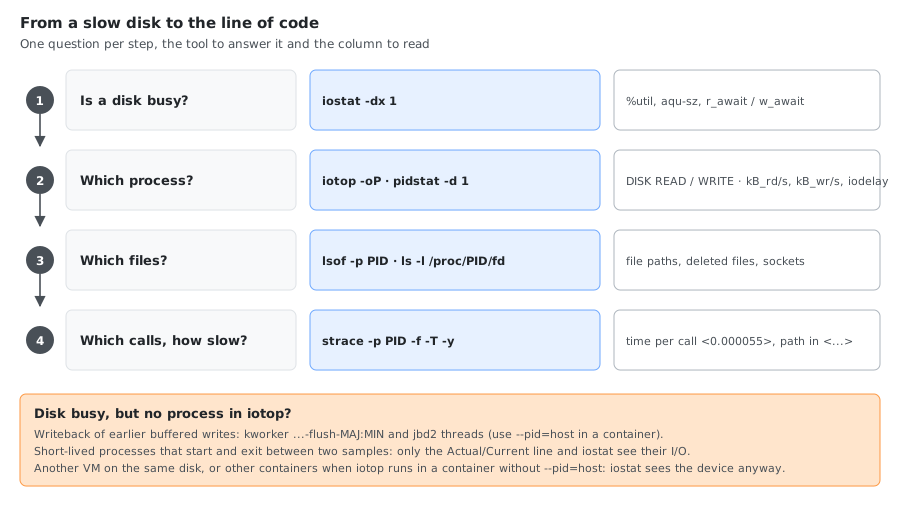
# 1. Is the disk busy? (one device, header once)
iostat -dx 1 sda | awk '/^Device/ {if(!h){h=1; print}; next} /^sda/ {print}'

# 2. Which process is responsible?
sudo iotop -oP

# 3. What files does that process have open?
sudo lsof -p <PID> -Fn | grep ^n | cut -c2-

# 4. What is it doing? (syscalls with file paths and timing)
sudo strace -p <PID> -f -e trace=read,write,openat -T -y 2>&1 | head -50
strace -y prints the path behind each file descriptor (write(1</var/tmp/strace.txt>, "x\n", 2) = 2 <0.000055>), -T the time spent in each call.
Which disk is behind a path?
iostat wants a device name, iotop’s writeback threads show a MAJ:MIN number, and you usually start from a directory:
# Filesystem holding a path; -T works for any path, not only mount points; -v drops the [/subdir] of bind mounts
findmnt -nvo SOURCE,FSTYPE -T /var/lib/docker    # /dev/vdb1 ext4
lsblk -no PKNAME /dev/vdb1                         # vdb  (the disk to give iostat)
df --output=source /var/lib/docker | tail -1       # /dev/vdb1, the same without findmnt

# Device behind a MAJ:MIN, e.g. kworker/u4:2-flush-253:16
basename "$(readlink /sys/dev/block/253:16)"       # vdb

# The whole tree with numbers and mount points
lsblk -o NAME,MAJ:MIN,SIZE,TYPE,MOUNTPOINTS
NAME    MAJ:MIN  SIZE TYPE MOUNTPOINTS
vda     253:0     20G disk
├─vda1  253:1     19G part /
├─vda15 253:15    99M part /boot/efi
└─vda16 259:0    923M part /boot
vdb     253:16   100G disk
└─vdb1  253:17   100G part /var/lib/ramalama
                           /var/lib/cni
                           /var/lib/rancher
                           /var/lib/containerd
                           /var/lib/docker
                           /mnt/lima-colima
- Without
-T,findmnt /var/tmpprints nothing when/var/tmpis a plain directory. Without-v, a bind mount shows as/dev/vdb1[/docker]. MOUNTPOINTS(all mount points of a device) needs util-linux 2.37: RHEL 9+, Ubuntu 22.04+. RHEL 7/8 and Ubuntu 20.04 answerlsblk: unknown column: MOUNTPOINTS; useMOUNTPOINTthere.- For LVM, RAID or dm-crypt,
lsblk -s /dev/mapper/<name>prints the stack from the logical volume down to the disks.
Alternatives at each step
| Step | Tool | Use case |
|---|---|---|
| Disk saturation | dstat -d | Read/write throughput. On RHEL 8+ it comes from PCP (pcp-system-tools); on Ubuntu 24.04 the dstat package is PCP’s version too and fails with Cannot open "/var/lib/pcp/pmns/root" until PCP is set up |
| Per-process I/O | pidstat -d 1 | Scripting and logging, see pidstat -d |
| Per-process I/O | atop | Per-process history, recorded to disk |
| Open files | ls -la /proc/<PID>/fd | No lsof needed, works in minimal containers |
| Syscall tracing | perf trace -p <PID> | Lower overhead than strace (needs the perf package for the running kernel) |
Why iotop and iostat Show Different Numbers
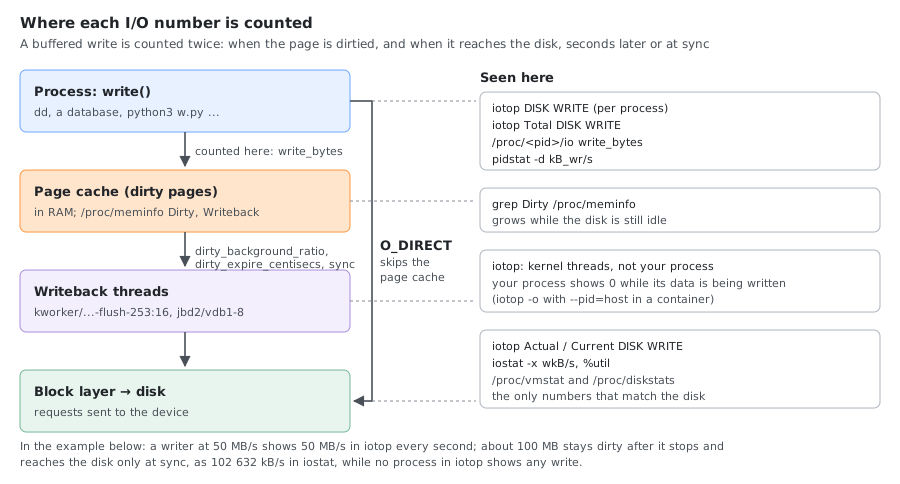
They measure I/O at different layers of the storage stack:
| Tool | Data source | What it measures |
|---|---|---|
iotop | taskstats (read_bytes, write_bytes, as in /proc/<pid>/io) | What each process caused, writes counted when the page is dirtied |
iostat | /proc/diskstats | Completed block device operations (physical disk I/O) |
A worked example
A Python writer doing buffered writes at 50 MB/s for 10 seconds (500 MB) on a 2 GB VM, with iotop, iostat and /proc/meminfo sampled every second (the three tools sample independently, so lines can be off by a second):
| Time | iotop: writer | iotop: Current | iostat wkB/s | Dirty |
|---|---|---|---|---|
| 09:35:54 | 50 496 K/s | 0 | 120 | 51 436 kB |
| 09:35:56 | 50 428 K/s | 48 415 K/s | 49 156 | 106 024 kB |
| 09:35:59 | 50 776 K/s | 48 749 K/s | 49 224 | 131 408 kB |
| 09:36:02 | 50 304 K/s | 0 | 0 | 102 660 kB |
| 09:36:03 to :08 | (writer done) | ~0 | 0 to 140 | ~102 600 kB |
09:36:10, after sync | nothing | 101 023 K/s | 102 632 | 68 kB |
- During the first second iotop already shows 50 MB/s for the writer while the disk does nothing: the data is only in the page cache.
- Once about 100 MB is dirty (
vm.dirty_background_ratio10 % of the available memory), background writeback starts and the disk keeps pace at ~48 MB/s. - When the writer stops, the last ~100 MB stays dirty: below the background threshold, it would wait for
vm.dirty_expire_centisecs(30 s).syncwrote it at once: 102 632 kB in one second on the disk, and no process in iotop showed it.
The write path
- The process calls
write()→ data goes to the page cache (memory) → iotop counts it immediately. - The kernel’s flusher threads (
kworkerthreads named after the device;pdflushbefore kernel 2.6.32) write the dirty pages to disk later. - The physical write hits the block device → iostat counts it, and so does iotop’s Actual/Current line.
The delay between step 1 and step 3 depends on (defaults from the Ubuntu 24.04 kernel):
vm.dirty_expire_centisecs(3000 = 30 s): how old dirty data must be before it is writtenvm.dirty_writeback_centisecs(500 = 5 s): how often the flusher threads wake upvm.dirty_background_ratio(10): % of memory dirty before background writeback startsvm.dirty_ratio(20): % of memory dirty before writing processes are made to wait
The read path
Reads line up better between iotop and iostat:
- Data in the page cache → no disk I/O; neither iotop nor iostat shows it (
rcharin/proc/<pid>/iostill counts it) - Data not cached → a physical read happens → both tools see it
Common discrepancies
| Situation | iotop | iostat |
|---|---|---|
| Process writes to the page cache, not flushed yet | High write | Low/zero |
| Flusher threads writing old dirty pages | Low (no user process active) | High write |
| Process reads from the page cache | Zero | Zero |
O_DIRECT / oflag=direct writes | High write | High write (bypasses the cache) |
Verify with dirty page stats
# Current dirty page state
grep -E "Dirty|Writeback" /proc/meminfo

# Watch writeback in real time
watch -n 1 'grep -E "Dirty|Writeback" /proc/meminfo'
Dirty:             49612 kB
Writeback:             0 kB
WritebackTmp:          0 kB
Comments